In this article, I will address XML External Entities vulnerabilities in .NET and the potential impact that it can have on your platform.By the end, you can expect to have a basic understanding of XML External Entities, how to find them, and what mitigation strategies are at your disposal to deal with this vulnerability.
We will explore how to implement solutions to XML External Entities attacks on the ASP.NET Core development stack. This means that to get the most out of this article, you need some experience working with C# and ASP.NET. If you are only interested in XML External Entities, we’ve written a number of articles focused on a variety of technology stacks.
With that out of the way, let’s dive in.
XML External Entities
Let’s start by explaining what XML External Entities are.
XML, or Extensible Markup Language, is a markup language and file format for storing, transmitting, and reconstructing arbitrary data. In addition, this language is used in the programming world to define rules for encoding documents in a format that is both human-readable and machine-readable.
Alright then, but how can a file structure become a threat to your application?
By default, XML processing tools allow the specification of an external entity, a URI, retrieved and processed during the XML file parsing.This parser can then request and embed the content on the specified URI inside the XML document.And that represents an open door for attacks since an attacker could leverage this property as an avenue to retrieve any resource.
In a nutshell, an XML External Entities attack, or XXE injection, is an attack that takes advantage of XML parsing vulnerabilities. It targets systems that use XML parsing functionalities that face the user and allow an attacker to access files and resources on the server.XXE injection attacks can include disclosing local files containing sensitive data, such as passwords or private user data using file: schemes or relative paths in the system identifier.
Given all this, it should be pretty apparent that any tenacious bad actor could potentially take over your server.
How to Spot XML External Entities
All that sounds pretty concerning. But what does it actually look like?
Let’s look at a simple example in action.
Here’s a sample XML document containing an item XML element.
<item id="1">
<title>Toilet Paper</title>
</item>
Alright, but where’s the external entity?
We add external XML entities by using a system identifier within a DOCTYPE header. The purpose of this header is to add a few more properties to the XML file structure.
For example, the code below contains an external XML entity that would try to connect to an internal website. This is not ordinarily accessible for users.
As mentioned before, these entities can access local or remote content on your server. And if you keep sensitive files on the server, those sensitive files will be vulnerable.You could be providing a path that an attacker can use to gain control of your website.
Likewise, other XML External Entities attacks can access local resources that may do even more than return data. This is a common avenue for denial of service attacks.
How to Mitigate XML External Entities Vulnerabilities
With all the definitions out of the way, what can you do to fix this issue on your platform?
I have good news for you. Mitigating XXE injection vulnerabilities is very simple.
Allow me to briefly refer to a previous article on the general approach as a quick refresher.
“Generally, as long as you are not intentionally trying to open a window for the vulnerability and consider that you need the functionality of loading user-provided XML files, you don’t have to worry much about this issue.”
“Let’s illustrate.”
“As we have mentioned, if an application has an endpoint that parses XML files, an attacker could send a specially crafted payload to the server and obtain sensitive files. The files the attacker can get depend heavily on how you set up your system and how you implement user permissions.”
“So, to prevent this situation from playing out, first, don’t use libraries that support entity replacement.”
Thankfully, there’s no popular library in .NET with such an issue.
Odds are that you are using something like XmlDocument or XmlReader, which both come with protections against such vulnerabilities baked in and the feature of external entities disabled by default.
Below is an example of a default, protected implementation:
public string xml_to_text(xml) {
  var xml_doc = new XmlDocument();
  xml_doc.LoadXml(xml);
return xml_doc.InnerText;
}
Now, suppose your application actually requires using external entities for some necessary features. In that case, one approach you can take to minimize the potential for exploits is to safelist known external entities.
Other Strategies
Some other strategies to mitigate XXE Injection attacks include the following:
Use fewer complex data formats like JSON and avoid serialization of sensitive data.
Patch or upgrade all XML processing code and libraries in your application.
Verify that XML file upload validates incoming XML using XSD validation.
Update SOAP to SOAP 1.2 or higher.
Use SAST tools to help detect XXE in source code.
Lastly—and I really want to emphasize this—do not parse XML unless it’s an application requirement. There are many ways to offer these functionalities without using these libraries.
And as we have said before, in the end, the best mitigation strategy is to not be open to vulnerabilities in any way.
Moving on
Providing robust and secure services is becoming more and more complicated. Projects of that caliber now require a significant investment of time and extensive expertise. And your organization might not be able to afford that cost.
Now, if you are responsible for a team of competent and productive members focused on delivering speedy and innovative solutions, we recommend our Dynamic Application Security Testing (DAST) suite. Our DAST tool tests a running version of your application to identify potential security vulnerabilities. This will allow you to have real-time, reliable, and detailed reports about the security status of your platform. Our product ensures that you get the best insight and tools to provide reliable decision-making information so that you can go back to focusing on your work.
This post was written by Juan Reyes.Juanis an engineer by profession and a dreamer by heart who crossed the seas to reach Japan following the promise of opportunity and challenge. While trying to find himself and build a meaningful life in the east, Juan borrows wisdom from his experiences as an entrepreneur, artist, hustler, father figure, husband, and friend to start writing about passion, meaning, self-development, leadership, relationships, and mental health. His many years of struggle and self-discovery have inspired him and drive to embark on a journey for wisdom.
Using markup languages like XML and JSON is pretty standard practice on the web.With these technologies, managing and delivering both human-readable and machine-readable data is extremely simple and transparent. Therefore, it’s common to find it on websites and platforms. However, it’s essential to be aware of the potential risks and vulnerabilities that you might bring to your platform by misusing technologies like XML.
One such vulnerability is XML External Entities. And in this article, we’ll address what they are, show you how to spot the vulnerabilities, and demonstrate how to protect your NodeJS applications against them.
We want to remind you that if you have no experience working with NodeJS, you might have trouble getting value from this article. Therefore, we strongly suggest you explore this introduction to NodeJS .We’ll be discussing some elements that might not be immediately clear unless you have some background in JavaScript and NodeJS.
Now, with that out of the way, let’s jump in.
Defining XML External Entities
So, what are XML External Entities?
XML, or Extensible Markup Language , is a markup language and file format for storing, transmitting, and reconstructing arbitrary data. In addition, this language is used in the programming world to define rules for encoding documents in a format that is both human-readable and machine-readable.
How does the XML file structure present a vulnerability? By default, most XML processing tools allow the specification of an external entity. This entity, usually a URI, is retrieved and processed during the parsing of the XML file. When this happens, the parser can request and include the content at the specified URI inside the XML document.
This vulnerability opens up the system for exploitation. A malicious actor could use this property as an avenue to retrieve any resource on the server. So, an XML External Entities attack, or XXE injection, takes advantage of XML parsing vulnerabilities. It targets systems that use XML parsing functionalities that face the user, allowing an attacker to access files and resources on the server.
Attacks can include disclosing local files that contain sensitive data, such as passwords or private user data and using file: schemes or relative paths in the system identifier. Clearly, a determined attacker could potentially take over your server, especially with sufficient understanding of server structures and some information about your technology stack.
Examples of XML External Entities
Now that you have a basic understanding of XXE injection, let’s go over an example.Here’s a sample XML document containing a username XML element:
Pretty harmless and straightforward, right? Where’s the external entity?
Well, first, an external XML entity can be added using a system identifier within a DOCTYPE header. This header basically adds a few more properties to the XML file structure.
For example, the code below contains an external XML entity that would fetch the content of /etc/passwrd and display it to the user rendered by username:
These entities can access local or remote content within your server, which is terrible if you keep sensitive files on it, potentially providing a path to give control of your website to the attacker.
Similarly, other XML External Entities attacks can access local resources that may not stop at returning data. So again, this is an avenue to impact application availability and lead to denial of service.
Mitigating XML External Entities Vulnerabilities
Mitigating XML External Entities vulnerabilities is, thankfully, relatively straightforward.As long as you’re not intentionally trying to open a vulnerability window and consider that you need the functionality user-provided XML files, you don’t have to worry too much.
As already mentioned, if an application has an endpoint that parses XML files, an attacker could send a specially crafted payload to the server and obtain sensitive files. The files the attacker can access depend heavily on how you set up your system and how you implement user permissions. So, to prevent this, first, don’t use libraries that support entity replacement like LibXML.
Sadly, NodeJS does not have a built-in XML parsing engine. You might already be using this library in your project. But don’t fret—entity replacement is disabled by default. Nevertheless, we recommend that you explicitly disable this feature.You can do this by simply changing all initializations of the library like so:
It’s also crucial to keep in mind that you may still be vulnerable to DDoS attacks if you decide to go this route.
Now, suppose your application actually makes use of external entities for some critical functionality. In that case, one approach you can take to minimize the potential for exploits is to safelist known external entities. You can do this simply by checking the XML file document before parsing it with your library for any strings containing any entity that’s not on the list.
app.post('/load_xml', upload.single('xml'), async function (req, res) {
    if (!req.file) {
        res.sendStatus(500);
        return;
    }

    try {
        const xml = req.file.buffer;
        const doc = libxmljs.parseXml(xml, {noent: true});

        if (doc.text().includes("<!ENTITY")) {
          throw new Error("INVALID XML FILE");
        }

        res.send(doc.text());
    } catch (err) {
        res.send(err.toString());
        res.sendStatus(500);
    }
});
Final Approach
Finally—and I want to make sure to emphasize this—do not parse XML if it’s not an application requirement. I know it might be convenient and allow the platform to provide convenient features for the users. Even so, there are many ways to offer similar functionalities without using these libraries.
In the end, the best mitigation strategy is to not be open to vulnerabilities in any way.It’s vital to keep in mind that providing robust and secure platforms to your users is becoming increasingly complex. Such work requires a considerable investment of time and expertise that your organization might not be able to afford.
If you are in charge of a team of brilliant and productive members focused on delivering speedy and innovative solutions, we recommend our security test suite StackHawk.Our product ensures that you get the best insight and tools to provide reliable decision-making information so that you can go back to focusing on the work you do best.
You can check it out and create a free account here .
Conclusion
Protecting your platforms against the most sophisticated exploits on the web requires an extensive understanding of the technology and a solid grasp of your platform’s infrastructure. Thankfully, most of the tools and libraries used to build infrastructure are pretty robust and secure. Regardless, the potential of an engineer unintentionally introducing a vulnerability and compromising the work of their team is always real.
This post was written byJuan Reyes.Juanis an engineer by profession and a dreamer by heart who crossed the seas to reach Japan following the promise of opportunity and challenge. While trying to find himself and build a meaningful life in the east, Juan borrows wisdom from his experiences as an entrepreneur, artist, hustler, father figure, husband, and friend to start writing about passion, meaning, self-development, leadership, relationships, and mental health. His many years of struggle and self-discovery have inspired him and drive to embark on a journey for wisdom.
In this article, we examine the topic of access control and how to provide a robust level of security for applications.
First, we briefly define broken access control. Then, we illustrate, with examples, what broken access control looks like and what vulnerabilities they target. Finally, we offer some mitigating solutions for those vulnerabilities.
If you have no experience working with Node.js, we highly suggest you explore this introduction to Node.js ; some aspects we’ll discuss might not be immediately clear unless you have some background in the technology.
With that out of the way, let’s jump right in.
Access Control 101
Simply speaking, access control describes a set of policies and mechanisms implemented to supervise and control access to resources on a system. You might know access control by another name: authorization .
Once a server determines your identity through some login or authentication mechanism, it grants or limits what functions and resources you can access within the system. In addition, we usually use access control for user tracking.
Despite the simplicity of its concepts, appropriately implementing a robust and secure access control system is very difficult. Access control is closely bound to a system’s architecture. Moreover, users regularly fall into more than one role, making access management more complex. Therefore, in general, we discourage developing access control from scratch, and instead, we recommend adopting battle-tested, robust solutions like OAuth 2.0 and JWT .
Explaining Broken Access Control
Broken access control comprises a set of known exploits that can represent a threat to your systems’ control over resource access.
Despite easy exploitation of many access control vulnerabilities if neglected, you can address them relatively quickly. This point is important because the consequences of a breach in access control can be pretty destructive — attackers can essentially take over your system.
Common Broken Access Control Vulnerabilities
As mentioned in our previous articles, attackers can exploit multiple vulnerabilities depending on your technology stack and architecture. However, in this article, for brevity, we focus only on insecure IDs, path traversal, file permission, and client caching.
Here’s a refresher on the common vulnerabilities of access control.
Insecure ID Vulnerability
Most modern websites use some form of ID or index to quickly and efficiently refer to data. For most circumstances, this works satisfactorily. However, if the IDs are easy to figure out, either by hand or brute force, then you have a security problem on your hands.
To illustrate, imagine you have a profile page section where the user profile is displayed. Then, this URL retrieves your user profile:
https://www.mywebsite.com/profile?id=123
Now, if I were to change the number in the query string manually, and no active access control were in place to validate my request, I could access any profile.
Path Traversal Vulnerability
The concept of Path Traversal defines the capacity of a user to navigate a filesystem’s directory tree freely.
A system without proper Access Control might be a victim of Path Traversal exploits and allow attackers to access restricted resources in the server.
This situation can happen when the system allows users to retrieve the path of a resource, an attacker modifies the resource path, and the system does not adequately validate the modification. To see an illustration, please refer to this link.
https://www.mywebsite.com/photos?file=user.png
If an attacker changes user.png to something like ../../etc/passwd , they could access the application’s secrets.
File Permission Vulnerability
A file permission vulnerability relates to a weakness in the mechanism that grants permission to specific users to access specific files on a server.
All web applications contain critical configuration files and resources that it should keep inaccessible to users. However, when an application lacks proper configuration policies, an attacker can target these files and take over the entire platform.
To illustrate this, here’s an example of an attack attempting to access a file that should be inaccessible.
Client caching vulnerabilities are tough to address because they involve attackers physically taking over a user’s computer. However, instead of attacking remotely, bad actors take advantage of session credentials, cached pages, or data already present in the browser of an authenticated client. Once this happens, the attacker has compromised the server and can access user data. Game over.
Addressing Broken Access Control
Unfortunately, Node.js doesn’t provide a native way to implement a robust web application authentication system. So, we need to implement it ourselves . In this case, we’ll use Auth0 to implement authentication as a single sign-on service ( SSO service) with a robust and reliable third-party solution. Additionally, we’ll use Passport as our middleware library to handle the authentication and authorization processes.
First, go to the Auth0 website and register a new application. If you don’t have an Auth0 account, you can sign up here .
Once in the Auth0 dashboard, go to the Applications section and click on the Create application button.Input a name for your application and make sure to choose Regular web applications as the application type.
Lastly, click the Create button.
After creating the application, go to the Settings tab and get your Auth0 domain and client id . Then, set Allowed callback URLs to http://localhost:3000/oauth2/redirect and Allowed logout URLs to http://localhost:3000/ .
The first URL tells Auth0 where to redirect the user after authentication, and the second URL tells Auth0 where to redirect the user after logout.
Lastly, save your changes.
Implementing Authentication Middleware
Now, in your project, go to your .env file (create one by using the touch .env command if you don’t already have one) and add the following keys.
When a user clicks the Sign in button, the system redirects them to your app’s sign-in page hosted by Auth0, where the user will log in.
After logging in, Auth0 redirects the user to your app.
Auth Routes
Now, we need to add the auth routes to our app.
Go to the app.js class and modify the code as follows:
var indexRouter = require('./routes/index');
var authRouter = require('./routes/auth');

var logger = require('morgan');
var session = require('express-session');
var passport = require('passport');

var SQLiteStore = require('connect-sqlite3')(session);

///...

app.use('/', indexRouter);
app.use('/', authRouter);

app.use(express.static(path.join(__dirname, 'public')));
app.use(session({
secret: 'keyboard cat',
resave: false,
saveUninitialized: false,
store: new SQLiteStore({ db: 'sessions.db', dir: './var/db' })
}));
app.use(passport.authenticate('session'));
That should add all the code necessary for authentication. Now we can proceed to enforce it.
In the case of Express.js , the following route exemplifies an unprotected endpoint, because it doesn’t enforce any authentication:
app.post('/admin', function (req, res) {
// ADMIN AREA
});
This endpoint is available to everyone and must be protected by some authentication mechanism.
Thankfully, Express.js allows you to implement an authentication mechanism as middleware . Therefore, a straightforward way to protect this endpoint would be the following:
function authenticate(req, res, next) {
if (!req.session.isLoggedIn) {
res.redirect('/index.html');
} else {
next();
}
}
You can also insert the authentication verification directly in the route, like bellow:
app.post('/admin', authenticate, function (req, res) { /***/ });
That’s about it.
Tackling Broken Access Control Vulnerabilities
Given that most access control mitigations are standard on all technology stacks, let’s go over a brief refresher on what we’ve already established for various vulnerabilities in previous articles on the subject.
Insecure IDs: You can easily achieve this solution by implementing global unique identifier numbers ( GUIDs) as IDs. You must develop your system with this vulnerability in mind early on. All IDs (or those belonging to sensitive resources) must be obfuscated and unique.
Path Traversal: Path Traversal mitigation requires validating all user inputs and restricting access to critical resources. Luckily, you don’t need to do much to implement proper path traversal policies, thanks to the robustness of libraries like Spring Security .
File Permission: Unless you need to tinker with server permissions and add features related to file manipulation, you don’t need to do much to keep file permissions secure. Nonetheless, consult with your server manager if you need further instructions.
Client Caching: In this case, the most effective solution is also the most simple. Don’t store sensitive user information in the client browser. However, if you must venture into sophisticated features due to requirements, implement proper HTML meta tags and async validations to confirm authority on page load.
Conclusion
As time passes, threats become more abundant and dangerous. To mitigate them and ensure users’ security, software companies constantly incorporate more sophisticated and robust solutions. And as developers, we’re responsible for ensuring that we take advantage of the solutions available to us so our platforms are protected from bad actors on the web.
Furthermore, ensuring the stability of our platforms and the security of our users’ information is a critical matter that gets more complex and sensitive over time.
This post was written by Juan Reyes.Juanis an engineer by profession and a dreamer by heart who crossed the seas to reach Japan following the promise of opportunity and challenge. While trying to find himself and build a meaningful life in the east, Juan borrows wisdom from his experiences as an entrepreneur, artist, hustler, father figure, husband, and friend to start writing about passion, meaning, self-development, leadership, relationships, and mental health. His many years of struggle and self-discovery have inspired him and drive to embark on a journey for wisdom.
What is this and why does it matter? Well, developing an application and putting it out there, though not an easy task, is but the first step. The second—and potentially never-ending—step is to make sure it continues to work, meeting the users’ needs in the best possible way.
If that sounds simple, it’s anything but: there are many components involved, and security is one of the most important ones.
That’s where XSS comes in. As one of the most common security threats, it’s something you, as a developer, must be aware of. No programming language or stack is immune to it, and .NET surely is no exception to the rule.
We’ll open this post with some fundamentals. You’ll get a brief definition of XSS, followed by an explanation of the damage it causes and how it works. After that, we’ll get to the .NET-specific portion of the post. You’ll see an example of .NET XSS and tips to protect yourself.
Let’s get started.
Requirements
This post will feature a practical portion. There are a few requirements if you want to follow along:
Also, I assume you’re on Windows and using Visual Studio 2022. (Get the free community edition here if you don’t have it.)
I expect you have some familiarity with .NET/C#.
.NET XSS Fundamentals
As promised, let’s open the post with some basics by answering the what, why, and how of XSS, not only in .NET but in general.
What is XSS?
XSS stands for cross-site scripting . It’s a type of injection attack. An injection attack, as the name suggests, is when a malicious agent is able to successfully introduce and run some unauthorized code into an application. This injected code interacts with the proper code of the app, making it behave in ways it shouldn’t.
XSS attacks happen when malicious individuals are able to “trick” a legitimate website into unwillingly executing a malicious script that’s provided by exploiting the usual mechanisms for user input—e.g., URL parameters or form fields. In short, the attacker exploits vulnerable sites that accept HTML code as input and then displays that without encoding it, and injects an unauthorized <script> tag in the hopes it will be accepted and executed.
Why Is XSS Dangerous?
In the worst-case scenario, a successful XSS attack can cause catastrophic damage to an application. By successfully executing the script, the attacker could gain access to browser cookies—which would allow them to perform actions or access data on behalf of the user—local storage, and more. The consequences can range from unauthorized data access to account stealing and even unauthorized financial transactions.
Keep in mind that XSS is often used together with—and facilitates—other types of attacks, such as CSRF .
How Does XSS Work?
Successful XSS attacks are usually due to websites blindly trusting all user input. I’ll get back to this later, but it’s never too much to reiterate: never trust user input!
Anyway, how does an XSS attack happen? Well, here’s a quick example. Let’s say you have a web app that takes an option as a URL parameter, such as this:
In this case, the site isn’t protected against XSS. So, what would happen is that the script would be executed, and you’d see the hello message being displayed. And, of course, in real life, the attacker would enter some malicious excerpt of code instead of a benign message.
.NET XSS: How Is Your App Protected?
As is the case with several other security threats, .NET is already well defended against XSS, and you’d actually have to work a little bit to make yourself unprotected. To understand how that works, let’s create a sample project.
Create a Sample Project
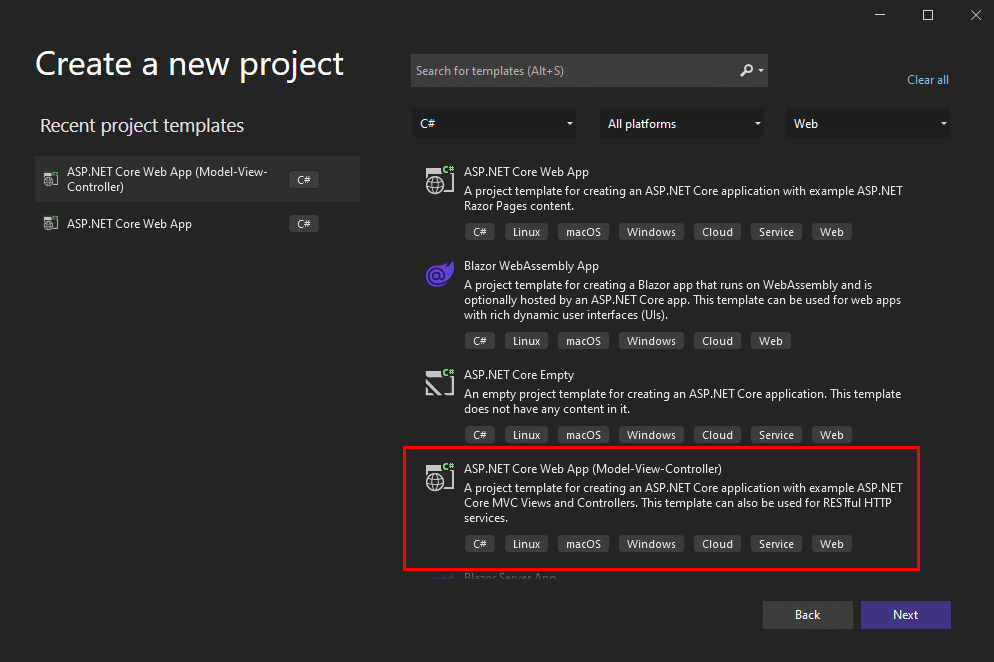
Start by firing up Visual Studio and clicking on Create a new project . Then, you’ll be prompted to pick a project type. Choose ASP.NET Core Web App (Model-View-Controller) , like in the following image:
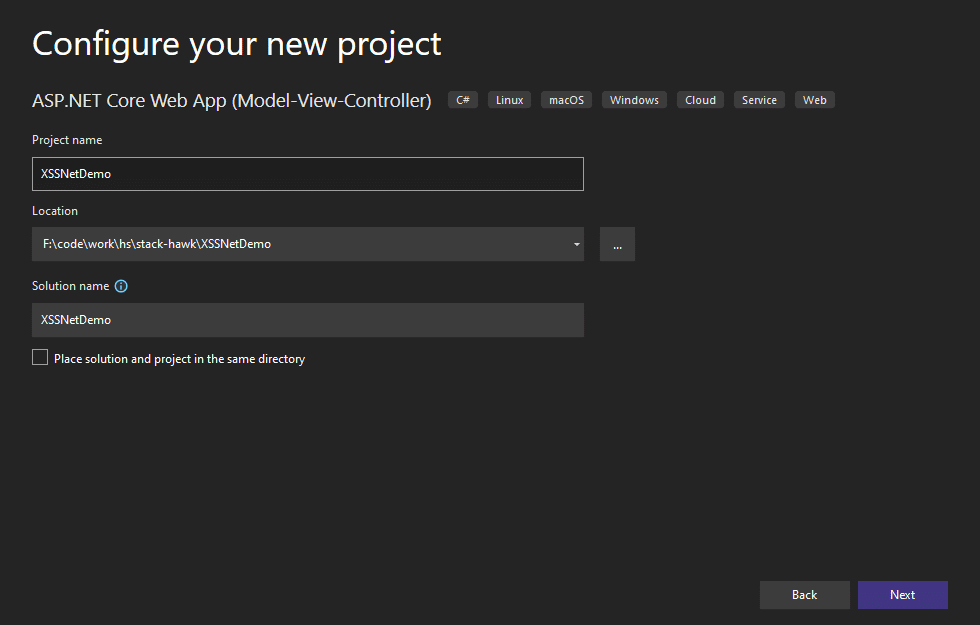
On the next screen, enter a project name and location, and a name for the solution:
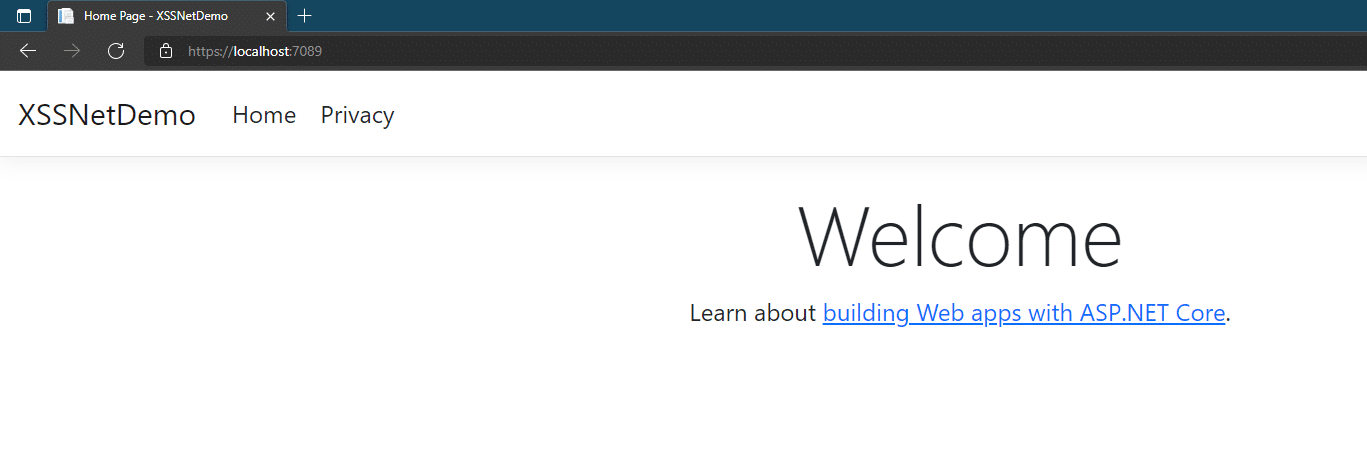
On the next screen, simply accept all of the defaults and click on Create . After Visual Studio finishes creating the application, perform a quick smoke test. Press F5, and your default browser should open and show you something like this:
Add a Model
The next step is to add a model. In Visual Studio, go to the Solution Explorer, right-click the Models folder, then go to Add and Class . Enter Todo as the name of the class and confirm. After you create the class, replace its contents with this:
namespace XSSNetDemo.Models
{
    public class Todo
    {
        public int Id { get; set; }

        public string?  Description { get; set; }

        public DateOnly DueDate { get; set; }
    }
}
So, this sample application will be a big cliché: a to-do list. The class above represents a to-do item, with an ID, a description, and a due date. For the next step, we want to create the controller and views for our app.
Scaffold the Controller and Views
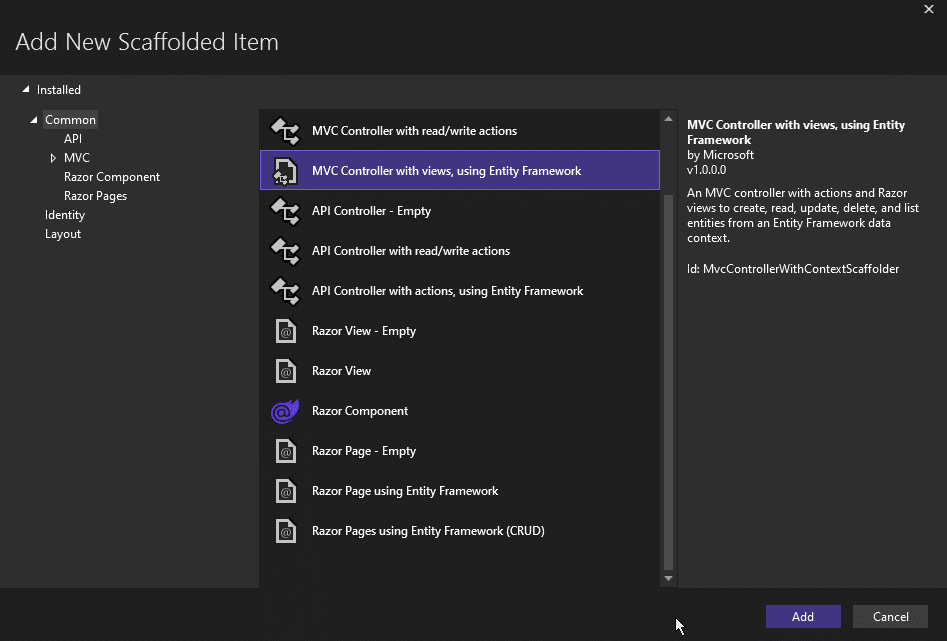
Go to the Solution Explorer and right-click the folder Controllers . Then, go to Add > New Scaffolded item .
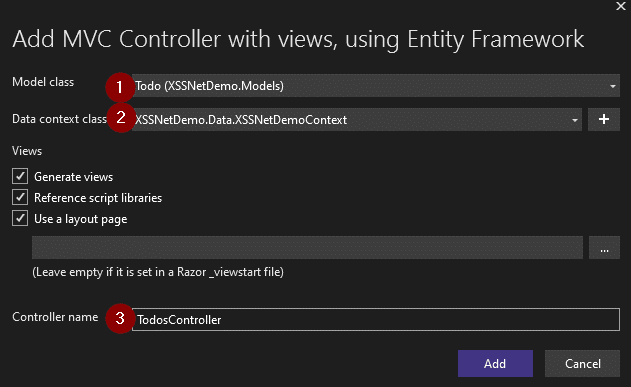
On the next screen, pick MVC controller with views, using Entity Framework , and then click Add :
You’ll then be prompted to enter a few important pieces of information.
First, you have to define which model you’re generating a controller for. Pick the Todo class.
Then, you’ll have to provide a database context for the controller. We don’t have one, so click the plus sign and add a new context.
Finally, change the Controller name, as Visual Studio will use the pluralization rules and come up with TodoesController . I think that TodosController looks nicer, so I changed it to that.
As for the other options, leave them with their default values. Finish by clicking on Add .
Before running the application, let’s make a small change so we can use an in-memory database. Go to the Program.cs class and remove the following line:
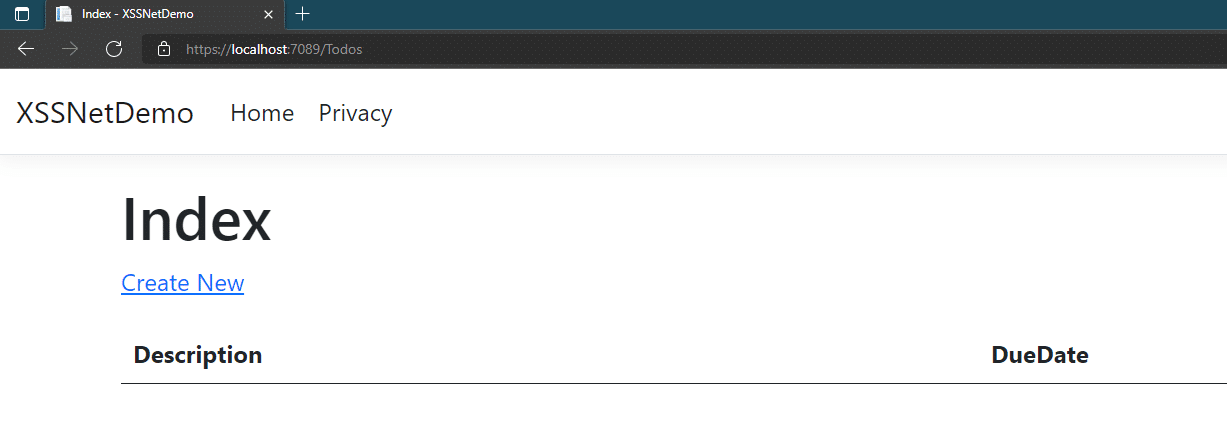
You’re finally ready to run the app. Press F5 in Visual Studio. Your browser will open the app. Go to the address bar and append /Todos to the address. You should see something like this:
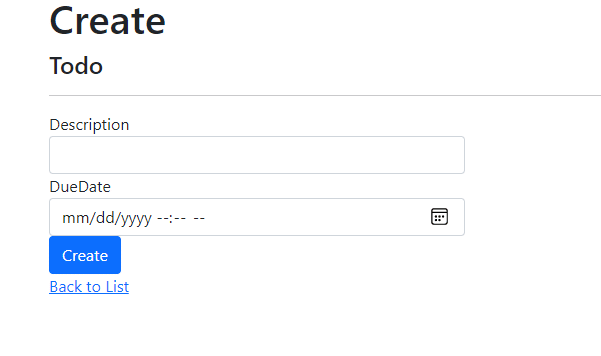
Click on Create New , and you’ll be taken to a new screen, where you’ll be able to add a new todo item:
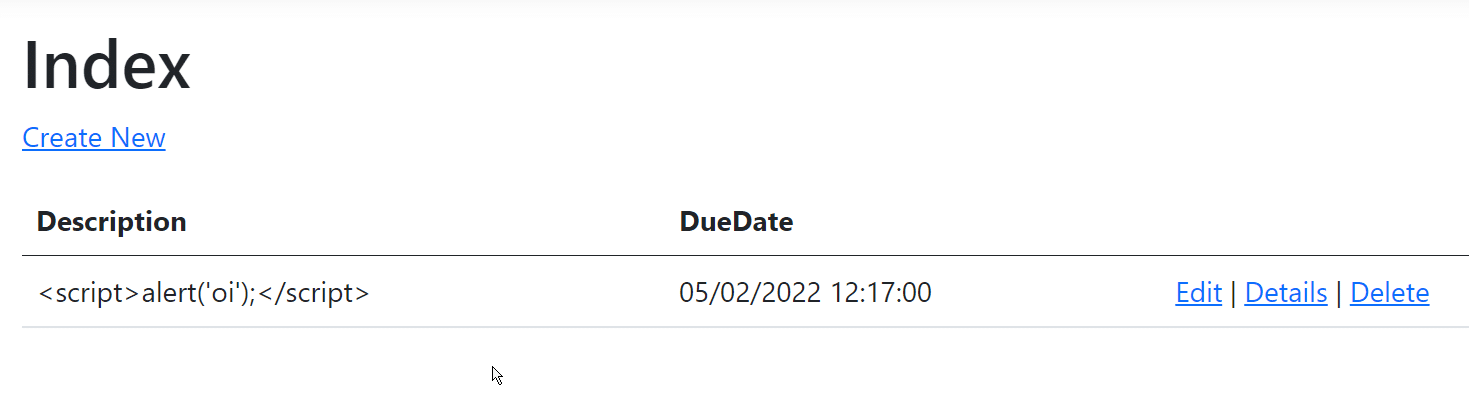
Now, let’s test whether we can inject some script into this app. On the due date line, enter whatever you want. But for the description, try to enter some script, like <script>alert(‘hey!’);</script> , and then click on the Create button.
Luckily, the result is quite anti-climatic:
As you can see, the application simply displays the “malicious” script instead of executing it. How is this possible? Well, if you use your browser’s feature of showing the page’s underlying HTML code, you’ll see something like this:
The code above shows that the less-than and greater-than signs from the <script> tag were replaced with those funny-looking codes. Those are HTML entities, which means the HTML tags were encoded. That way, the page can safely display them instead of running them.
Opening the App to XSS
For the sake of curiosity, let’s say you want to be able to make the app vulnerable to XSS. How would you go about that?
Go to the Views folder. Locate the Todos folder, and then open the file called Index.cshtml .
Inside the file, locate this line:
@Html.DisplayFor(modelItem => item.Description)
Replace it with the following:
@Html.Raw(item.Description)
As the code suggests, now we’re displaying the raw HTML without any type of encoding. Just to make things clear, this is terrible practice! Don’t do it in real life.
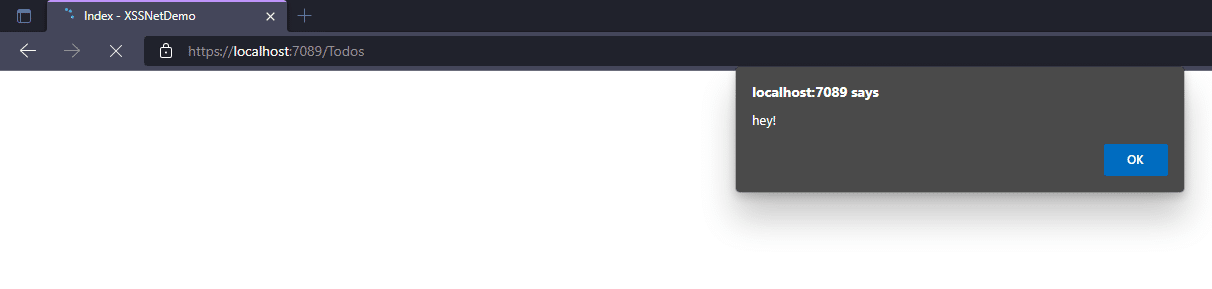
Now, run the application again, inject the malicious script as the description again, and you’ll see this:
Another Bad Example
Before we go, here’s another example of what not to do. Go back to the TodosController.cs class and add the following method:
public string Introduce(string id)
        {
            return $"Hello, my name is {id}.";
        }
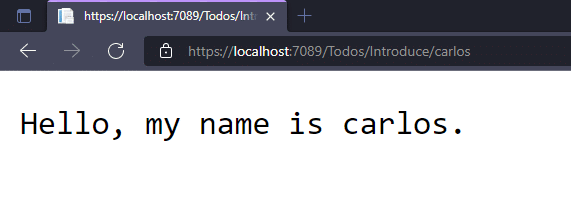
Now, run the app again. Then, append /Todos/Introduce/<YOUR-NAME> to the address, making sure to use your actual name. You’ll see something like this:
Now you know what to do. Replace the name with a script and voilà—it will be executed. How can you solve this problem? Simple:
public string Introduce(string id)
        {
            return HtmlEncoder.Default.Encode($"Hello, my name is {id}.");
        }
Make sure to add using System.Text.Encodings.Web; to your list of usings and you’re done. Now the code properly encodes the entered code for HTML, avoiding the interpretation and execution of scripts.
Conclusion
XSS is a security threat that can have devastating effects, but avoiding it is relatively simple. You have to remember to never trust user input and always encode the HTML code that is to be displayed.
Additionally, it helps if you don’t allow the user to submit HTML at all—for rich-text formatting purposes, for instance. If there’s a need, prefer a format such as markdown that you can then safely convert to HTML when it’s time to display it.
This post was written by Carlos Schults.Carlosis a consultant and software engineer with experience in desktop, web, and mobile development. Though his primary language is C#, he has experience with a number of languages and platforms. His main interests include automated testing, version control, and code quality.
This post aims to provide the reader with insight and guidance about open redirect vulnerabilities. We’ll focus on the different vulnerabilities that one can typically find in platforms without appropriate security and how to apply mitigation measures against them.
It’s important to know that our discussion of open redirect will be concise and limited in scope. Furthermore, if you have limited experience with .NET (the development stack of choice for this article), you might want to check out Microsoft’s ASP.NET documentation .
What Is Open Redirect?
To understand open redirect, it’s crucial that you first understand what redirects are and why they are so prevalent on the web.
Redirects are how a platform moves a user from one URL to another to perpetuate functionality. Additionally, developers use them as a contingency against incursion from an incorrect or unauthorized address. Broadly speaking, redirects serve as a tool for developers to ensure that their users follow a proper flow.
Understanding this, one can see how they are necessary and ubiquitous on the web. Yet this also makes these redirects potential targets for bad actors trying to mislead users and direct them to malicious websites.
Open redirects occur when a web application accepts unvalidated input and ends up redirecting users to malicious websites. Now attackers have a path when using phishing scams or attempting to steal a visitor’s credentials.
Sadly, open redirects are one of the most overlooked threats that users can become victims of nowadays. The logic behind the neglect from the development and security community is mainly that the impact on the platform itself is low and vulnerable code is rare.
Despite this, users can still become victims of these exploits, and sufficiently determined attackers can exploit users and, in fact, cause significant damage to the level of confidence users have in your platform.
Exploring Some Open Redirect Examples
Now that you have a basic understanding of what open redirect is, we’ll illustrate the point. Let’s see what an open redirect attack would look like on the web.
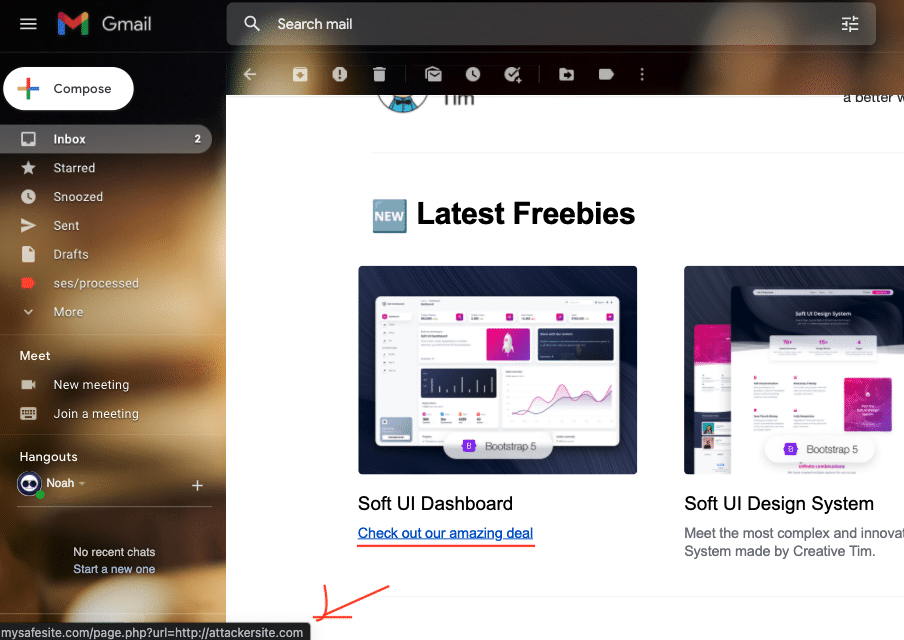
You should be able to see from this URL that the vulnerable site ‘mysafesite.com’ contains a page named ‘page’ that includes a feature that receives user input, in this case a URL in the query string, and uses it to redirect the user.
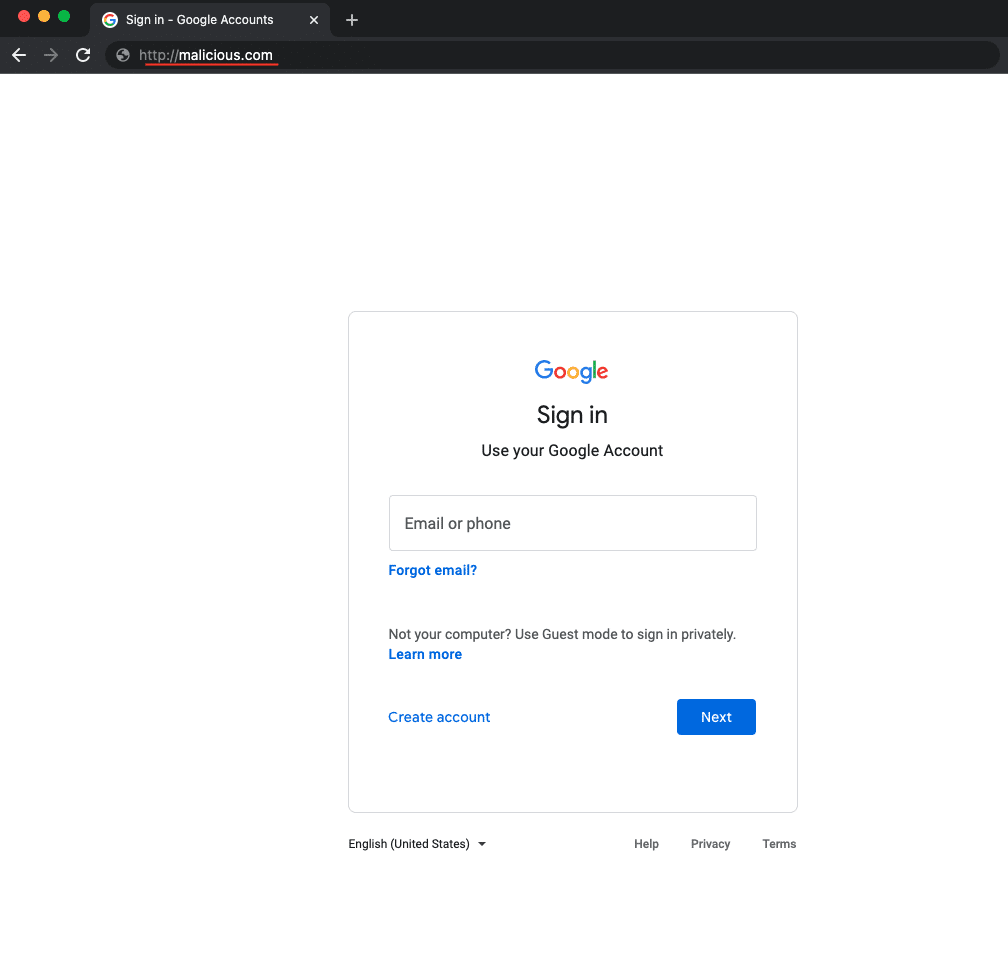
When an unsuspecting user clicks on this link, the browser redirects them to the legitimate website. However, if the server doesn’t validate the URL to redirect appropriately, it will redirect the user to a malicious site. Additionally, since the URL contains the legitimate domain, an attacker could easily fool the user about the legitimacy of the malicious site.
Once the user is on the attacker’s site, the attacker can disguise the website and ask for credentials. Finally, the attacker can redirect the user back to the legitimate site after storing the credentials. Thus, the attacker succeeds at procuring the credentials, and the victim is none the wiser.
Bad News
You may already hear the security engineer on your team advocating for your dismissal for even considering such a poor implementation. And understandably, you probably think that this kind of implementation must be nonexistent in this day and age. Yet you would be surprised by the abundance of poorly implemented solutions like these.
This is not to say that this is the full extent of open redirect vulnerabilities. Far from it. Despite the low level of sophistication found in open redirect attacks, they usually exist as part of a suite of exploits with phishing and cross-site scripting. These exploits work in synergy as a more sophisticated, multi-step attack to thwart more resilient and robust platforms.
Open redirect attacks are of the following kinds:
Header-Based Open Redirect
Header-based open redirect attacks exploit vulnerable code directly by the user input. Much like the example above, these attacks heavily hinge on the logic behind the redirect in the platform and social engineering. Additionally, no JavaScript is necessary for this attack to work, so it’s particularly nefarious.
JavaScript-Based Open Redirect
JavaScript-based open redirects are triggered only when executing JavaScript as part of the redirect functionality. Therefore, unvalidated redirects of this form do not work for server-side functions.
How to Prevent Open Redirect Vulnerabilities
In order to prevent open redirect vulnerabilities, you must rethink your approach to solutions dependent on redirection.
The most successful solution for open redirect is, well, to do away with redirects. This, of course, might not be a viable solution for some, and we will offer some alternatives, but we do want to emphasize that even if you think you need redirection, you actually might not.There are more modern, safe, and secure ways to provide the same functionality without opening yourself to this vulnerability.
If, however, you must have redirects, consider limiting the possible redirection destinations available to users. But, again, using fixed options in HTML elements can go a long way in mitigating these exploits.
Additionally, parsing and identifying potentially malicious inputs can weed out many of the attacks the service might receive. For example, if the user is not supposed to leave your domain and is showing an intent to do so, that is already a red flag. In .NET, we can implement such a solution with the “LocalRedirect” helper.
public IActionResult SomeAction(string redirectUrl)
{
    return LocalRedirect(redirectUrl);
}
Simply adding the helper to the provided input does the trick.
“LocalRedirect” will throw an exception if a non-local URL is specified. Otherwise, it behaves just like the redirect method.
Going Further
Moreover, by using the “Url.IsLocalUrl” method, we can check if a provided URL is local and change the behavior of an application if we need to handle such behavior.
The “URL.IsLocalUrl” method protects users from being inadvertently redirected to a malicious site. In addition, you can log the URL details provided when a non-local URL is supplied in a situation where you expected a local URL. Logging redirect URLs may help you diagnose redirection attacks.
Beyond these strategies, you can implement platform solutions like firewalls, redirection notices, etc.
It’s crucial to be aware that performing penetration tests, security audits, and keeping your libraries updated is considered good practice and the best way to ensure the security of your platform. However, doing all this work can be time-consuming and complex. That’s why we encourage you to consider using StackHawk.
Conclusion
As you have seen, addressing these vulnerabilities is not complicated. It just takes time.
Doing vulnerability mitigation on all possible fronts can be demanding and sometimes not worth the time of development when considered against other potential vulnerabilities to address. This is why we encourage you to consider robust and tested solutions for your team.
We hope that this article has helped you provide better solutions for your users and clients.
This post was written by Juan Reyes.Juanis an engineer by profession and a dreamer by heart who crossed the seas to reach Japan following the promise of opportunity and challenge. While trying to find himself and build a meaningful life in the east, Juan borrows wisdom from his experiences as an entrepreneur, artist, hustler, father figure, husband, and friend to start writing about passion, meaning, self-development, leadership, relationships, and mental health. His many years of struggle and self-discovery have inspired him and drive to embark on a journey for wisdom.