Your AI agent ships code. StackHawk ships it secure.

StackHawk integrates into the agent loop to test your running app, surface what’s actually exploitable, and fix it — before a PR is opened.
A dark-themed code editor shows a security scan report. The report highlights a passed HawkScan test and flags a critical SQL injection issue, displaying detailed remediation steps and validation status. Sidebar menus are visible on the left.

Powering secure AI-driven development

No Security Tickets. No Rework.

Give your coding agent an AppSec Wingman

Zero net new vulnerabilities

Vulnerabilities are fixed before code is ever committed, closing the window before attackers can use it.

A dark-themed code editor displays a detected SQL injection vulnerability with a high severity. The code fix changes concatenated query parameters to a parameterized query. A Commit & Push button is below.

Burn down your backlog

Create fixes, not tickets. No more triaging and your backlog shrinks instead of compounding.

A dark-themed user interface shows a backlog list with four security issues; three are marked as fixed—SQL Injection, Cross-Site Scripting, and Command Injection—while Broken Access Control is still generating a fix.

Every other tool finds vulnerabilities. StackHawk fixes them.

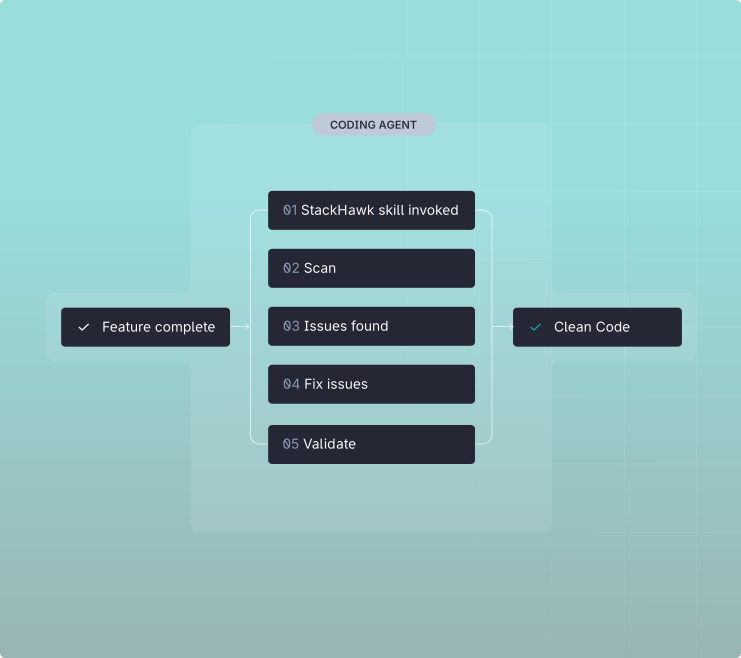
Feature complete and secure

The same AI coding agent that builds your feature calls StackHawk—scanning the app, fixing issues, and verifying them before you push.
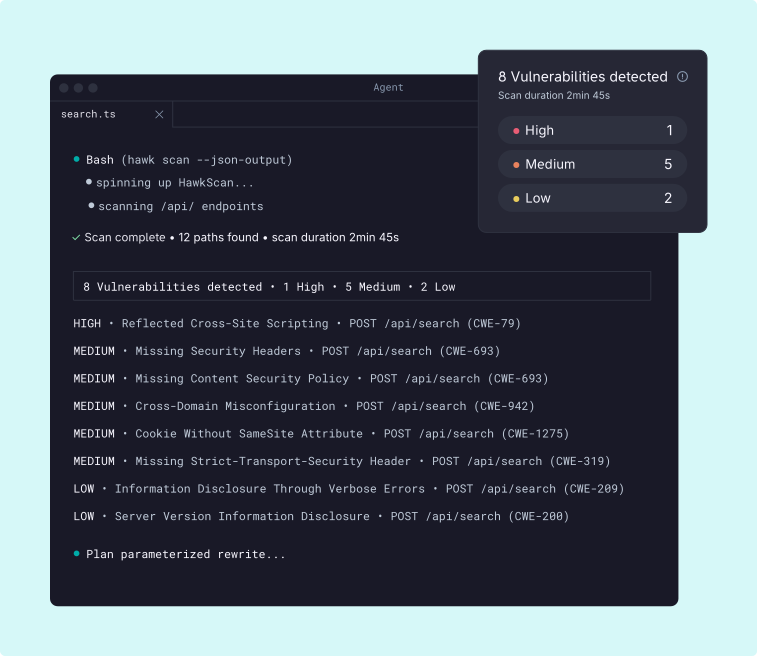
A dark-themed code editor displays a terminal output showing a SQL query, a fired PostToolUse hook, and steps for running a security scan using the HawkScan skill with configuration and detected routes details.
A dark-themed code editor displays a vulnerability scan summary for search.ts, highlighting 8 vulnerabilities (1 high, 5 medium, 2 low) and listing issues found in POST /api/search endpoints.

Find

Runtime tests against your running app, surfacing only what’s actually exploitable. No noise.

Fix

The agent remediates directly in the codebase, using full source context to write the correct fix.
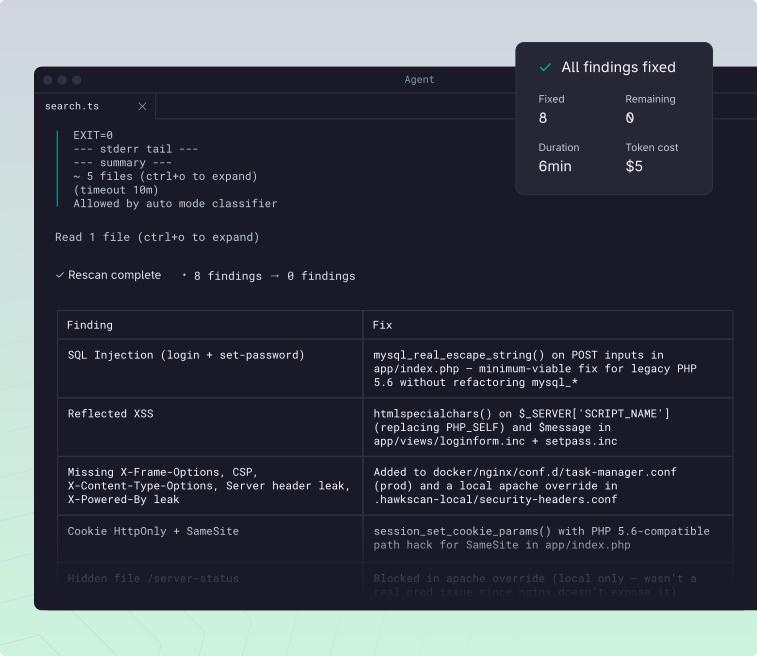
A terminal window displays the output of a code security scan. It lists vulnerabilities like SQL Injection and missing headers, along with recommended fixes, showing a table with Finding and Fix columns.
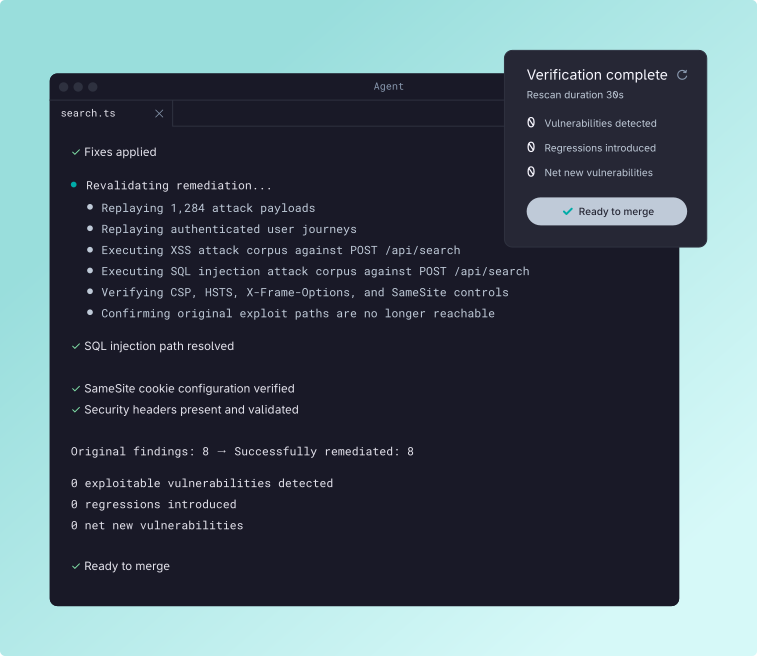
A dark-themed code interface displays a security scan summary for search.ts, listing actions like attack replays, XSS detection, and security header verification, with results on vulnerabilities and remediation status.

Verify

A rescan confirms the vulnerability is gone. Ship clean code.

Security at the Speed of AI Development

%

Vulnerabilities resolved before the PR opens.

Net new exploitable vulnerabilities shipped. 
To fix vulnerabilities, not weeks or sprints.

StackHawk agent skills

Two skills. One complete security loop — built into the agent you’re already using.

HawkScan skill

The agent runs security tests against your running app. Post-commit and pre-PR, vulnerabilities are identified, remediated, and verified to ensure they’re gone.

A dark interface shows progress for Initiating HawkScan Skill, with steps: Configuring the scan (active), Finding exploitable vulnerabilities (75% complete), Fixing critical vulnerabilities, and Revalidating fixes (both inactive).
SQL Injection IDOR Broken Auth Auto Fixes Rescanning Verification Post-Commit Pre-PR

StackHawk API skill

The agent communicates with the StackHawk platform to optimize how your applications are tested and triaged. Configure the security tooling without becoming a security expert.

A dark interface displays a list of questions, including “Can you help optimize testing for our application?” and “What’s my security posture across all apps?” Each item has an upward arrow icon on the right.
Findings Fix Status Policies Scan History Tech Flags App Setup Risk Tracking Release Status

“Security teams have always triaged mediums and lows into the backlog. Not because they didn’t matter — because there wasn’t enough time. In a post-Mythos world, an attacker chains three mediums into a critical exploit in seconds. StackHawk fixes everything. That changes the math entirely.”

Principal Product Security Engineer
Leading HealthTech Company

Deploy across every agent in use

Claude Code

StackHawk is the dynamic security tester your Claude Code agent was missing. Install StackHawk agent skills once and Claude Code can find and fix exploitable vulnerabilities at runtime.

Two white logos on a dark background: on the left, a stylized bird with wings spread inside geometric shapes; on the right, a circular symbol with radiating lines. A vertical line separates them.

Cursor

Cursor builds the feature. StackHawk proves it’s safe to ship. StackHawk agent skills install into Cursor via .cursor/rules/. The agent can run HawkScan, parse findings, and patch code — without leaving the editor.

Two white symbols on a dark background: on the left, a stylized bird with wings spread inside angular lines; on the right, a geometric cube with one corner shaded; separated by a vertical line.

Codex

One install. Security built into Codex. StackHawk agent skills ship as a Codex plugin. After install, Codex can configure scans, test your local app, and remediate findings as part of its normal build loop.

Two white icons on a dark background: on the left, a stylized bird with outstretched wings inside a hexagon; on the right, a cloud-like shape with a terminal prompt symbol inside. A vertical line divides them.

Antigravity

StackHawk scans, fixes, and verifies apps built in Antigravity. Install StackHawk agent skills as a plugin and the agent can configure scans, test your app, remediate findings, and verify fixes as part of its workflow.

A dark background displays two white logos: on the left, a stylized bird with outstretched wings inside a geometric hexagon; on the right, a simple, abstract curved shape. A vertical line separates them.

GitHub Copilot

Copilot auto-discovers StackHawk skills from your repo. Drop the StackHawk skills into your repository and Copilot picks them up automatically. Every developer gets the same security workflow — no per-engineer install.

Two white icons on a dark background: on the left, a stylized bird with outstretched wings inside a geometric shape; on the right, a simplified robot face with large eyes and a mouth. A vertical line separates them.

One skill. Every agent. Team-wide.

StackHawk skills bring the same security workflow to every coding agent. Put StackHawk skills in the repo and every developer gets the same security workflow, regardless of which agent they use.
A dark box with the text Deploying StackHawk is centered on a light background, surrounded by faded tech-related icons, including terminal, robot, and loading symbols.

Try StackHawk now.