Imagine if just about any tech-savvy user who visits your website could control the JavaScript of your site. There is a vulnerability that makes that possible. An attacker can inject malicious JavaScript code into a website via an XSS attack. The malicious code can perform actions like defacing the design of a website or granting unauthorized access to sensitive user data.
XSS stands for cross-site scripting . It’s one of the OWASP Top 10 security risks that affect web applications.
In this post, I’ll explain what XSS is. Then I’ll walk you through some examples of XSS in Laravel. I’ll also show you a few ways of preventing an XSS attack for each example.
So, let’s take a looking at the definition of XSS.
What Is XSS?
In an XSS attack, attackers look for vulnerabilities on a website that will let them inject malicious scripts into the website. Once attackers get their scripts injected, they can control the behavior of the victim’s site and steal user data.
A simple XSS attack can occur on a vulnerable website that accepts user input via a GET parameter and displays the data on the webpage. Let’s take a look at the following URL:
https://example.com/profile/?u=joseph
The URL points to a page that reads the value for username from the u parameter in the URL and displays it on the webpage. An attacker may inject malicious code into the website by setting the value for u to the following:
https://example.com/profile/?u=alert("Hahaha!!! you got hacked!!!")
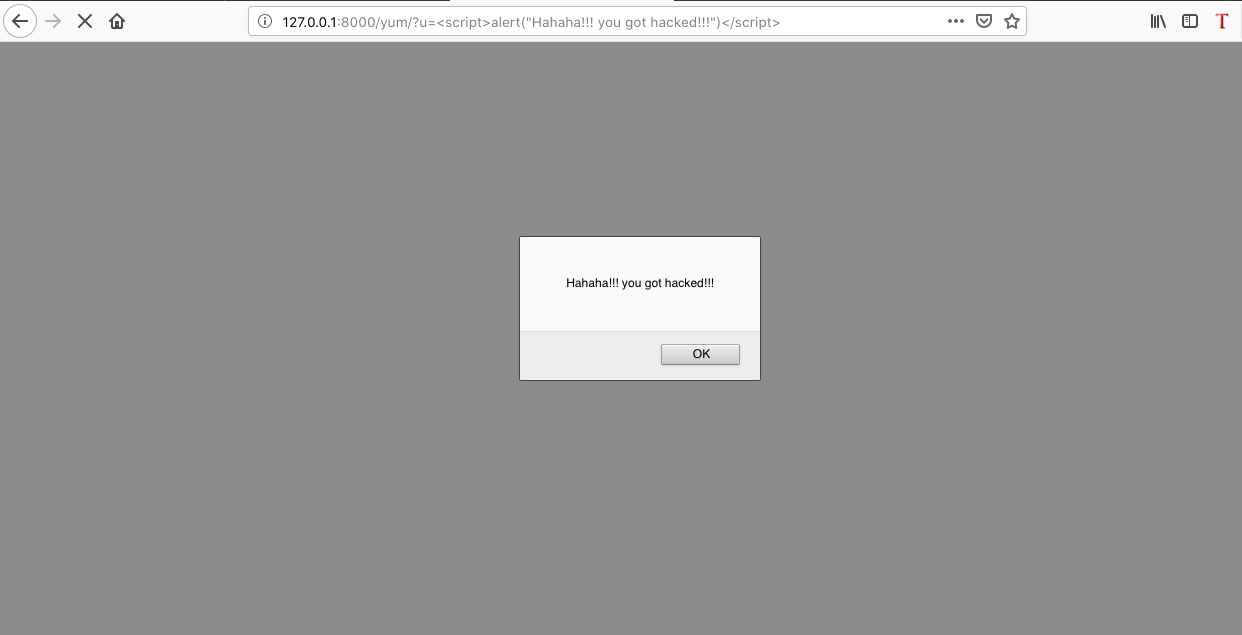
The injected script will cause the webpage to throw a JavaScript alert dialog with a creepy message that reads “Hahaha!!! You got hacked!!!” as shown in the screenshot below:
In the code we just looked at, the attacker isn’t really doing anything very harmful — just displaying a creepy message. But if attackers can execute that code, then they can run even more dangerous code. To learn the full details about XSS and see the different types of XSS attacks check out this post .
XSS and the Laravel Framework
Now that we know what XSS is, let’s take a look at XSS in Laravel. Laravel is a very popular framework, written in PHP , for building web apps. While Laravel is popular for backend development, it offers a neat way to render user interface (UI) using the blade engine .
What Is Blade?
Blade is a PHP templating engine built into Laravel. When building a Laravel app, your HTML code goes into the blade file. Blade files are saved with the .blade.php extension.
In XSS, the malicious code runs on the client-side (on the user’s browser). The malicious code runs along-side normal code when users load a webpage. Although Laravel has some mechanisms in place to protect against XSS, Laravel apps are vulnerable to XSS attacks. We’ll look at examples of some vulnerabilities in the next section.
Example 1: Embedded PHP Code
As a developer, you can embed standard PHP code in a blade file. This example looks at a webpage that displays custom data to users based on their current country. The current country is specified in the URL via a GET parameter.
Using standard PHP inside a blade file, this code will display a user’s country:
<p>Hello user, your current country is [ <?php echo $_GET['country']; ?> ] </p>
The webpage displays the value for the country parameter like this:
Hello user, your current country is [NG]
And the URL for the page becomes
https://example.com/shop/?country=NG
Injecting the following code into the URL enables an XSS attack:
The injected code causes a redirect to google.com as soon as the page loads.
Prevention
Since a blade template renders our webpage, we can rewrite our code by replacing the standard PHP code with a blade function. The new code is shown below:
<p>Hello user, your current country is [ {{ Request::get('country') }} ] </p>
The above code uses the {{ }}
 echo statement to escape the value of the country parameter. This causes the value to be rendered as plain text all the time. Request::get()
 is a more Laravel way of doing $_GET['']
 .
Some other good ways to prevent this kind of XSS attack are sanitizing and validating user inputs. You should avoid processing or displaying user data without checking the nature of the content. In our example, the expected input has a two-character country code.
Example 2: Rendering UI Outside Blade
In Laravel, you can output data or even render HTML directly from a controller class. And in this example, we render a user interface outside of a blade file.
We’ll use the same page and URL from the previous example. However, we change the code to exclude any blade files. The malicious version of the URL is again,
This time the page UI renders using the following code from a Laravel controller class:
public function shop() {
echo "Hello user, your current country is " . $_GET['country'];
}
Just like in the last example, when a user clicks on the link, the page redirects to google.com.
Prevention
We can prevent this type of XSS attack by passing the user input through PHP’s htmlspecialchars()
 function. Doing so escapes HTML tags and any scripts, causing the page to render the user input as plain text. Here is the code for this solution:
public function shop() {
echo "Hello user, your current country is" + htmlspecialchars($_GET['country']);
}
Sanitizing user data and removing unwanted characters or codes can also help.
Another solution is validating user input. For our example, this can be done by having a list of countries and verifying that the values passed by users exist in the list. The code for this solution is shown below:
$country = $_GET['country'];
$country_list = array('NG','US','RU', 'GH');

if(in_array($country, $country_list))
{
echo "Hello user, your current country is " . $_GET['country'];

} else {
echo "Invalid input[Country]";
}
Example 3: Stored User-Generated Content
In our two examples so far, we looked at how to prevent XSS attacks for user inputs coming from a URL parameter. In this example, we’ll look at data coming from a MySQL database.
Our example app this time displays a product page where users can drop product reviews. The URL for this page looks like the following:
If you save and output review messages without any validation or without escaping the content, the above code could grant an attacker access to the cookies of unsuspecting users.
A database stores the malicious code in this example. The malicious code will affect all users who visit the affected page, leading to information leak for hundreds to thousands of visitors.
Prevention
When building a website that displays user-generated content, make it a habit to validate data before display. If you use blade files to render pages, I recommend you use the {{ }}
 feature. Alternatively, you can use PHP’s htmlspecialchars()
 function.
Using Laravel Middleware for XSS Prevention
You can also prevent XSS attacks on a Laravel site using middleware. To create a middleware, open terminal or command prompt and make sure the current directory is set to the root of your Laravel project. Then, enter the following command:
php artisan make:middleware XSS
The command you just entered will create a new XSS.php file under app/Http/Middleware. Now, open XSS.php and add the following coding to the handle() method:
public function handle($request, Closure $next)
  {
$userInput = $request->all();
array_walk_recursive($userInput, function (&$userInput) {
$userInput = strip_tags($userInput);
});
$request->merge($userInput);
return $next($request);
}
Next, you will need to register the new middleware inside Kernel.php which is located at app/Http/Kernel.php . Open the Kernel file and add the following code to the routeMiddleware array:
'XSS' => AppHttpMiddlewareXSS::class
The complete code for the array should look like this after adding the new middleware:
/**
* The application's route middleware.
*
* These middleware may be assigned to groups or used individually.
*
* @var array
*/
protected $routeMiddleware = [
'auth' => AppHttpMiddlewareAuthenticate::class,
.
.
.
'XSS' => AppHttpMiddlewareXSS::class,
];
One final step, let’s create a route that makes use of the middleware we created. To do that, open web.php or the specific route file for your project and create a route like this:
And with that, we have our middleware active in example.com/product . We can easily use the middleware in multiple routes by adding each route to the route group.
In Closing
I’ll close by pointing out that this post is not an exhaustive list of XSS vulnerabilities in Laravel. However, patching all three vulnerabilities mentioned in this post can help improve the security of your Laravel applications.
In addition, you learned what XSS is and should now understand how to test your application for possible vulnerabilities. XSS is a serious security issue in general, and it’s serious in Laravel too.
This post was written by Pius Aboyi.Piusis a mobile and web developer with over 4 years of experience building for the Android platform. He writes code in Java, Kotlin, and PHP. He loves writing about tech and creating how-to tutorials for developers.
There are many ways for a malicious user to take advantage of vulnerable websites. One of them is called command injection.
Today, you’ll learn what command injection is, how an attacker could use it to jeopardize your web application, and how you can prevent that from happening in your PHP applications.
Let’s get right to it!
A command injection attack is based on the execution of arbitrary (and most likely malicious) code on the target system.
What Is Command Injection?
A command injection attack is based on the execution of arbitrary (and most likely malicious) code on the target system.
In other words, it’s a way to use an application designed to do one thing for a completely different purpose.
Let’s take the example of a simple contact form. The purpose of such an application is simple: to allow people to leave their contact information for someone inside the company to get in touch. An attacker might want to use the application to steal information about other applicants, for example. And they might achieve that goal by injecting malicious code.
How Is Command Injection Performed?
In order for a command injection attack to occur, three things must happen at once:
An application is using some function to make a call to a system shell.
The application is passing unsafe/unvalidated data to such a call.
An attacker is aware of this fact and acts on this knowledge.
Examples of Command Injection in PHP
These three PHP functions, if not used safely, can lead to the presence of this vulnerability:
The problem lies in the fact that all of them take an arbitrary string as their first parameter and simply forward it to the underlying operating system.
This doesn’t imply any risk if the string is written by the programmer (aka you), like this:
Here the command is being created from two sources: a fixed string ( “ls “ ) and a URL parameter ( $_GET['modifiers']
).
This means that the actual command that’s about to be executed depends on user input.
Let’s say someone issues a request such as http://yourdomain.com?modifiers=-l
.When the code gets executed, the value of $_GET['modifiers]
will be “-l” , which will result in the command “ls -l” .
No harm done, right?
But what if the user isn’t so nice?
What if they were to issue a request such as http://yourdomain.com?-l%3B+rm+%2A+-Rf
?
The resulting command would be “ls -l; rm * -Rf” .
If you know a little bit about the Linux console, you should recognize the command “rm * -Rf” … and be very scared. (In case you’re not familiar with the Linux console, that command means “delete every file in this directory and its subdirectories.”)
It’s very much unlikely that someone will issue such a request by mistake .
But if someone wants to break your site and they know a little PHP (or any other programming language), it’s easy to create such a string.
In case you’re wondering where “-l%3B+rm+%2A+-Rf” comes from, it’s the result of the following:
urlencode("-l; rm * -Rf");
How Can an Attacker Craft a Command Injection Request?
Probably the easiest way is to use your own forms.
In the example above, imagine there’s a previous page that looks like this:
The advantage for the attacker of using this mechanism is that, by using this kind of tool, it’s really easy to automate the attack.
Where Does Unsafe Data Come From?
Unsafe data can come from several different sources. So far, we’ve discussed URL parameters, but an attacker can use any available way to transfer information to your application, such as the following:
POST
COOKIES
HTTP headers
Uploaded files
ThePOST
example would be really similar to theGET
one, so I’ll skip it to show you how this attack could be performed using HTTP headers.
It all begins with your code using such information in order to put together a command that will be issued to the operating system:
And a few more you can find here (just to name those that deal with the file system).
Another interesting side effect of using these functions is the increased portability of your code.
If you use the shell execution functions, the command is interpreted by the operating system itself instead of the PHP interpreter.
This means if you’re writing your code in a Windows environment but the production server is a Linux or similar, things aren’t going to work.
Of course, there will be cases where you need to run specific commands that aren’t part of the PHP core, like a particular binary program or a script you’ve created.
Let’s see how to deal with such situations.
Don’t Use Unsafe Data in Combination With Direct Shell Execution Functions
If you absolutely need to use system calls, then you must use proper validations on your data.
For instance, if you were going to issue a command such as this one:
You better make sure $targetIP
is actually an IP address!
In order to perform such a validation, PHP provides a built-in function called filter_input , which you could use like this:
<?php
    if ($targetIP = filter_input(INPUT_GET,'ip',FILTER_VALIDATE_IP)) {  	$cmd = exec( "ping $target" ); } else { die("Please provide a valid IP address"); }
Similar functions exist to validate other sources of data (and also, there are several different filter types you can use to accommodate your particular needs).
You can manually scan through your code looking for dangerous code, or you can look into bringing on an automated tool that can be included right into your team’s workflow.
Protect Your Code from Injections
Today you learned what a command injection attack is, what features a PHP application could have in order to be vulnerable to such an attack, and what to do to disable such a threat in your applications.
Now you have some homework to do!
You can manually scan through your code looking for dangerous code, or you can look into bringing on an automated tool that can be included right into your team’s workflow. One such tool is StackHawk, which can monitor every pull request and give you insights about how to solve them before they hit production.
You can read the details on how to implement it here .
This post was written by Mauro Chojrin.Maurohelps PHP developers hone their craft through his trainings, books, workshops, and other tools. He’s been in the IT industry since 1997 and has held roles such as developer, architect, and leader of technical teams. Mauro also likes to write and vlog.
A Cross-Site Request Forgery (CSRF) is a common malicious attack because it requires little technical expertise. The combination of the ease of execution, low barriers for executing it, and the prevalence of targets require active measures against it.
Let’s start with a few definitions.
Cross-Site Request Forgery
As explained by OWASP , a CSRF, is a popular attack vector on a website or SaaS application. It’s a type of malicious exploitation of a website where unauthorized commands are submitted from a user that the web application trusts. So the key ingredients are:
A website (the target)
A trusted, legitimate user
Malicious code that tricks the website into carrying out an unintended action
If the victim is a normal user, the malicious code can make the user transfer funds, send emails, load images, and so on. If the victim is the website’s administrator, the entire system can be compromised.
Why Is It Important to Mitigate CSRF?
As stated above, CSRF requests are easy to execute, can have dire consequences, and have a broad attack surface. They are serious attacks – something that every website and SaaS application needs to take into account. Transferring funds to an illicit bank account is catastrophic for a financial institution. But even if we are talking about a social media app, posting NSFW content on a user’s wall or other personal space can have serious consequences as well.
Spring Framework
The Spring Framework is a popular Java framework for developing enterprise and web applications. Originally created in 2005 by Pivotal, it is still going strong today. Over the years, different modules have been added to the core Spring container. One of the most popular is Spring Boot. The Convention over Configuration (CoC) is part of the Spring framework. It allows you to code with minimal configuration.
Spring Security
Another popular module is Spring Security. As the official documentation explains very well , “Spring Security is a powerful and highly customizable authentication and access-control framework. It is the de-facto standard for securing Spring-based applications. Spring Security is a framework that focuses on providing both authentication and authorization to Java applications. Like all Spring projects, the real power of Spring Security is found in how easily it can be extended to meet custom requirements.” In other words, this is the standard security module for Spring-based applications. It provides protection against attacks like session fixation , clickjacking , and cross-site request forgery.
A CSRF attack tricks a system into executing actions that it thinks were initiated by a legitimate user
Spring CSRF in Java
Spring is written in Java, so we need to discuss mitigating CSRF in Java first. In some cases, preventing a Java CSRF or even a general CSRF is the same as preventing a Spring CSRF. As stated above, a CSRF attack tricks a system into executing actions that it thinks were initiated by a legitimate user. There are three ways to handle it:
The wrong way (which allows an attacker to execute a CSRF)
The right way in Java (preventing any CSRF attempts)
The right way with Spring Security
Example
Let’s look at the classic scenario that involves a user sending funds to a bank account.
The Wrong Way
GET http://somebank.com/transfer.funds?account=validAccount&amount=1000 HTTP/1.1
What we have here is a basic HTTP request with all the relevant data in theGET
parameters: the amount to transfer, the destination account, etc. The fact that this is an HTTP request allows every other user on the local network to eavesdrop on the request and create a malicious version:GET http://somebank.com/transfer.funds?account=malicousAcconut&amount=100000 HTTP/1.1
Thus, the hacker transfers funds to a different bank account than the user intended. The attacker is exploiting the fact that this is a plain HTTP request with all the business logic available in the GET parameters.
The Right Way
First and foremost, this should be an HTTPS request. Although HTTPS doesn’t do anything directly to prevent a CSRF attack, it’s a prerequisite to providing at least a minimal amount of security to a financial transaction. HTTPS makes the data exchanged between the browser and the website encrypted, thus making the life of an attacker harder. In addition, switching from aGET
request to aPOST
request helps, but it doesn’t fully protect you from a CSRF because the same attack can be rendered via a simple form. For instance, we can send the data in a POST request this way:POST http://somebank.com/transfer.funds HTTP/1.1 account=validAccount&amount=1000
It’s easy to create an HTML form that will be presented to the legitimate user and allow the attacker to yet again execute his attack:
A proper way to do this in Java can be via a web filter that makes sure that the HTTP/s origin of the request is what we expect it to be and that it matches the server host. This way, if the request comes from a different source, we can block it:
This combined with HTTPS and at least one additional mitigation technique (like short-lived session-only cookies) provides adequate protection against CSRF attacks.
The Spring Security Way
There’s another way to do this. Spring Security uses the “Synchronizer Token Pattern,” or STP. This means that we embed a unique value in each request and session from the browser and validate this token every time on the server. For every request or session, we expect to see a certain value from the browser. And if we don’t see it, we block the request. The value is generated by the server and put into the source code of the HTML page (or HTTP header), and the server expects to see it (or a version of it) in the next request. So for the example above, here is what the form should look like:
Without this token, the attacker won’t be able to execute an attack. To generate this token with Spring Security, we don’t have to do much as this functionality is built in and enabled by default. It can be disabled by adding this code:
CSRF is a common and high-risk attack vector. However, as we’ve seen above, it’s fairly easy to mitigate this risk with HTTPS, origin verification, and STP. As long as you’re following the best practices, CSRF attacks will be blocked. Thankfully, in Spring we have CSRF protection built in, so all we have to do is make sure that we don’t disable it.
This post was written by Alexander Fridman.Alexanderis a veteran in the software industry with over 11 years of experience. He worked his way up the corporate ladder and has held the positions of Senior Software Developer, Team Leader, Software Architect, and CTO. Alexander is experienced in frontend development and DevOps, but he specializes in backend development.
Web application security is a must nowadays. There are many bots trying to exploit pretty much any website on the Internet, which means that even brand new websites can become victims of cyberattacks. Cross-site scripting, or XSS for short, is one such attack. XSS is a type of injection attack, meaning that the attacker injects malicious code into the application. That code then is executed on the victim’s machine.
XSS is one of the most common attacks, so you should make sure that your applications are safe. If you want to know more about XSS attacks in general, here’s a terrific overview . In this post, you’ll learn what XSS attacks look like in Ruby on Rails applications and how to prevent them.
How XSS Works
Let’s cover some basics first. You know already what XSS is, but what does it actually look like? In the most simple scenario, imagine you have a form on your website. You’re expecting the user to enter, for example, their name in the text field. But what if a user enters the following JavaScript code?
<script>alert("This is a XSS attack!")</script>
If, after submitting the form with that field, you see a popup in your web browser, it means that your application is vulnerable to an XSS attack. Of course, displaying a simple popup by itself doesn’t create any real risk; that was just an example. But imagine that an attacker writes JavaScript code that tries to steal other users’ credentials or hijack their sessions. That’s the real risk. An attacker can create code that downloads other users’ cookies and sends them to the attacker’s server. All of this will happen under the hood. The user won’t even notice.
XSS in Rails
The good news is that Rails has built-in XSS prevention. Before you get too excited, though, I need to tell you that it doesn’t prevent all XSS attacks. So read on.
To prevent XSS attacks, Rails automatically escapes all data sent from Rails to HTLM output. In the example above, we demonstrated that pasting JavaScript code into the text field can lead to XSS. This is because we use valid HTML tags for scripts (), so the victim’s browser interprets it as any other HTML code. It doesn’t know that this particular piece of code came from the attacker and not from the server.
Escaping HTML Tags
What does it mean when we say that Rails automatically escapes the HTML output? It means that Rails changes the known opening and closing tags and other special characters to something else. For example, the HTML tag opening character “<” is changed to “<”. Therefore, we no longer send valid HTML code to the browser. We send modified code. Without <> tags, the code won’t be executed by the browser as standard HTML code. You can generate a typical text input with the following Rails code (form helper):
<%= form.text_field :first_name %>
This allows a user to enter their first name in the text field. You can then use the user inputs later as follows:
<h2>Welcome <%= params[:first_name] %></h2>
If Rails didn’t protect you from XSS, and if we pass the previously mentioned JavaScript instead of the first name, the HTML output would look like this:
<h2>Welcome <script>alert("This is a XSS attack!")</script></h2>
This looks from the browser perspective like normal HTML code. Therefore, the browser would execute the code from script tags. But as we mentioned before, Rails escapes user input and changes the special characters that indicate HTML opening tags. So Rails-generated HTML output will look like this instead:
<h2>Welcome <script>alert("This is a XSS attack!")</script></h2>
Without proper HTML opening and closing tags, the browser won’t execute the JavaScript code (it will just print it like any other text). This covers roughly 80 percent of cases. However, there are ways to create XSS-vulnerable code with Rails.
Insecure by Design
There are ways to intentionally disable string escaping. You may want to pass raw data this way, such as when generating HTML by a third-party component or when offering rich text editing functionality. In these cases, you can use a raw helper as follows:
<%= raw @user.descripion %>
As the name suggests, this passes raw data to HTML output. Just be sure, if you do this, that you know what you’re doing because passing user input to the raw helper creates XSS vulnerabilities!
Another option when you need to disable Rails’ auto-escaping feature is the .html_safe method. There are legitimate use cases for it, but using it together with user input is not safe. Also, the name .html_safe doesn’t mean that the output will be secured. It means that whatever you pass using this method is safe to be interpreted as HTML.
<%= @user.description.html_safe %>
You need to double or triple check the code when you use one of the above. Without string escaping, you are prone to XSS vulnerabilities.
Hidden XSS
You know already that Rails automatically escapes data sent to HTML output. However, there are a few Rails helpers that don’t escape the data because they were never designed to receive user input. Unlike with raw or .html_safe , which purposely disable string escaping, these methods were not designed with that need in mind. Even so, some people pass user input to them anyway, which creates an XSS vulnerability. One example is the link_to helper. It’s very commonly used in Rails to create links, for example.
In most cases, we pass two parameters to the link_to helper: the name of the link and its destination, which usually is one of the Rails routes . However, there is nothing stopping you from hardcoding the destination URL as follows:
The above code is XSS vulnerable. Why? The user can provide JavaScript code as the portfolio URL. And since link_to wasn’t designed to be used with user-generated input, it doesn’t automatically do string escaping. So you won’t get a standard link like the following:
Something similar may happen in other places where no one expects user input, such as the metadata field, background images, and comments. Every place that was not designed to receive user input may be prone to XSS. So you don’t want to end up with something like this in your code:
Make sure that you always pass user input as a parameter and that you sanitize it. And whenever possible, use the allowed values list.
Summary
As you can see, you don’t need to do anything special to protect yourself from XSS in Rails. The framework does most of the job for you. You just need to avoid passing user input when you’re not supposed to.
By design, there are a few helpers and methods that don’t include automatic data escaping, but they were never meant to be used with user-generated input. Your job is simply to make sure that you don’t pass that kind of input using these methods. If you want to learn more about securing Rails, we also published a Rails SQL Injection Guide .
This post was written by Dawid Ziolkowski.Dawidhas 10 years of experience as a Network/System Engineer at the beginning, DevOps in between, Cloud Native Engineer recently. He’s worked for an IT outsourcing company, a research institute, telco, a hosting company, and a consultancy company, so he’s gathered a lot of knowledge from different perspectives. Nowadays he’s helping companies move to cloud and/or redesign their infrastructure for a more Cloud Native approach.
“With great power comes great responsibility.” — Uncle Ben
As a developer creating apps, you have great power at the tip of your fingers. However, you’re also charged with the responsibility of keeping the data your app stores safe. Structured Query Language (SQL) is a relational database management system for software development. SQL injection is an old and very common security issue in SQL.
In this post, we’ll explain how SQL injection can be carried out on a Laravel app and suggest some prevention techniques. First, we’ll take a look at what SQL injection is. After that, we’ll see some examples of SQL injection in Laravel and ways to prevent them.
It’s possible to feel a false sense of safety while using a framework or tool by assuming that the maintainers of the tool have covered everything security related. Laravel provides many safe ways to work with SQL. However, it’s still worth learning about what’s not covered. Keep reading along to learn about some use cases and features in Laravel that may leave your application exposed to SQL injection.
Before we dive into examples of Laravel SQL injection, let’s take a look at what SQL injection is.
What Is SQL Injection?
A hacker can inject malicious code and perform even more serious operations on your database.
First up, we’ll explain SQL injection using a practical example. Say you have a web app that displays a user profile via the following URL:
https://example.com/profile.php/?user=john.doe
To fetch data for the current user john.doe , the following query will be executed:
SELECT * FROM users WHERE username = 'john.doe'
In an attempt to perform an SQL injection, a hacker can set the value for the user parameter to something like this:
https://example.com/profile.php/?user=john.doe’ OR 2=2;--
For the above HTTP request, the following SQL query will be executed:
SELECT * FROM users WHERE username = 'john.doe' OR 2=2;--'
The above SQL query will always return true since 2=2 is always true, and with the OR keyword, if one side is true, the entire expression will return true. Therefore, the above query will return all rows in the “users” table. This is a typical example of an SQL injection.
With a vulnerability like the one demonstrated above, a hacker can inject malicious code and perform even more serious operations on your database. You can learn more about what SQL injection is, the various kinds of SQL injections, and recommended best practices in this detailed post .
Laravel SQL Injection
Laravel is a free open-source PHP framework. It follows the MVC design pattern and has built-in tools for performing tasks like user authentication, routing, and database operations.
With the help of the Eloquent ORM , you can build a small Laravel app that reads and writes data to an SQL database without writing a single raw SQL query. That is, you don’t need to write queries like “SELECT * FROM table” to read data from SQL. However, Laravel supports raw SQL query, as your desired task may require raw queries in some cases.
Now let’s look at some examples of Laravel SQL injection and possible ways to prevent attacks.
Example 1: Use of RawMethods
RawMethods are Laravel’s neat way of letting developers use raw queries in only specific parts of a database query. Some examples of Laravel’s RawMethods include selectRaw , whereRaw , and orderByRaw . RawMethods, however, are vulnerable to SQL injection, which the official documentation states in the following sentence: “Remember, Laravel can not guarantee that any query using raw expressions is protected against SQL injection vulnerabilities.”
To demonstrate SQL injection in the whereRaw RawMethod, let’s take a look at the following code:
The code sample above should return a single row from the posts table. Or nothing if no post exists with the id specified. However, this code has a third unintended behavior.
The value for id is defined by user input. Let’s look at what happens when a user enters the following value:
https://example.com/post/11 AND 1=1
The HTTP request above will lead to the execution of the following SQL query:
SELECT postTitle, postBody FROM posts WHERE id = 11 AND 1=1
The application will return the row with id 11 as expected. This is because 1=1 is always true. However, say a hacker changes 1=1 to something that’s always false, for example:
SELECT postTitle, postBody FROM posts WHERE id = 11 AND 1=2
This will cause the application to return zero rows or crash. This behavior shows the existence of SQL injection vulnerability in the whereRaw part of our initial query.
Prevention
We recommend anyone using Laravel to avoid raw queries as much as they can.
Doing so, they can enjoy some of the security features already built in to the framework. But if you must use raw queries, you should ensure you do server-side validation of user inputs.
One way to fix the vulnerability in our example is to validate that the value of id is an integer. You can do so with the following code:
We introduced a ? as a placeholder for the value of id and provided the actual value for id as a second parameter for whereRaw .
Example 2: Use of DB::statement
If all you want to do is run a query, Laravel has the DB::statement method for that. It accepts raw SQL query as a parameter, but it isn’t completely covered by Laravel’s built-in security features. To demonstrate how the DB:statement works, let’s take a look at the following code:
DB::statement("UPDATE users SET password=".$newPassword. " WHERE username =" . $username);
The above code should change the password for a specific user by updating a correct row in the users table. However, in a situation where a user inputs “Anybody OR 1=1” as the username and “123456” as the password, a different outcome arises.
The following query will be executed:
UPDATE users SET password="123456 " WHERE username ="Anyone" OR 1=1
The above query will set the password for all users to “123456”. With this type of exploit, a hacker can gain access to multiple user accounts on your website.
Prevention
User input validation can help in this case too. In addition, you can use ? as a placeholder for user inputs, then supply the actual values as the second parameter of the DB::statement method as implemented below:
DB::statement("UPDATE users SET password=? WHERE username =?", [$password, $username]);
Example 3: Error Messages
Applications built with Laravel may display sensitive information such as database queries during unhandled exceptions.
DB::statement(“SELECT * FROM users WHERE id=”.$id );
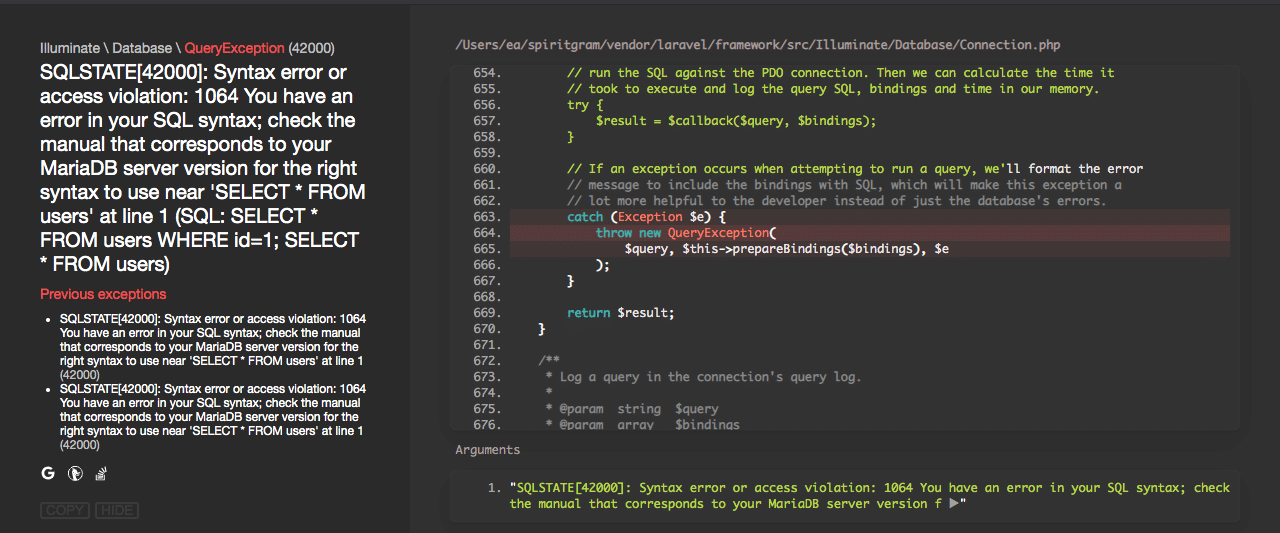
The above code will display the following error message in the user’s browser when an invalid id (non-integer value) is entered:
As seen in this screenshot, the error page displays sensitive details about the associated SQL query. This kind of information helps a hacker understand the logic underneath your application and exposes you to potential attacks.
Prevention
Test your app for this kind of unhandled exception before pushing to production. There’s also a way to completely turn off this type of error reporting in Laravel. We recommend that you turn error reporting off in production. You can still find helpful details about your app crashes and errors in the Laravel log files.
To turn in-page error reporting off, open the .env file and change the value for APP_DEBUG from true to false . The final code should look like this:
APP_DEBUG=false
To Close Up
In summary, SQL injection is, unfortunately, a thing in Laravel. But validation of user inputs and parameterized queries can help reduce the risk of SQL injection.
The security of your Laravel application is a continuous process. And we can’t exhaust all the possible vulnerabilities and solutions in a single post. So be sure to always follow best practices and keep your code and tools up to date.
This post was written by Pius Aboyi. Pius is a mobile and web developer with over 4 years of experience building for the Android platform. He writes code in Java, Kotlin, and PHP. He loves writing about tech and creating how-to tutorials for developers.