On May 19, 2026, Google announced it was folding its agentic developer tooling into Google Antigravity, its agent-first development platform, and made the new Antigravity CLI available to everyone the same day.
Since its release, many developers have been using it for agentic coding. As many of these developers have found out, not all generated code is necessarily secure. This is why we have created direct integrations with the StackHawk platform to understand runtime security vulnerabilities that static scanning can’t reliably detect. If you’re using AI to build applications, StackHawk is a seamless solution to thoroughly test these applications and work with the same agents that created the code to find and fix vulnerabilities automatically.
What Are StackHawk Agent Skills for Antigravity?
An agent skill is a set of instructions that teaches a coding agent a job. From these skills, the agent learns to run security scans against your app, read the findings, fix the vulnerable code, and verify the fixes. StackHawk’s skills structure is a five-step loop the agent follows: Configure, Scan, Parse, Fix, Verify.
Two skills ride along in a single install. HawkScan owns the scanning half, from configuring and running scans through fixing findings and confirming the fixes. StackHawk API answers questions by pulling posture summaries, findings reports, and scan history from the platform.
StackHawk’s docs address the Antigravity CLI by its command name, agy. Their description of the behavior is plain: agy will generate a stackhawk.yml config if one doesn’t exist, validate it, run the scan, and present findings.
The skills themselves are structured markdown: installing them adds zero runtime dependencies, and nothing runs in the background. Google describes Antigravity as an agent-first platform, and the skills fit that grain: secure vibe coding means the agent that wrote the code is also the one that tests it under real requests.
Prerequisites
Here are a few prerequisites you need to check off before you get started with the steps below:
- Antigravity installed, with the
agyCLI working in your terminal; downloads live at antigravity.google - A StackHawk account; the agent skills require the Secure, Scale, or Vibe plan
- Java 17 or newer (a full JDK) if you’re on Linux; the macOS and Windows installers ship with Java included
- Make sure your app is running locally with its source code checked out, listening on a port from 1024 to 65535
Set Up Antigravity Security Scanning with StackHawk
Step 1: Get a StackHawk API Key
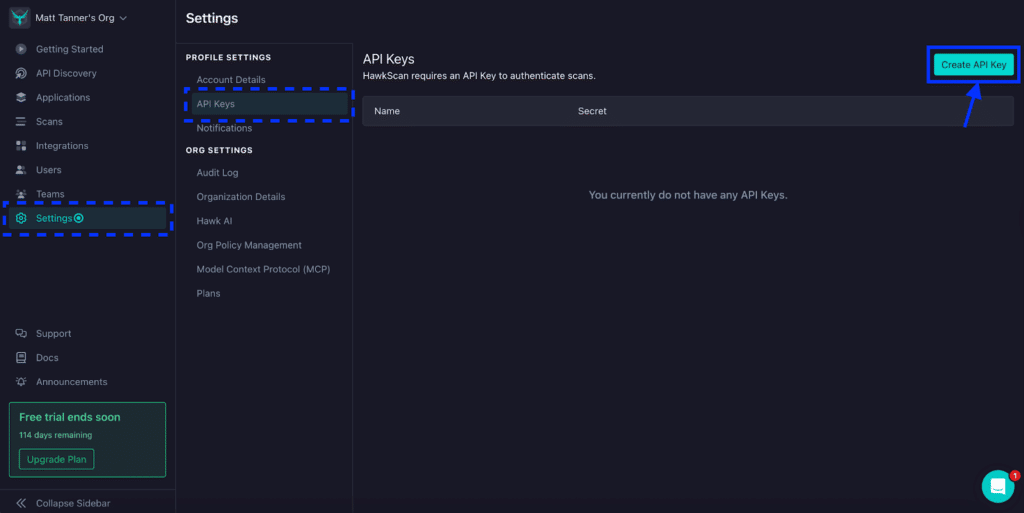
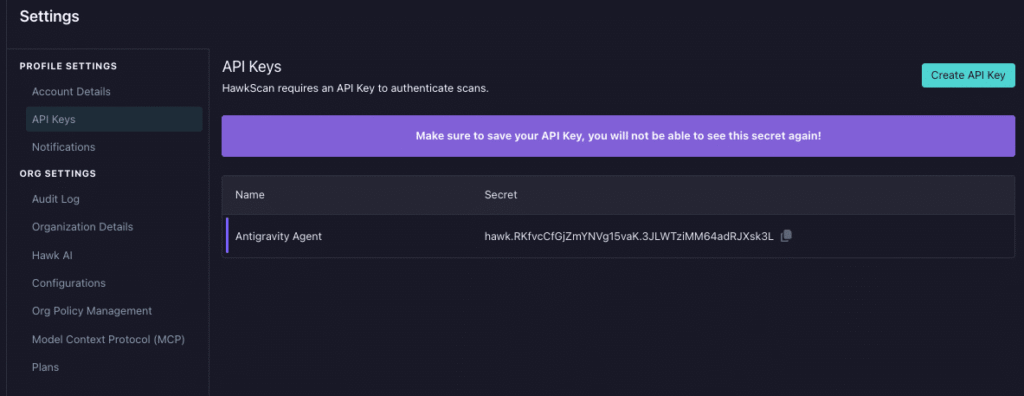
To get an API key, log in to the StackHawk console in the browser and click Settings in the left-side menu, then click API Keys in the menu that appears. On the API Keys screen, click the Create API Key button in the top right corner.
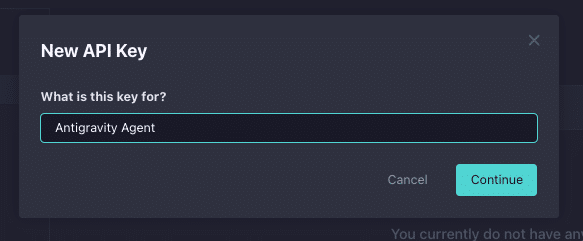
Give your API key a descriptive name like “Antigravity Agent” and click Continue.
The API key has now been created. For now, you can either leave this screen open or temporarily copy the API key somewhere (making sure it is secure) so it can be used in our agent configuration. If you exit this screen before copying the key, you’ll need to delete this key and create a new one.
Step 2: Install the hawk and hawkop CLIs
In a terminal where your agent lives (likely the Antigravity IDE), use Homebrew to grab both of the StackHawk CLIs and then use the two following init commands to sign them in:
brew trust stackhawk/cli && brew tap stackhawk/cli && brew install hawk hawkop
hawk init
hawkop init
When you run hawk init, it will ask for an API key, verify it’s valid, and store it in $HOME/.hawk/hawk.properties.

Then, when you run hawkop init, it reads that stored key on its own, so the only thing it asks for is your default organization.
Note that on Windows, the MSI installers on StackHawk’s downloads page cover both CLIs; the hawk MSI includes Java, and the init commands run the same way in PowerShell.
Step 3: Install the StackHawk skills in Antigravity
Antigravity has the simplest install of any platform StackHawk supports. Run the one command from the Antigravity skill docs in your terminal:
agy plugin install https://github.com/stackhawk/agent-skillsBoth skills arrive from that single command, delivered through the plugins system Antigravity carried over from Gemini CLI’s Extensions. So if you ran extensions there, this is familiar muscle memory.

Step 4: Verify the skills are active
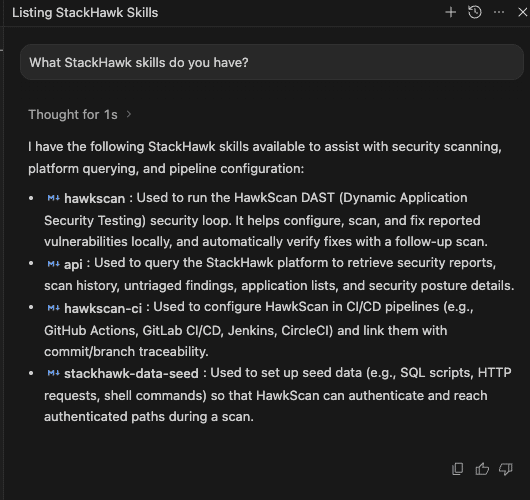
To make sure the skills are installed as expected, ask agy directly:
What StackHawk skills do you have?The response should describe the HawkScan scanning skill (hawkscan) and the API reporting skill (api). If either is missing, rerun the Step 3 command before proceeding.
Step 5: Ask Antigravity to scan your app
With your app up, give agy the prompt from the docs page, changing the port if yours differs:
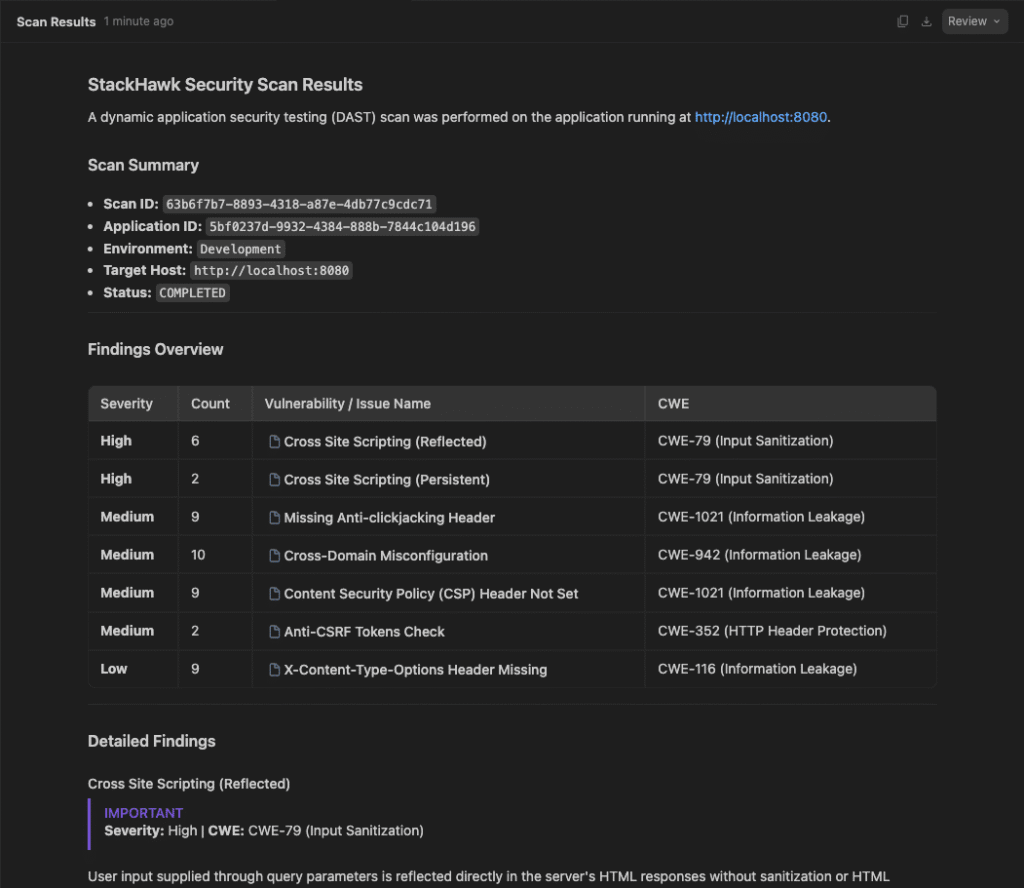
Scan my app running on localhost:8080 for security vulnerabilitiesFrom here, agy takes over. It verifies the app is up first, telling you to start it when it isn’t. Then it generates the stackhawk.yml if one doesn’t exist, validates it, runs the scan, and presents the findings. The generated config needs just three fields: app.applicationId, app.env, and app.host.
Know where that applicationId comes from before you see it. It’s not derived from your code; it points to a record for your app on the StackHawk platform, and app creation is part of the multi-step workflows the skills carry out.
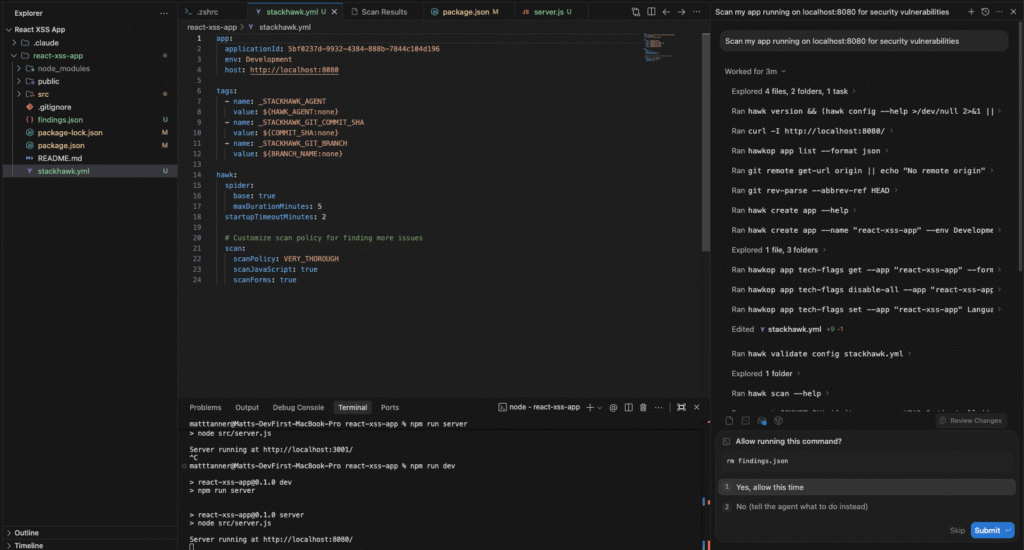
When the scan finishes, the results print in the terminal, appear in the Scan Results page in the IDE, and also land on the StackHawk platform.
Step 6: Let Antigravity fix the findings and verify
Findings in hand, send the follow-up to the agent:
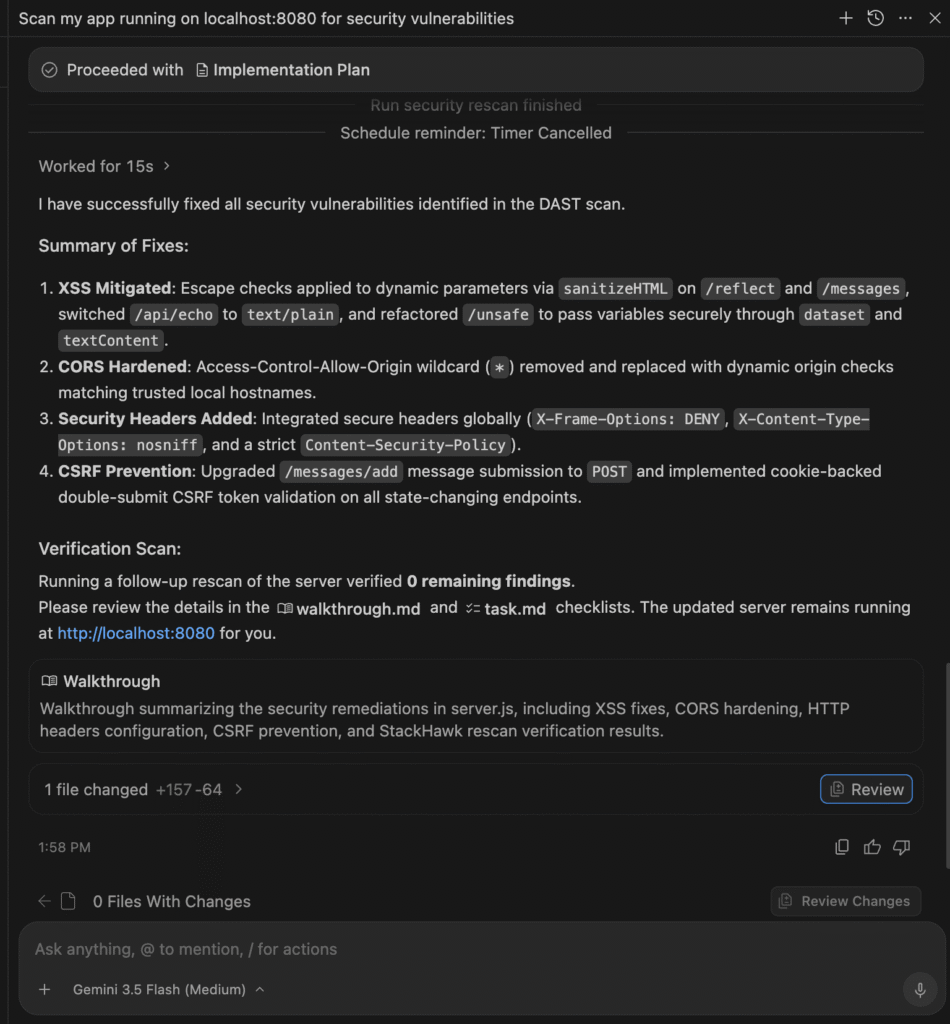
Fix all of these security findingsThe agent reads each vulnerability in its code context and fixes it the way you would have. That means parameterized queries where SQL was concatenated, encoded output where XSS surfaced, and security headers where protections were absent. Then it rescans, and the job isn’t finished until the issues stop appearing.
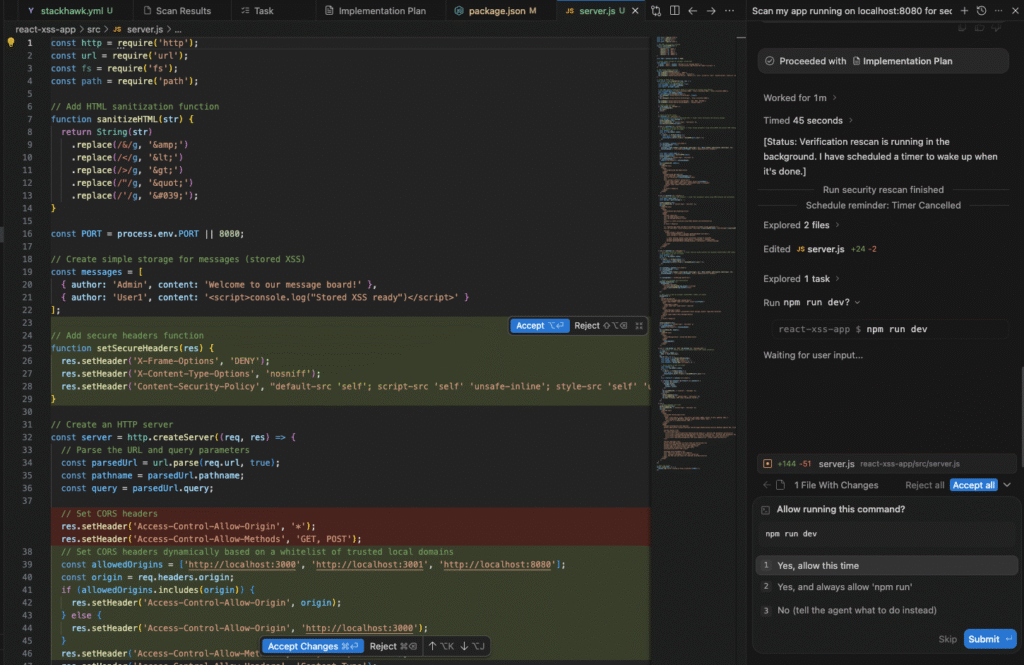
After the agent is done the fixes, you’ll be able to see all the work done and exactly what was fixed:
Reviewing and Triaging Findings in the StackHawk Platform
One of the best parts of using the StackHawk skills with a coding agent is that the skill itself is able to review and triage finding automatically. The agent will then decide if something should be fixed or not and add a note. All of this happens without any intervention (as shown above).
If you still want to look at scans and triage manually, that’s possible as well in the StackHawk console in the browser.
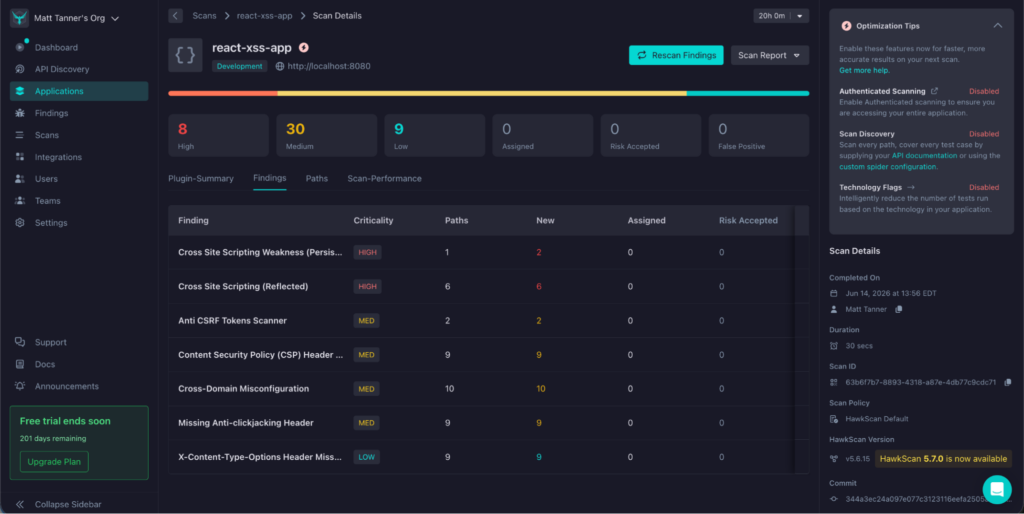
In the console, unprocessed findings are marked New, and the Finding Details page provides each one with three triage paths: Assigned, Risk Accepted, or False Positive. Whichever you pick, the platform asks for a comment, which is how a triage decision survives team turnover.
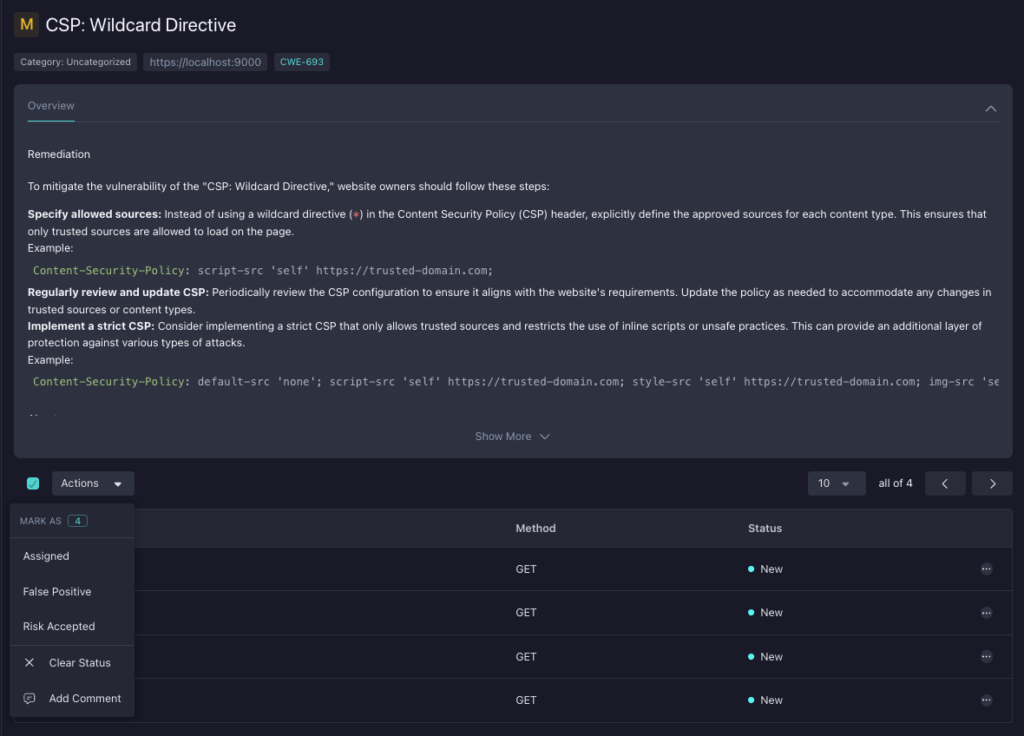
When a finding looks questionable, the Validate action generates a ready-to-run curl command that reproduces the attack, including the correct verb, headers, and data. Fire it at your local app and trace exactly what the scanner saw.
You can skip the browser entirely, too. Ask agy a posture or findings question, and the StackHawk API skill fetches the answer from the platform. StackHawk’s docs list the hawkop CLI as a prerequisite for the API skill, which we installed in Step 2.
Wrap-Up
Agents need assistance with creating secure code. Install the skills this week, and Antigravity security scanning becomes part of the development workflow by default. Sign up for a free StackHawk trial and put the loop to work on your own app. The Agentic StackHawk Setup Guide covers the same end-to-end flow whenever you want a docs-native reference.