Semgrep
 GitHub
 Snyk
Snyk Endor Labs
 AWS
AWS


Historically, dynamic application security testing (DAST) has been treated as a staging or production-only activity. You have static testing for code and pipeline testing, and DAST runs after code is deployed. This had to happen because legacy DAST tools were built to crawl fully rendered web applications. And, they were slow.
Today, however, that architectural limitation is outdated. Modern DAST (API-first, config-as-code, designed for CI/CD) doesn’t require a heavyweight environment to run. It can run where developers are already working, and it’s fast enough to provide feedback in that context.
This matters more now than it did even a year ago. With AI-assisted development increasing the pace at which code is being generated, testing in only staging or production is no longer an acceptable risk. This is especially true in CI/CD pipelines, where AI-generated code arriving through pull requests at higher velocity makes automated security gates more important, not less.
Where you run DAST determines what you can actually test for.
Production environments require prod-safe policies, limiting you to non-invasive checks. But the vulnerability classes that cause real breaches—authorization bypasses, business logic flaws, privilege escalation—require active exploitation attempts to detect. Those tests need environments where state changes are acceptable.
That’s why a multi-stage approach matters. Modern DAST can run at four stages in the development lifecycle: production, QA/staging, CI/CD pipelines, and developer workstation. Each has different constraints and different test types that make sense to run.
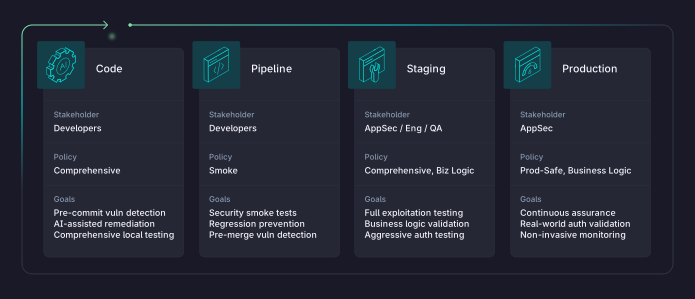
In this post, we’ll cover the pros and cons of DAST at each stage, starting with the latest (production) to the earliest (code).
TL;DR:
- Production gets prod-safe, non-invasive, continuous monitoring with read-based authorization and business logic checks.
- Staging and QA get comprehensive, invasive testing including write-based business logic and full exploitation attempts.
- Pipelines and pull requests get smoke tests, regression checks, and time-boxed validation.
- Testing during code creation (or with AI coding assistants) gets comprehensive testing against local data and environments.
Production: Continuous Assurance Without Disruption
Production testing is where many teams start. The infrastructure already exists. You don’t need to maintain any additional environments, and you’re testing what actual users see and interact with.
But there are major constraints (and risks) with testing in production. You can’t run tests that might affect real data or disrupt live services, such as SQL injection attempts that could corrupt a database, buffer overflow tests, or destructive fuzzing. All of these need to stay out of production.
What to Test in Production
Avoid all injection-type attacks that can result in actual damage to your production environment, modify state, or leave artifacts in your database such as write-based business logic tests like price manipulation, workflow bypasses, or state-changing parameter tampering.
Prod-safe policies are more passive, and include:
- OWASP Top 10 basics, such as XSS detection, information disclosure, security misconfigurations, and missing headers, all work well here. These tests observe and analyze without modifying the state.
- As long as they’re production safe, some business logic and authorization testing are best done in production. Can user A see user B’s data? Can a standard user hit admin-only endpoints? Can someone access resources outside their tenant? These read-based access control checks validate your actual authorization boundaries against your actual user population. You’re testing real access controls instead of test data that may not reflect reality.
- BOLA and IDOR detection through read-based checks work the same way. API enumeration to validate endpoint authorization. All of this runs safely against live systems.
Production Testing Tradeoffs
Production testing gives you continuous assurance and validates real-world authorization boundaries. But if prod-safe scanning is your deepest test, you’re missing most of what attackers actually exploit.
The other obvious tradeoff here is that it’s just too late in the development lifecycle. Every vulnerability found in production is already exploitable, meaning a bad actor (or a security researcher) may have already found it. But it’s not just about exposure. When findings arrive after developers have moved on to other work, it creates friction, and fixes become fire drills rather than planned work.
How to Operationalize Prod Testing
The key is making production scans continuous and low-noise. Schedule scans on a cadence (hourly or nightly, depending on change velocity), scope them to prod-safe policies, and route findings into existing triage workflows rather than creating a separate process. Establish clear ownership: production findings against an API should route to the team that owns that service. Without ownership, production scan results become another dashboard nobody checks.
Staging: Full-Depth Testing Without Constraints
Staging (or QA/test) environments exist specifically for comprehensive and aggressive, but low-risk testing. Since you’re working with test data, state changes are expected. If something breaks, you reset the environment and move on without killing production. This freedom matters because the vulnerability classes that actually cause breaches require active exploitation attempts to detect.
What to Test in Staging
Everything from production, plus the tests that prod-safe policies prohibit, such as:
- SQL injection, command injection, and other injection attacks. Buffer overflow and memory corruption tests. File upload vulnerabilities with actual malicious payloads.
- Authorization testing gets more aggressive here. Horizontal privilege escalation where you actively attempt to access another user’s data, not just check whether the access is theoretically possible. Vertical privilege escalation, where you try to reach admin functions from a standard user account.
- Business logic flaws that require state changes: price manipulation in checkout flows, approval workflow bypasses, and parameter tampering that modifies records. BOLA and IDOR vulnerabilities with full exploitation attempts, not just read-based detection.
- Multi-step attack chains that require modifying application state between steps. Race conditions and concurrency issues that need multiple simultaneous requests.
Business Logic Testing in Staging
Testing whether a regular user can manipulate order prices means actually attempting the manipulation. Testing whether approval workflows can be bypassed means submitting requests that skip steps. In production, these tests risk affecting real transactions. In staging, you can confirm exploitability without consequences which makes it the perfect stage for business logic testing.
Authorization bypass vulnerabilities look like legitimate traffic to monitoring tools. A user updating their own order is normal behavior. A user updating their order with a modified price parameter that shouldn’t be accepted is a business logic flaw. You can’t find these by observing traffic. You have to actively try to break things.
Staging Testing Tradeoffs
The benefits of testing in staging are clear, but it does require maintaining that environment and ensuring it accurately reflects production. That alone can be burdensome and create false positives. And although surfacing findings here is less risky than in production, findings still arrive after code has been merged and deployed, creating the same friction with developers.
This is where you catch what matters. Broken authentication, authorization bypasses, and business logic flaws.
How to Operationalize Staging Testing
Run comprehensive scans on every deployment to the staging environment, not on a schedule. Tie scan execution to your deployment pipeline so coverage stays current with the code. The biggest operational challenge here is environment fidelity: if staging drifts from production (stale data, missing services, different auth configurations), findings become unreliable. Ideally, you should even reset data back to a known baseline before each test.
Treat your staging environment as test infrastructure that needs maintenance, not just a place code passes through.
In Pipeline: Catch Issues Before Merge
Scanning in CI/CD pipelines or pull requests (PRs) puts security feedback directly into the developer workflow. Which, in a perfect world, is what we want!
Tests run automatically when PRs are opened or when builds are kicked off. Developers get results while they’re still in flow with what they were trying to build.
The constraint here is time. A scan that takes an hour blocks the entire development process. Teams will bypass security gates that slow them down too much. PR scanning needs to complete in minutes. That means running locally and optimizing for smaller artifacts — individual microservices and APIs — rather than scanning your entire application end to end.
This is a fundamental architectural difference, not just a speed improvement. Legacy DAST tools were built to crawl entire applications, which is why they can’t run in pipeline without grinding development to a halt. Modern DAST solutions like StackHawk are built for exactly this: fast, targeted scans against the specific services being changed.
There’s a second architectural difference that matters just as much: where the scanner runs. Legacy DAST operates from a fixed position, typically a permanent appliance in the data center or, more commonly today, a cloud-hosted service. That means scan traffic has to traverse the network boundary between the scanner and your test environment, passing through firewalls, WAFs, proxies, and other security controls along the way. Each of those hops adds latency, and any one of them can interfere with scan traffic in ways that reduce test fidelity. A WAF blocking a SQL injection test payload, for example, means you’re testing your perimeter controls, not your application.
StackHawk’s scanner runs wherever your code does. It executes locally in the pipeline, right next to the application under test. That means it can reach internal environments that a cloud-hosted scanner simply cannot, no inbound firewall rules or VPN tunnels required. And because there’s nothing between the scanner and the application rewriting, filtering, or dropping requests, you get clean results that reflect the actual security posture of your code.
What to Test in Pipeline
Deep business logic testing takes too long for PR feedback loops, so when testing in pipeline, focus on smoke tests that cover the essentials without the time cost, including:
- Targeted injection tests, auth validation, and header/TLS configuration checks.
- Regression testing for previously fixed vulnerabilities prevents known issues from reappearing. If a vulnerability was fixed six months ago, the PR scan confirms the fix is still in place.
- API contract validation against OpenAPI specs catches changes that break security assumptions. New endpoint discovery identifies attack surface additions that need review.
- Authentication and session handling for new features validate that developers implemented security controls correctly.
How to Operationalize Pipeline Testing
Testing is one thing, but building policies around the results of those tests is what moves the needle. For example, you probably want to break builds and block deployments when high-severity findings are identified, but allow known or low-severity issues to pass.
The other two pieces that are crucial are ensuring tests are fast, and that findings are accurate and actionable. Tests cannot meaningfully slow down builds, or developers will abort and skip. And findings must have realistic remediation guidance.
Pipeline Testing Tradeoffs
Early testing is great, but it requires unique infrastructure. Unlike SAST that just scans static code, DAST needs a running application. That means ephemeral test environments that spin up for each build. Some tools try to solve this by triggering scans from vendor-hosted cloud environments, but this leads to long test cycles and high false positives, causing more delay and frustration for developers, when what they need are timely, accurate, and reproducible findings..
To get fast, deterministic testing in-pipeline, you need local scanning, and tests configured as code. That’s what makes scans consistent and reproducible across environments, and keeps developers moving fast.
The payoff is substantial. Developers fix issues because the findings surface in their PRs, where they are already focused, not because a ticket shows up in their backlog two weeks later. Security feedback arrives while context is fresh.
Locally: Security in the IDE (or AI Code Assistant!)
Shifting application security testing as far “left” as possible means surfacing vulnerabilities as early in the development lifecycle—before code even enters version control. The developer runs the scanner locally during active development. Issues get fixed before anyone else ever sees the code.
This matters more now than it did five years ago. AI-assisted development tools like Cursor, Claude Code, and GitHub Copilot generate code faster than developers could write it manually. The attack surface expands with every prompt. Testing at the workstation is the only way to keep pace.
What to Test Locally
Developers working with local test data can run comprehensive policies. The same depth of testing available in staging works here because there is no production data at risk.
- All OWASP categories relevant to the feature being built
- Authentication and authorization for new endpoints
- Input validation and injection vulnerabilities
- Business logic in new features — the best time to validate that security controls match the intended design is while the logic is fresh in the developer’s mind
AI-Assisted Testing and Remediation
The real unlock with workstation testing isn’t just finding vulnerabilities earlier — it’s closing the loop between detection and remediation in the same session.
DAST tools that integrate with AI coding assistants (via MCP or similar protocols) can feed scan findings directly into the developer’s workflow. The scanner identifies an injection vulnerability. The AI assistant reads the finding, understands the code context, and proposes a fix. The developer reviews and accepts. Write code, scan, fix, repeat — all before the code leaves the workstation.
This also changes how teams scale shift-left testing. Instead of training every developer on security tooling, you distribute the scanner and AI integrations to workstations and let the assistants handle the rest. Adoption goes up because the developer’s workflow barely changes.
Local Testing Tradeoffs
Developers need to run applications locally, which requires setting up a local environment. The good news is that they usually already have it. Some overhead is required to automate local testing, although AI can speed up that process considerably. Adoption depends on making scanning frictionless enough that developers actually use it.
But catching defects before they enter the SDLC becomes a realistic outcome with workstation testing. Developers learn secure coding patterns through immediate feedback. Problems get fixed when fixing is cheap.
Building a Multi-Stage Strategy
Our advice? Start where you are. Some testing is always better than none. If production scanning is your only DAST today, add staging scans next. The infrastructure probably already exists.
But if you want to start shifting DAST left — into pipelines and developer workstations — tooling alone won’t get you there. You need development teams that treat scan results as their responsibility, not tickets lobbed over the wall from AppSec. That means choosing tools developers will actually adopt and building security feedback into workflows they already use.
A team that tests across multiple stages catches more vulnerabilities, earlier, and fixes them faster than a team relying on production testing alone. Each stage tests different things. Each stage catches what the others miss.
How StackHawk Helps
StackHawk’s vision is to shift DAST left with a simple goal in mind: find vulnerabilities when developers still have context and fixes are cheap. Every stage you move left reduces the cost of remediation and the window of exposure.
That said, there are real-world constraints and tradeoffs to testing early. Not every application lives in a modern CI/CD pipeline. Legacy apps, apps inherited through M&A, and applications without active development also need security testing. That’s why StackHawk tests across every single stage of the development lifecycle, including production and even in our own hosted cloud environment.
With StackHawk, AppSec teams can start surfacing exploitable vulnerabilities without requiring local setup, CI/CD integration, or engineering support. No YAML, no Docker — just point it at your application and scan. It’s the fastest path to actionable findings, whether you’re validating production, testing legacy applications, or bridging the gap while you build toward full pipeline automation.