Semgrep
 GitHub
 Snyk
Snyk Endor Labs
 AWS
AWS


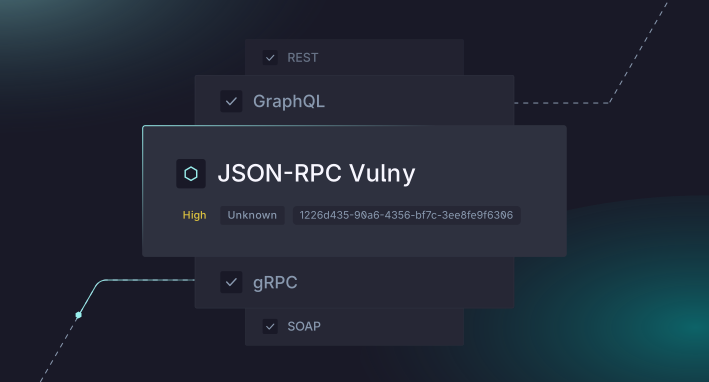
JSON-RPC is a lightweight remote procedure call protocol that powers everything from blockchain nodes and cryptocurrency wallets to microservice architectures and IoT systems. Its simplicity makes it a popular choice for developers who need structured request-response communication without the overhead of REST. But that simplicity can also be deceptive. JSON-RPC endpoints are just as vulnerable to injection attacks, broken authentication, and data exposure as any other API surface.
Until now, security testing JSON-RPC APIs has been a largely manual affair. Most DAST tools are built around REST or GraphQL paradigms, leaving JSON-RPC services as a blind spot in your security pipeline. StackHawk now supports JSON-RPC API security testing, so you can scan your JSON-RPC endpoints for vulnerabilities as part of your existing development workflow.
In this tutorial, we’ll walk through how to configure StackHawk to scan a JSON-RPC API, run your first scan, and review the findings, all in about fifteen minutes.
What Is JSON-RPC, and Why Does It Need Security Testing?
JSON-RPC is a stateless, transport-agnostic remote procedure call protocol encoded in JSON. A client sends a request object with a method name and params, and the server responds with a result or an error. It’s defined in the JSON-RPC 2.0 specification and looks like this:
// Request
{
  "jsonrpc": "2.0",
  "method": "items.search",
  "params": { "query": "Apple" },
  "id": 1
}

// Response
{
  "jsonrpc": "2.0",
  "result": [{ "id": 1, "name": "Apple", "description": "A fruit" }],
  "id": 1
}
Unlike REST APIs where each resource typically has its own URL, JSON-RPC funnels all requests through a single endpoint (often /jsonrpc or /rpc). The method field determines what action gets executed server-side. This architectural difference means traditional web crawlers and DAST scanners can’t effectively discover and test JSON-RPC methods on their own. They see one URL and have no way to enumerate the available procedures.
That’s a problem, because JSON-RPC APIs are susceptible to the same classes of vulnerabilities you’d find in any web service.
Common JSON-RPC Vulnerability Categories
The server-side implementations that handle method calls are where things go wrong. Here are the most common vulnerability categories that affect JSON-RPC services, several of which are present in the jsonrpcvulny test app.
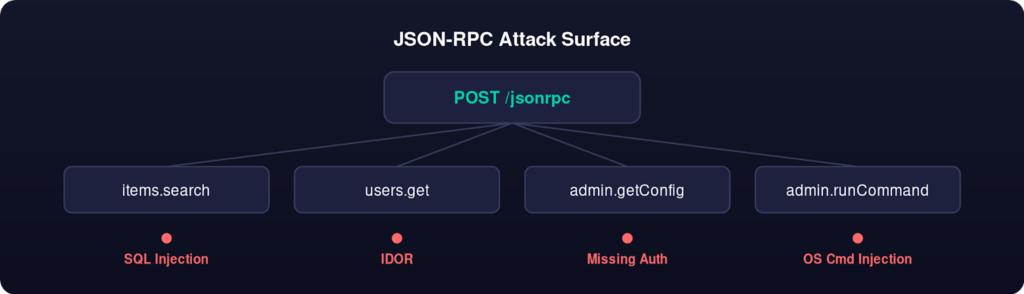
SQL Injection occurs when method parameters are passed directly into database queries without proper sanitization. An items.search method that takes a query parameter and interpolates it into a SQL statement is a classic example. An attacker can manipulate that parameter to extract data, modify records, or even drop tables entirely.
OS Command Injection is a risk whenever a JSON-RPC method passes user-supplied input to a system shell. This is more common than you’d think: methods that handle file operations, system monitoring, or administrative tasks sometimes shell out to the underlying operating system. If input isn’t carefully validated, an attacker can chain arbitrary commands.
Stored Cross-Site Scripting (XSS) can occur when a method accepts user input that gets stored and later rendered without proper encoding. If an items.create method accepts a name or description parameter that ends up displayed in a web interface, an attacker can inject malicious scripts that execute in other users’ browsers.
Server-Side Request Forgery (SSRF) comes into play when a method accepts URLs or network addresses as parameters. If the server fetches those resources without validation, an attacker can use the method to probe internal network services, access cloud metadata endpoints, or interact with other internal APIs that shouldn’t be publicly accessible.
Authentication and Authorization Bypasses are another common issue. JSON-RPC services sometimes implement authentication at the transport level but fail to enforce per-method authorization. This can mean that an authenticated user with limited privileges can call administrative methods they shouldn’t have access to, or that sensitive configuration endpoints are left entirely unauthenticated.
The single-endpoint architecture of JSON-RPC makes some of these issues harder to catch with traditional security tools. REST-oriented scanners expect different URLs for different resources, and they build their attack surface maps by crawling links and forms. With JSON-RPC, everything goes to the same URL, and the attack surface is hidden in the method namespace.
Testing a JSON-RPC Endpoint with StackHawk
Prerequisites
Before we dive in, you’ll need a few things set up on your machine:
- A StackHawk account (free tier works fine for this tutorial)
- Docker installed and running
- The StackHawk CLI installed
- Your StackHawk API key (grab this from the StackHawk platform under Settings > API Keys)
If you’ve run HawkScan before for REST or GraphQL APIs, you’re already set. The same toolchain supports JSON-RPC without any additional installation.
Step 1: Set Up a Vulnerable JSON-RPC Application
We’ve built a purpose-made vulnerable JSON-RPC application to make it easy to follow along with this tutorial. Clone the repo, generate the required TLS certificates, and start it up:
# Clone the repo
git clone https://github.com/kaakaww/jsonrpcvulny.git

# Change to the correct directory

cd jsonrpcvulny

# Generate certs

./scripts/generate-certs.sh

# Start services

docker compose up -d
This spins up a JSON-RPC service on https://localhost:9000 that exposes several intentionally vulnerable methods. It’s the perfect target for learning how StackHawk’s JSON-RPC scanning works without risking anything in production.
Once the containers are running, you can verify it’s working with a quick curl:
# Verify it's running
curl -k https://localhost:9000/health
The -k flag tells curl to accept the self-signed certificate. If you see a JSON response with {“status”:”ok”}, you’re good to go.
Step 2: Create a StackHawk Application
If you haven’t already, log in to the StackHawk platform and create a new application:
- Navigate to Applications and click the Add button on the right and select Add Application.
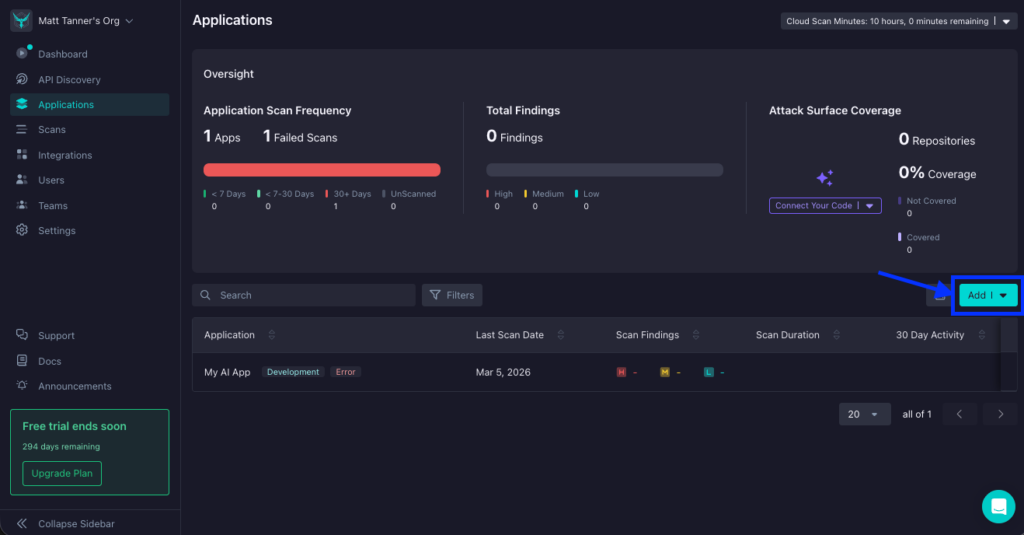
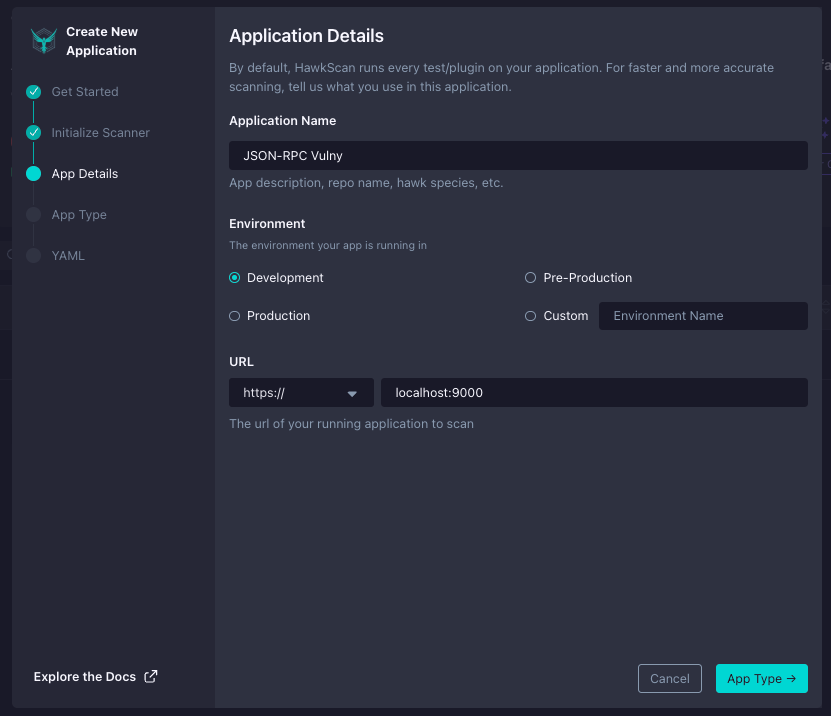
- Give it a name like “JSON-RPC Vulny” and set the environment to Development and set the host URL to https://localhost:9000
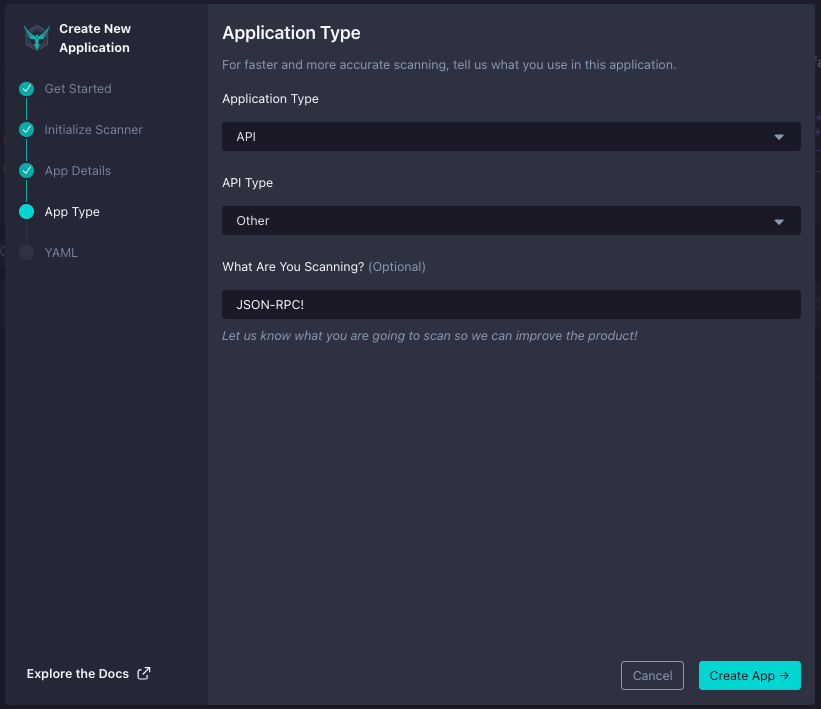
- Specify the Application Type as “API” and the API Type as “Other”
- Copy the Application ID, which you’ll need for the stackhawk.yml configuration file
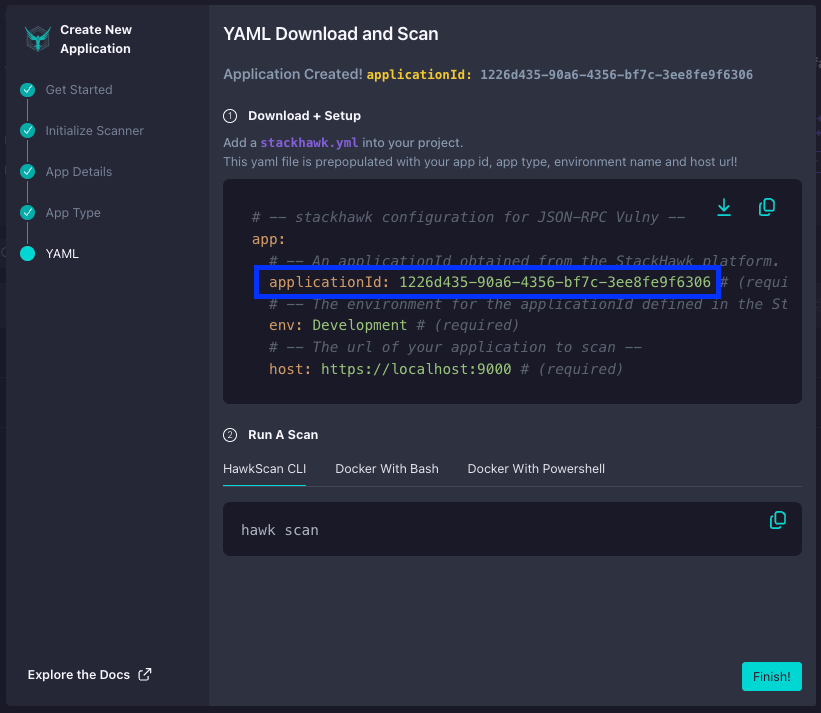
Every application in StackHawk gets a unique ID that ties your scan configuration to the right place in the platform. This is how StackHawk knows where to send your scan results and how to organize findings across different environments and services.
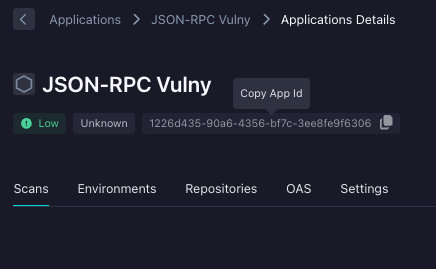
Quick tip: if you lose your App ID, you can always get it back in StackHawk by click on the app. The App ID will be at the top:
Step 3: Configure stackhawk.yml for JSON-RPC
The jsonrpcvulny repo already includes a stackhawk.yml, but let’s walk through the key parts. The JSON-RPC configuration looks like this:
app:
  applicationId: ${APP_ID}
  host: ${APP_HOST:https://localhost:9000}
  env: Development
  jsonRpcConf:
    enabled: true
    endpoint: /jsonrpc
    filePath: schema/openrpc.json
The key configuration here is the app.jsonRpcConf block. Setting enabled: true turns on JSON-RPC scanning, endpoint tells HawkScan which path to send requests to, and filePath points to an OpenRPC schema that describes your service’s methods and parameters. If you’ve worked with StackHawk’s OpenAPI support for REST APIs or schema introspection for GraphQL, this is the equivalent concept for JSON-RPC: you’re giving the scanner a map of your API’s attack surface.
The OpenRPC Schema
The API definition file is an OpenRPC schema that describes your JSON-RPC methods. Here’s a simplified look at what schema/openrpc.json contains for the vulny app:
{
  "openrpc": "1.3.2",
  "info": {
    "title": "jsonrpcvulny API",
    "description": "A deliberately vulnerable JSON-RPC API for security testing",
    "version": "1.0.0"
  },
  "methods": [
    {
      "name": "items.search",
      "summary": "Search items by name",
      "params": [
        { "name": "query", "required": true, "schema": { "type": "string" } }
      ]
    },
    {
      "name": "users.get",
      "summary": "Get user by ID (requires auth)",
      "params": [
        { "name": "userId", "required": true, "schema": { "type": "integer" } }
      ]
    },
    {
      "name": "admin.runCommand",
      "summary": "Run shell command (admin only)",
      "params": [
        { "name": "cmd", "required": true, "schema": { "type": "string" } }
      ]
    }
  ]
}
Each entry in the methods array tells HawkScan the method name, its parameters, and their types. The scanner uses this information as seed data: it knows the shape of valid requests and can intelligently fuzz the parameters to test for injection vulnerabilities, XSS, type confusion, and more.
The full schema includes additional methods like items.get, items.create, users.list, users.update, admin.getConfig, and debug.echo, each with their own parameters and type definitions. Think of this file as the JSON-RPC equivalent of an OpenAPI spec: it gives the scanner the context it needs to test effectively.
Authentication Configuration
The jsonrpcvulny app uses JWT-based authentication, and the repo’s stackhawk.yml includes a full authentication configuration:
authentication:
    loggedInIndicator: "\"token\":"
    loggedOutIndicator: "\"error\":"
    tokenAuthorization:
      type: HEADER
      value: Authorization
      tokenType: Bearer
      isJWT: true
    tokenExtraction:
      type: TOKEN_PATH
      value: '$.result.token'
    usernamePassword:
      type: JSON_RPC
      loginPath: /jsonrpc
      jsonrpcMethod: auth.login
      usernameField: username
      passwordField: password
      scanUsername: janesmith
      scanPassword: password
Notice the type: JSON_RPC in the usernamePassword block. HawkScan builds the JSON-RPC 2.0 envelope automatically. You just specify the method name (auth.login) and the field names for credentials. HawkScan handles the rest: calling the login method, extracting the JWT from the response using the tokenExtraction path, and including the bearer token in subsequent requests to authenticated methods.
Step 4: Run Your First Scan
With the configuration in place, kick off a scan:
export APP_ID=<your-app-id>
export API_KEY=<your-api-key>

hawk scan stackhawk.yml
Or if you prefer running HawkScan via Docker directly:
docker run --rm \
  -v $(pwd):/hawk:ro \
  -e API_KEY=${HAWK_API_KEY} \
  --network host \
  stackhawk/hawkscan:latest
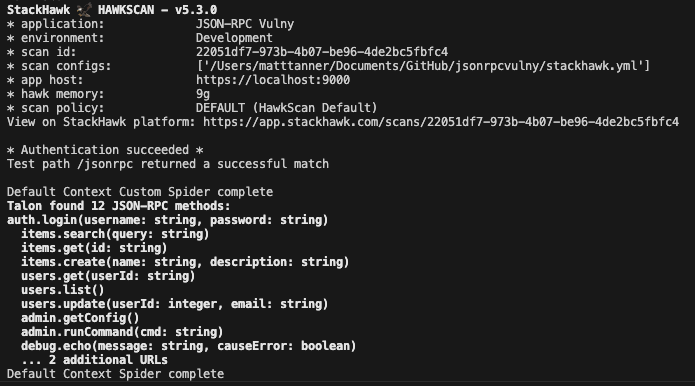
HawkScan will read your stackhawk.yml, load the OpenRPC schema, authenticate via the auth.login method, and begin testing each method. You’ll see real-time output in your terminal as it works through the methods and checks for vulnerabilities.
Once the scan kicks off, you’ll see this in the terminal (or something similar):
What Happens During a Scan
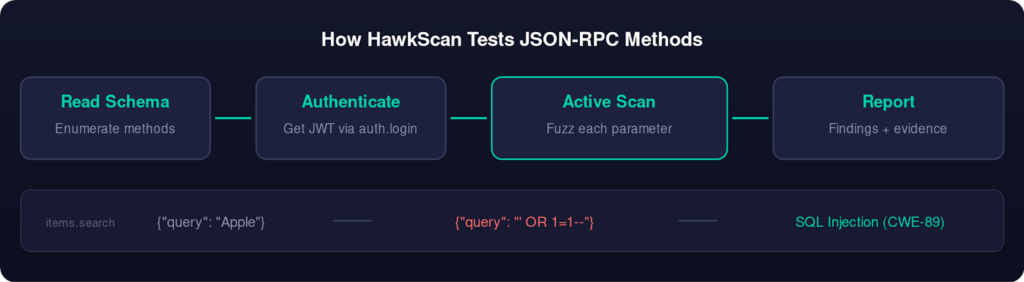
When HawkScan processes a JSON-RPC configuration, it goes through several phases. First, it reads the OpenRPC schema to enumerate all available methods and their parameter definitions. This is the discovery phase, and it’s why the filePath in your stackhawk.yml matters: without the schema, HawkScan has no way to know what methods exist behind the single /jsonrpc endpoint.
Next, if authentication is configured, HawkScan calls the login method (auth.login in our case), extracts the JWT from the response, and validates that it can access protected methods. This happens before any attack payloads are sent.
Then the active scan begins. For each parameter in each method, HawkScan sends attack payloads designed to trigger specific vulnerability classes. For string parameters, it tries SQL injection payloads, OS command injection sequences, XSS payloads, and more. For numeric parameters, it tests boundary values and type confusion attacks. The scanner compares each response against the expected behavior to determine whether a payload triggered a vulnerability.
This is the same scanning engine that powers StackHawk’s REST and GraphQL testing, adapted to understand the JSON-RPC request/response format. The key difference is that instead of fuzzing URL paths and query parameters, HawkScan is fuzzing method names and JSON-RPC params.
Step 5: Review Your Findings
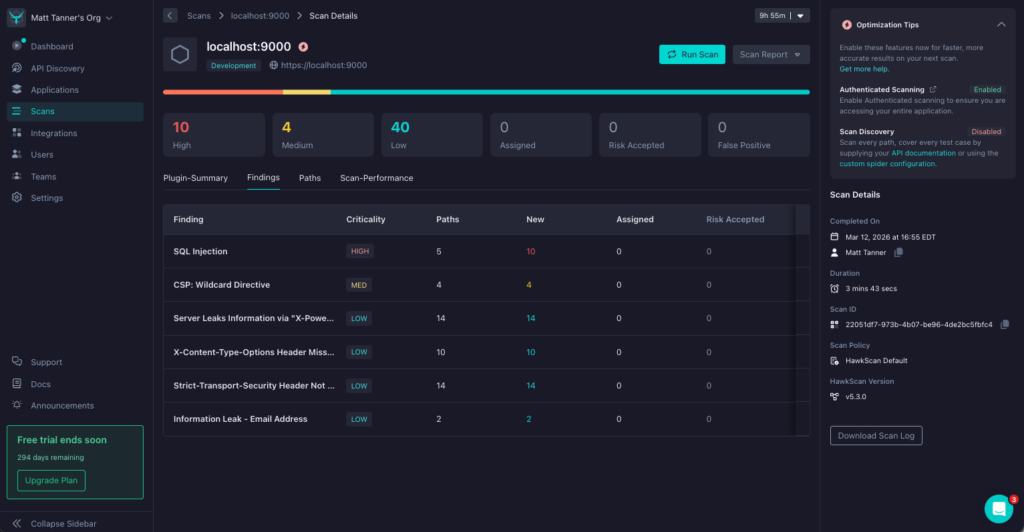
Once the scan completes, head to the StackHawk platform to review the results. You’ll find your scan under the application you created, with findings organized by severity.
For the jsonrpcvulny application, you should see findings across several vulnerability categories:
SQL Injection
The items.search and items.get methods don’t properly sanitize their parameters, allowing an attacker to manipulate database queries. HawkScan detects this by injecting SQL syntax into the query and id parameters and observing how the application responds, checking whether error messages reveal database details or whether carefully crafted payloads change the response data. The users.get and users.update methods are similarly vulnerable.
Authorization Flaws (IDOR)
The users.get and users.update methods are vulnerable to Insecure Direct Object Reference (IDOR) attacks. An authenticated user can access or modify other users’ data by simply changing the userId parameter. The application doesn’t verify that the requesting user has permission to access the specified resource.
Missing Authentication
The admin.getConfig method exposes server configuration data without requiring any authentication. This means anyone who can reach the endpoint can read potentially sensitive configuration details like database connection strings, API keys, and internal service URLs.
Stored XSS
The items.create method accepts a name parameter that gets stored and later rendered without proper encoding. HawkScan detects this by submitting payloads containing script tags and checking whether the stored content is returned unescaped in subsequent responses.
Each finding in the StackHawk platform includes the specific request and response that triggered the alert, along with remediation guidance to help you fix the issue. You can triage findings, mark false positives, and track remediation progress using the same workflow you’d use for any other API type that StackHawk supports.
Triaging and Fixing Findings
The StackHawk platform makes it easy to work through your findings systematically. For each vulnerability, you can see the exact JSON-RPC request that triggered it, the response from the server, and the specific CWE (Common Weakness Enumeration) classification. This gives your development team the context they need to reproduce the issue and implement a fix.
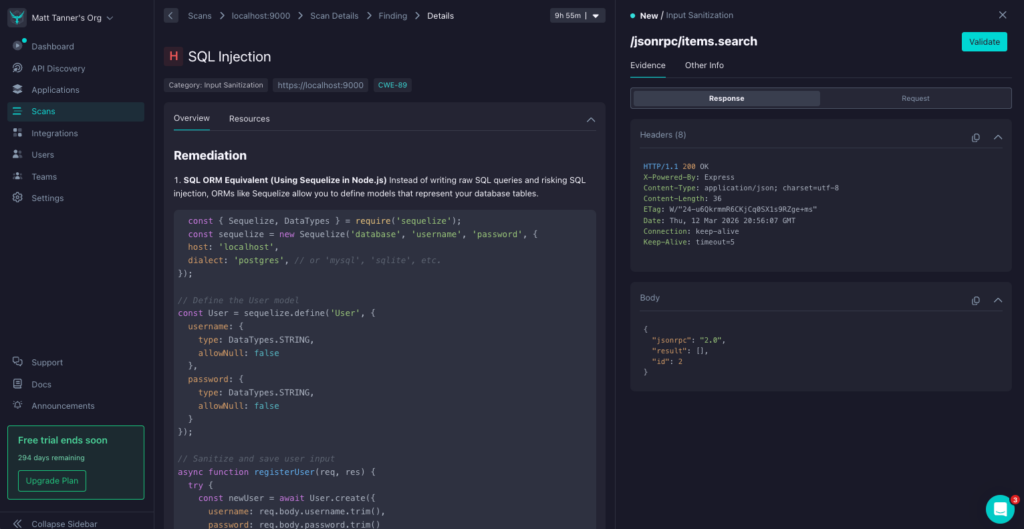
For the SQL injection in items.search, the fix typically involves using parameterized queries or an ORM instead of string interpolation. For the IDOR in users.get, the solution is to verify that the authenticated user has permission to access the requested resource before returning data. For the missing auth on admin.getConfig, the fix is to add authentication middleware to the method handler. For the stored XSS in items.create, the solution is to sanitize and encode user input before storing and rendering it.
Conclusion
With JSON-RPC support, StackHawk now covers REST, GraphQL, SOAP, gRPC, and JSON-RPC APIs. Whether you’re building blockchain infrastructure, microservices, or IoT backends that rely on JSON-RPC, you can test for vulnerabilities in your CI/CD pipeline the same way you already test your REST and GraphQL services.
To get started, sign up for a free StackHawk account, clone the jsonrpcvulny test application, and run your first scan. If you run into any questions, the StackHawk Docs are a good place to start!
Want to see how StackHawk handles your own API security testing workflows? Schedule a demo to see it in action.