
Change one number in a URL, and suddenly you can see someone else’s bank statements. Modify a user ID in an API request, and you’re reading private medical records that you shouldn’t have access to. When these scenarios are able to take place, that’s BOLA—and it’s been the #1 API security risk since 2019, maintaining its top spot in the OWASP API Security Top 10 2023 edition.
BOLA vulnerabilities, exploited maliciously or by accident, can expose financial records, medical information, and any data your application handles to attackers. The attacks themselves don’t even need to be overly complex, no sophisticated exploits or zero-days required. It’s about APIs that fail to ask one critical question: “Should this user actually have access to this specific resource?”
In this blog, we’ll break down how BOLA works, show you some real examples of BOLA exploits in action, and give you practical advice to keep your APIs locked down.
What is Broken Object Level Authorization (BOLA)?
BOLA occurs when your API fails to verify that users attempting to access data actually have permission to do so. Sure, they might be logged in—but should user #123 really be able to view user #456‘s private information just by changing a number in the URL?
Object-level authorization means controlling which users can perform actions on specific data objects. A healthcare app should ensure patients see only their own medical records, not anyone else’s. The “broken” part means these controls are either missing entirely or implemented incorrectly.
BOLA typically manifests in two ways: APIs that rely too heavily on easily predictable object identifiers (such as customer IDs or order numbers), or APIs that don’t verify that the authenticated user has permission to interact with the requested resource.
When these weaknesses are exploited, here is the general attack pattern. First, attackers analyze API requests and responses, looking for patterns in how objects are referenced (e.g.,/users/{userID} or /orders/{orderID}). Then they experiment by changing those identifiers, attempting to access data belonging to other users. If the API doesn’t enforce proper authorization, the attack succeeds. Once they know that access is possible, they can view, edit, or delete sensitive data. In certain cases, they gain complete control over data and objects they should never be able to touch.
BOLA is widespread and dangerous for three reasons: it requires minimal technical skill to exploit, it’s difficult for standard security scanners to detect, and, according to recent data, it accounts for approximately 40% of all API attacks.The impact ranges from privacy breaches to full account takeovers, financial fraud, and the sabotage of systems controlled via APIs.
What is the difference between BOLA and Insecure Direct Object Reference (IDOR)?
In terms of how developers and security teams talk about this vulnerability, you’ll see both “BOLA” and “IDOR” used. They’re essentially the same thing, but the shift in terminology from IDOR to BOLA tells you something important about how we understand the problem.
IDOR is the older term, focusing on APIs that expose internal object references that attackers can easily manipulate. Think of a URL like /api/customers/{customerID}, where changing the customerID lets you access other users’ data.
The shift to BOLA emphasizes that the core problem isn’t just the type of reference used; it’s broken authorization logic. This could mean relying on predictable identifiers, or failing to verify that the user making the request actually owns the resource or has legitimate permissions to interact with it.
That said, the relation between the two is that all IDOR vulnerabilities are examples of BOLA. Not all BOLA vulnerabilities involve directly exposed, easily manipulated object references, though, as seen with IDOR. The heart of the matter is always a failure to implement object-level authorization checks correctly.
What is the root cause of BOLA?
BOLA vulnerabilities stem from development practices that prioritize convenience over security, or from a lack of knowledge about how to properly secure a service. Here are the primary mechanisms/oversights that can cause BOLA to exist within a codebase:
Over-reliance on Object Identifiers
Using sequential numerical IDs, predictable strings, or other easily guessable patterns in API endpoints invites exploitation. Consider /api/documents/{documentID}. An attacker can substitute values for {documentID} to access documents they shouldn’t be able to see. While convenient for developers, using these references as the sole authorization factor is asking for trouble.
Lack of Ownership and Permission Verification
Another fundamental mistake is failing to consistently validate that the user attempting an action actually owns the targeted object or has the necessary permissions. APIs must verify these rights on every single request. Although it may seem sufficient, comparing the user ID in a JWT token to a user ID parameter isn’t enough for most use cases. You need to go further in verifying ownership of the specific resource being accessed through additional database lookups or IAM libraries.
Blind Trust in User Input
Trusting what users send you is the fatal mistake that gets made frequently when these attacks are successful. Instead, developers need to treat every object ID, every parameter, every piece of user input as potentially malicious. Validate everything, sanitize everything, and always verify permissions server-side. Skip this, and you’re vulnerable to manipulations that authorization checks might miss.
Insufficient Focus on Authorization
In pressured development environments, the ones that emphasize the delivery of core functionality regardless of what impact it may have to security, BOLA tends to pop up naturally. The focus on speed and lack of caution leads to inconsistent authorization logic where some endpoints are rigorously protected, others left wide open. In the worst of cases, authorization might be skipped entirely on certain API operations.
The Fallacy of Obscurity
Some think that using UUIDs instead of sequential IDs can offset some of the risk. While it can help, that’s defense-in-depth tactic, not a solution. Attackers will enumerate, scrape, or find those UUIDs in other API responses. Obscurity buys you time as its harder to crack than simple object identifiers, but it’s not really a security mechanism that fully protects against a BOLA attack.
Wrapping it all up in a bow, BOLA happens when developers skip proper authorization checks… it’s that simple.
What is an Example of BOLA?
Understanding how these attacks take shape can help developers to understand how they can protect against them in their code. Let’s look at three scenarios that illustrate how this vulnerability manifests in real applications.
Scenario #1: Leaky Social Media Profiles
A social media platform lets users update their profile information through an API endpoint. An example request may look like this:
PATCH /api/users/profile

{

   "userID": 12345,

   "displayName": "My New Name",

   ...

}
If the API blindly trusts the provided user ID without verifying it against the currently logged-in user’s session, an attacker can modify anyone’s profile. The consequences? Reputational damage, misinformation, and social engineering attacks made easy.
To fix this, developers should tie the logged-in user’s session to their legitimate ID. Verify that submitted objects actually belong to them. Never trust what the client sends directly as it is easy to override and manipulate.
Scenario #2: Medical Record Tampering
Next, in a more regulated industry, imagine a healthcare system has an API to retrieve patient records. A simple GET request can be sent to the endpoint like so:
GET /api/patients/{patientID}/recordsNow, let’s assume the API checks authentication but not authorization. This would mean that any authenticated user can retrieve any patient’s records by changing the patient ID. Even if the endpoint is read-only, in this case confidentiality is completely compromised. If it allows POST, PUT, or PATCH requests, attackers can modify records, which could lead to incorrect diagnoses or unauthorized changes.
Once again, the fix is to implement strict role-based access control. Users should only access and modify data they legitimately need based on their role and relationship to the patient.
Scenario #3: Unintended Invoice Manipulation
Now, an attack with a direct financial impact. Assume that we have a B2B invoicing system marks invoices as paid through a POST endpoint, like this:
POST /api/invoices/{invoiceID}/markPaidIf the API doesn’t verify the relationship between the logged-in user’s company and the invoice ID, attackers can disrupt cash flows. Sequential invoice numbers (which are extremely common) make this even easier. Paid invoices get marked unpaid, which could lead to business relationships being impacted since those in charge of payments will be asking again for a payment already received. On the other side, unpaid invoices could get marked paid, causing direct financial losses.
In this scenario, this can be avoided by associating invoices with specific companies/accounts. Then, when someone goes to action the invoices, you can verify that the user making changes is authorized for those entities.
How to Protect Against BOLA
Now that you know the causes and where potential vulnerabilities hide, here’s how to actually prevent BOLA attacks. The following list contains the requirements for any API handling user data that wants holistic protection against this type of vulnerability.
Rethinking Object Identifiers
Don’t rely solely on object identifiers, such as sequential IDs or UUIDs. While non-guessable identifiers like UUIDs reduce risk compared to sequential IDs, they’re not a complete solution. Implement comprehensive session management with user roles and permissions for fine-grained access control. Associate object identifiers with authenticated user sessions and their permissions to verify the legitimacy of access requests.
Strict Authorization Checks
Enforce proper access control at every API endpoint. These checks must verify both the requester’s identity and their ownership or permission levels for the object or action they’re attempting. This dual-layer verification blocks unauthorized access. It is critical to remember that simply comparing a user ID in a JWT token to a user ID parameter isn’t sufficient. You must verify that the authenticated user has explicit permission to access or modify the specific resource being requested. This is where most BOLA vulnerabilities hide.
Input Validation and Sanitization
Attackers craft inputs designed to exploit vulnerabilities in API authorization logic. Ensure object identifiers adhere to expected formats and then sanitize inputs to reject or escape special characters. This reduces the risk of injection attacks and manipulation attempts.
Principle of Least Privilege
Limit user and system component permissions to the bare minimum necessary for their roles or tasks. This minimizes the potential impact of a BOLA breach and limits the blast radius. Even if something does slip through, the compromised accounts are restricted in what they can do.
Runtime Monitoring and Anomaly Detection
Implement Security Information and Event Management (SIEM) tools to detect suspicious behavior patterns. Watch for:
- Repeated attempts to access different user IDs from a single session
- Enumeration patterns (sequential ID requests)
- Unusual spikes in access to sensitive resources
- Parameter pollution (same values appearing in unexpected locations)
Log all access to sensitive resources, including user IDs, IP addresses, and timestamps, for auditing and incident response.
Rate Limiting
Implement API rate limiting to reduce the effectiveness of automated attacks, such as brute-force ID enumeration. Rate limiting slows down attackers and can prevent data breaches by making large-scale enumeration impractical. If rate limits are hit (especially multiple times), an alert can also be helpful in identifying if it is an attack or an API client with an insufficient rate limit.
API Gateways with Security Policies
Deploy API gateways to enforce security policies like authentication, rate limiting, and data encryption. Gateways centralize logging and monitoring, making it easier to detect and respond to security incidents. However, remember that traditional API gateways and WAFs cannot effectively detect BOLA on their own because they don’t understand application business logic.
Zero Trust Approach
Never trust, always verify. Every request must be validated, regardless of the user’s authentication status. Remember that most API attacks come from authenticated sessions. Authentication proves who someone is but authorization controls what they can do. You need both, and authorization must be verified on every single request.
How StackHawk Can Help Detect and Prevent BOLA
Traditional DAST solutions couldn’t detect BOLA because they test with a single authenticated session and look for known attack patterns rather than understanding authorization logic. A scanner testing as “User A” has no way to verify whether “User B” should also have access to a given resource. StackHawk changes that.
StackHawk’s Business Logic Testing enables automated multi-user authorization testing directly in your CI/CD pipeline. Instead of relying on pattern matching, StackHawk tests your API from multiple user perspectives simultaneously, discovering authorization vulnerabilities that single-user tools architecturally cannot detect.
With StackHawk, developers and security teams can:
- Test Authorization Across User Boundaries: Configure multiple authentication profiles representing different users and privilege levels. StackHawk then automatically attempts cross-user access testing, verifying whether User B can access resources created by User A.
- Detect Privilege Escalation: Mark administrative accounts as privileged, and StackHawk tests whether unprivileged users can access admin-only endpoints or perform elevated operations.
- Get Complete Evidence for Fast Remediation: When authorization flaws are found, StackHawk provides the full test sequence, including which user attempted access, what resource they targeted, and the complete request/response for both the authorized and unauthorized users. This detailed evidence makes remediation straightforward.
- Automate What Previously Required Manual Pen Testing: Multi-user authorization testing has traditionally been manual work that must be repeated every release cycle. With Business Logic Testing, this validation runs automatically on every build, catching regressions before they reach production.
By adopting a developer-first approach and integrating seamlessly with existing dev tools and practices, StackHawk makes comprehensive BOLA testing accessible to developers and security teams alike.
Enabling BOLA Detection in HawkScan
StackHawk provides multiple approaches to BOLA detection, ranging from out-of-the-box plugins to comprehensive multi-profile testing. You can start simple and add depth as your testing needs grow.
Option 1: Enable BOLA Plugins
Enabling BOLA (and IDOR) detection in StackHawk is easy. Two ways to do this are to use the “OpenAPI – Experimental” policy or to customize an existing policy. The “OpenAPI – Experimental” policy allows users to scan for the vulnerabilities outlined in the OWASP API Security Top 10.
To set HawkScan up with the “OpenAPI – Experimental” policy, you will log into StackHawk, go to the Applications screen, and click on your application.
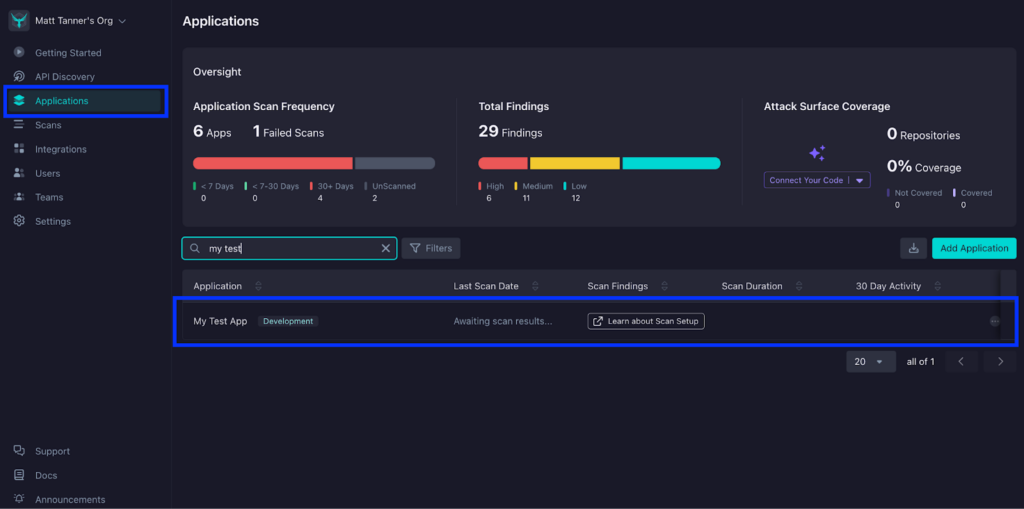
Once you’ve open up your application, you’ll click the Settings tab.
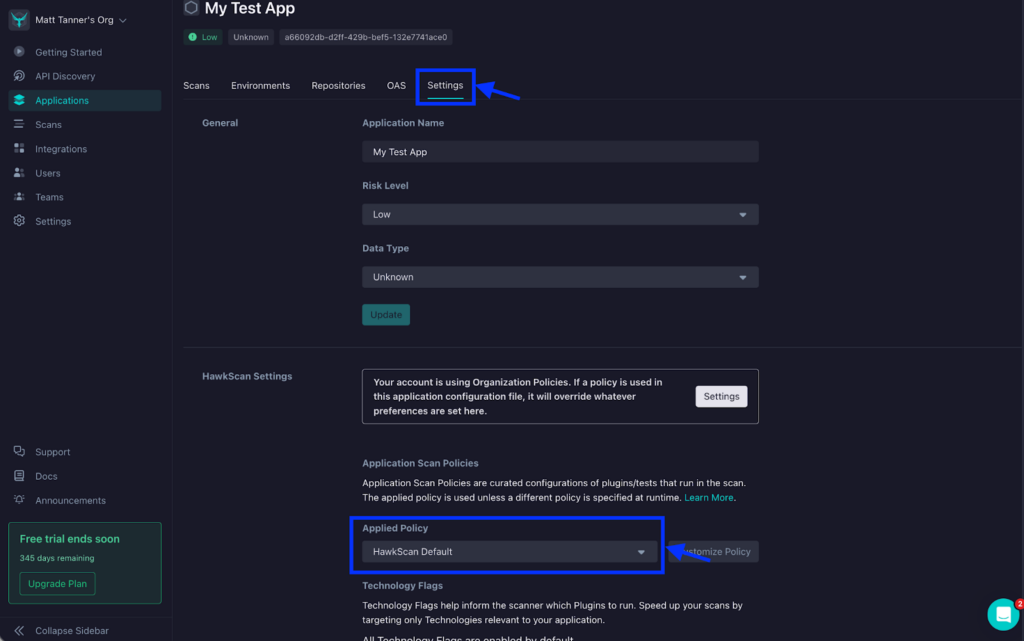
Next, on the Settings screen, under HawkScan Settings, click the Applied Policy dropdown and select the “OpenAPI – Experimental” policy.
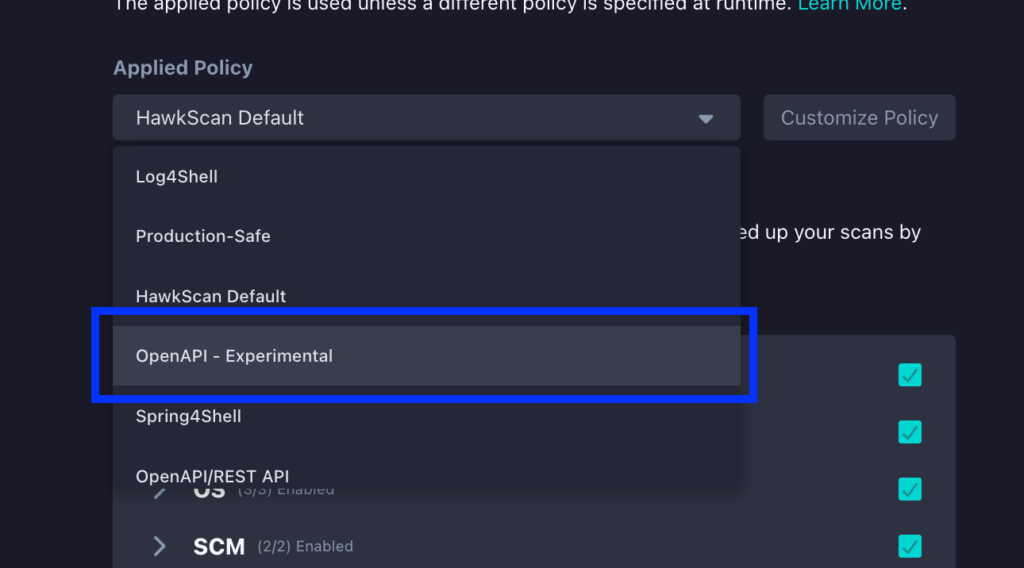
At this point, you can then run HawkScan and begin detecting potential BOLA vulnerabilities.
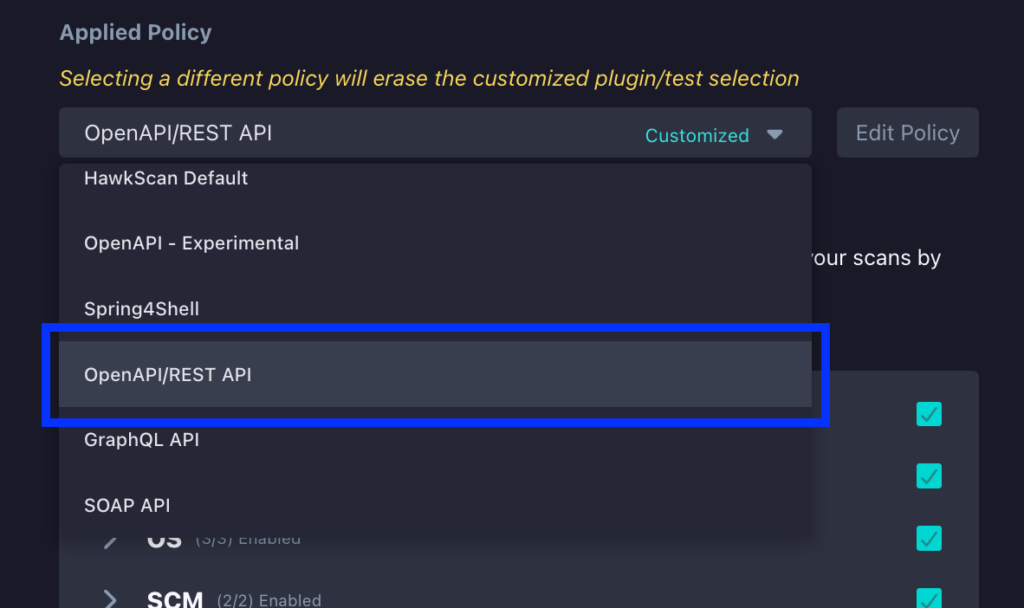
As also mentioned, another way to do this is to simply customize an existing policy to scan for BOLA/IDOR vulnerabilities. To show how this can be done, we can navigate to the same HawkScan Settings section that we looked at above. From here, we will select the “OpenAPI/REST API” policy from the Applied Policy dropdown.
Next, click the Edit Policy button right beside the dropdown.
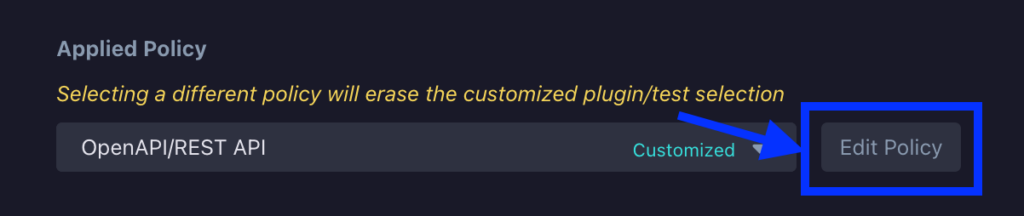
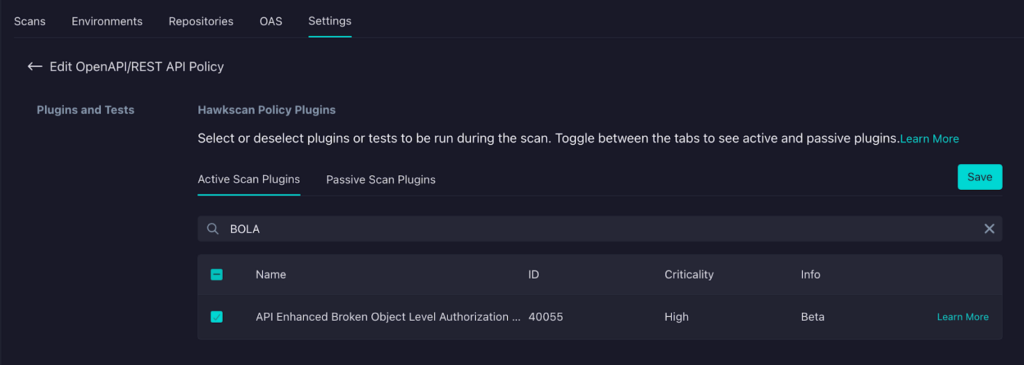
On the next screen, under the Plugins and Tests section, click on the BOLA entry (API Enhanced Broken Object Level Authorization) to enable HawkScan to execute tests for potential BOLA vulnerabilities.
If you also want to enable IDOR testing, you can also select the API Active IDOR Validation plugin.
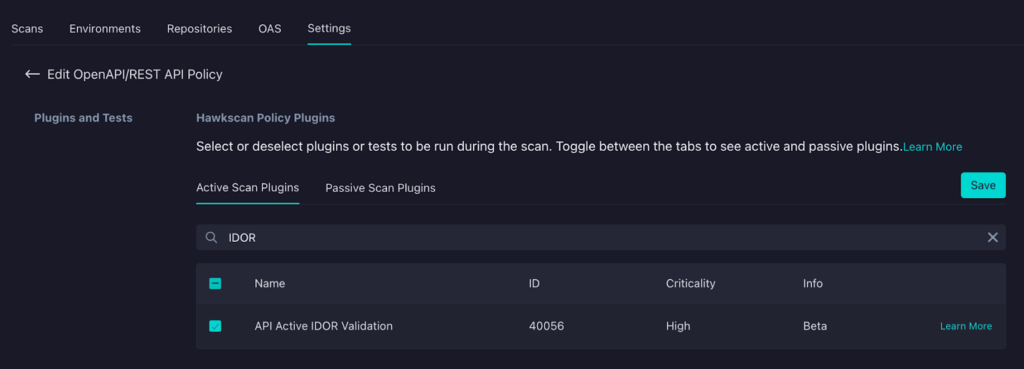
Regardless of how you have enabled BOLA testing in HawkScan, your tests will include testing for potential BOLA vulnerabilities (and IDOR, if you enabled it)!
Option 2: Configure Multi-Profile Testing
For deeper BOLA detection, configure multi-profile testing in your stackhawk.yml. This approach tests authorization by scanning your API from multiple user perspectives and attempting cross-user access.
Before you start, you need the following:
- OpenAPI Specification (user-provided or generated by StackHawk)
- Two user accounts with different access levels in your staging or test environment
- Valid credentials for each profile
Once you have those prerequisites ready, you’ll need to add some additional configuration to your stackhawk.yml.
Here’s what a basic two-profile configuration looks like:
app:
applicationId: xxXXXXXX-xXXX-xxXX-XXxX-xXXxxXXXXxXX

  env: Test

  host: ${APP_HOST:https://api.example.com}

  openApiConf:

    filePath: openapi.yaml

  authentication:

    loggedInIndicator: "HTTP.*2[0-9][0-9]\\s*O[kK](\\s*)|HTTP.*3[0-9][0-9].*"

    loggedOutIndicator: "HTTP.*4[0-9][0-9](\\s*)Unauthorized.*"

    usernamePassword:

      type: JSON

      loginPath: /api/auth/login

      usernameField: email

      passwordField: password

      scanUsername: ${USER_A_EMAIL}

      scanPassword: ${USER_A_PASSWORD}

    tokenAuthorization:

      type: HEADER

      value: Authorization

      tokenType: Bearer

    tokenExtraction:

      type: TOKEN_PATH

      value: token

    testPath:

      path: /api/users/me

      success: "HTTP.*200.*"

    profiles:

      - name: userA

        userNamePassword:

          username: ${USER_A_EMAIL}

          password: ${USER_A_PASSWORD}

      - name: userB

        userNamePassword:

          username: ${USER_B_EMAIL}

          password: ${USER_B_PASSWORD}
The main authentication block defines the login flow and requires credentials via scanUsername and scanPassword. The profiles section then provides credentials for each user you want to include in cross-user testing—you’ll need at least two profiles for business logic testing to work.
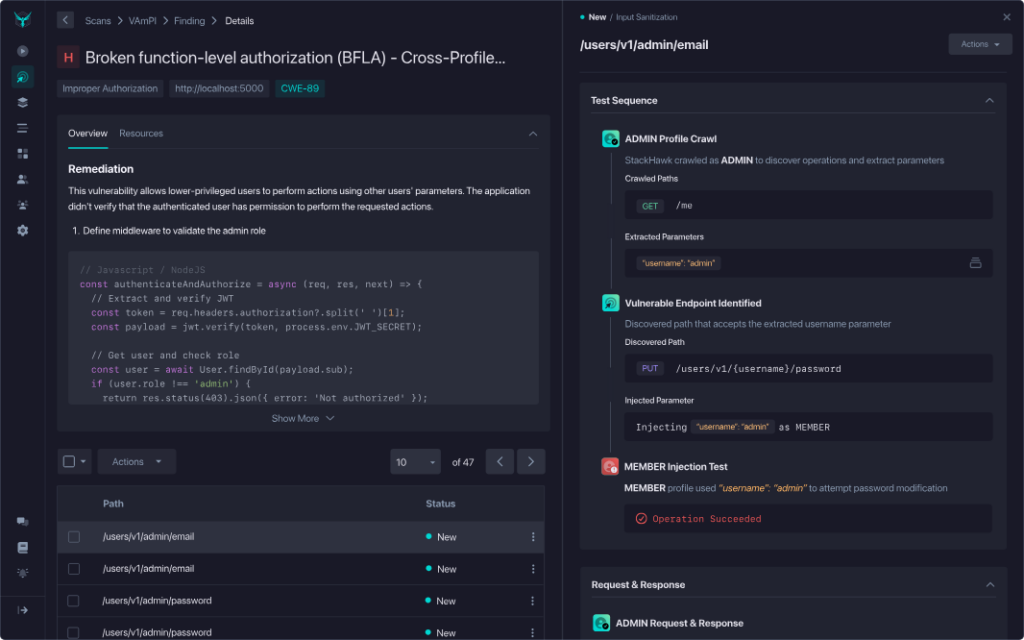
When you run a scan with this configuration, StackHawk executes a multi-phase testing strategy. First, it crawls your API endpoints using each profile, capturing resource identifiers like user IDs, order IDs, and document references from API responses. Then it attempts cross-profile BOLA testing, where StackHawk takes resources discovered by Profile A (like /api/orders/12345) and tries to access them as Profile B.
When StackHawk detects a BOLA vulnerability, the findings include the complete test sequence with full request/response evidence. You’ll see exactly which user accessed what resource and how authorization was bypassed, making it easy to understand the issue and fix it.
Conclusion
Understanding BOLA is a crucial first step in securing your APIs, but implementing robust authorization mechanisms in the real world can be complex. The key lies in empowering your developers with the tools and knowledge they need to build security into the core of your API design.
StackHawk goes beyond simply identifying potential BOLA vulnerabilities in your running application. It bridges the gap between detection and remediation by providing clear explanations, actionable guidance, and seamless integration into your existing development workflows. This collaborative approach makes API security less intimidating and helps developers instill secure coding practices.
By proactively using StackHawk to detect and address BOLA vulnerabilities, you can significantly minimize the risks of this common API threat. Schedule a demo today to see StackHawk in flight or sign up for a 14-day free trial to try our comprehensive API security platform for yourself.