When a regular user sends a DELETE request to your API, and then they’re wiping out customer accounts, you can tell that something isn’t right. Same scenario: when someone changes a request from GET to POST, they’re suddenly given the power to start modifying system settings. There’s a name for these types of issues: it’s called Broken Functional Level Access, or BFLA, and it occurs when users can execute functions they shouldn’t have access to.
BFLA sits at #5 on the OWASP API Security Top 10, in the same spot since 2019, and the updated 2023 edition kept it right there. Unlike BOLA (which focuses on accessing specific data), BFLA focuses on the actions users can perform:
- Can a basic user hit the delete endpoint?
- Can they access admin panels?
- Can they run privileged operations by changing their API requests?
Surprisingly, it’s quite easy to exploit these issues. When authorization checks are missing at the function level, attackers don’t even need fancy exploits to take advantage. They just need to understand your API structure and figure out which endpoints don’t check permissions. This post shows you how these attacks work, where they hide, and how to fix them. Let’s start by digging a bit further into the deeper nuances of what BFLA is.
What is Broken Function Level Authorization (BFLA)?
BFLA occurs when APIs don’t verify that users have permission to execute functions. Most of the time, the user is authenticated, and their credentials are completely valid. But the API never asks if their role allows them to perform the specific operation they are trying to access.
Most applications work similarly, but for a simple example, let’s imagine that a system works like this: regular users create content, update their profiles, and view dashboards. Moderators hide bad content or suspend users. Admins delete accounts, change system settings, and access all user data. Each role has different functions it can use, and those functions should only be accessible by those roles. BFLA exists when those restrictions aren’t enforced.
The attack is simple. Someone with a regular account starts testing what they can do. They try switching HTTP methods to see what security rules are in place. They ask prodding questions like: if GET works, does POST? Does DELETE? They look for admin endpoints in the JavaScript or network traffic. They send requests to functions they shouldn’t be able to access. If the API processes those requests instead of returning 403 Forbidden, they likely have confirmation that they have found a BFLA bug.
Why is it so common to see BFLA in the wild? Developers implement authentication (proving who you are) but forget the authorization (checking what you can do) piece. The API verifies the JWT token is valid, sees that the user is logged in, and processes the request. It never checks if that user’s role allows the operation.
The request looks fine to security tools. Valid token, proper formatting, no SQL injection or XSS. Traditional WAFs and API gateways let it through because nothing looks malicious.
BFLA shows up in two main ways. First, developers secure some endpoints but miss others. Maybe they protect the create (POST) function but forget delete. Second, they rely on UI restrictions. If the admin panel doesn’t show for regular users, developers think they can’t access admin functions. But attackers can send direct API requests, skipping the UI completely.
Modern apps make this worse. Multiple user roles, nested permissions, users in several groups, rules that depend on context, all leading to the fact that authorization gets complicated fast. Mistakes happen, especially when teams rush to ship features.
What is the difference between BFLA and BOLA?
You’ll see both BFLA and BOLA (Broken Object Level Authorization) discussed in API security. They’re related but different.
BOLA is about accessing specific objects or data. The API lets you use an endpoint, but you shouldn’t be able to access that particular resource. An attacker changes /api/files/100 to /api/files/101 and reads someone else’s file. In another scenario, maybe they modify the userID values in a request to view other accounts. The function itself is fine for their role, but they just shouldn’t access that specific object since they don’t have true permission or ownership.
BFLA is about executing operations or functions. The attacker isn’t changing object IDs to access different data. They’re performing actions their role doesn’t allow at all. A content moderator tries to delete user accounts (an admin-only function), a viewer tries to publish articles (an editor function), or someone with read-only access is able to execute write operations.
Here’s an example using a document system:
GET /api/documents/:docID - Users can read documents
POST /api/documents - Users can create documents
DELETE /api/documents/:docID - Only admins can delete
In a BOLA attack, a regular user changes docID from 200 (their document) to 300 (someone else’s) in the GET request. Suddenly, they’re reading a document they don’t own.
In the case of BFLA, a regular user sends a DELETE request to /api/documents/200 (their own document). The delete function should be admin-only, but the API runs it anyway because it doesn’t check role permissions.
Both are authorization failures. The fix for BOLA is checking object ownership (does this user own this resource?) while the fix for BFLA is checking role permissions (is this user’s role allowed to run this function?). You need both checks in place to make sure you’re protected against both types of vulnerabilities.
What is the root cause of BFLA?
As with most of the OWASP API Top Ten, BFLA occurs when development moves faster than security, and certain rules and checks get lost in the mix. Here’s what causes these security issues:
Over-Trusting Authentication
Authentication proves who you are. Authorization says what you can do. They’re not the same thing, but developers treat them like they are. An API checks if the JWT token is valid, confirms the user is logged in, and processes the request. It never checks if that user’s role allows the operation. Every logged-in user becomes an admin.
Inconsistent Security Across Endpoints
Developers add authorization to obvious endpoints but miss edge cases. The POST /api/users endpoint checks if you’re an admin before creating users, but what about PUT /api/users/:id/role? Or DELETE /api/users/:id? If those don’t have the same checks, attackers find the gaps. Authorization needs to cover everything, not just some things.
Client-Side Security
The UI hides admin buttons from regular users. Front-end routing blocks admin pages. Developers see this and think the functions are safe, but they’re not. This is because the attackers can skip the UI completely and send HTTP requests directly to the API endpoints. Client-side restrictions are convenience features and are critical for user experience, but they can’t be relied on as security controls for backend processes. If the API endpoint exists and responds, it’s vulnerable even if not accessible to users in the frontend implementation.
Complex Permission Models
Modern apps have complicated permission structures. Users belong to multiple groups. Permissions might be role-based, attribute-based, or depend on context. Someone might be an admin for one project but a viewer for another. This complexity makes authorization hard to get right and tough to track all of the edge cases. Mistakes happen when access rules aren’t clear or applied consistently.
Testing Gaps
Security testing usually checks authentication, looking to see if attackers can access the system without credentials. Fewer teams seem to test fully for authorization, making sure that testing covers factors such as what each role can actually do? Testing BFLA means creating multiple user accounts with different roles, then trying every API operation with each account. Some teams may skip this or only test a subset since it takes time and is hard to automate.
The “Hidden Endpoint” Myth
Some developers think that not documenting an endpoint makes it secure. If users don’t know /api/internal/resetDatabase exists, they can’t exploit it. This is, unfortunately, an incorrect assumption since attackers can read client code, watch network traffic, and run endpoint scanners and discover these endpoints anyway. In fact, attackers find and exploit undocumented endpoints all the time. Obscurity isn’t security.
BFLA comes down to one thing: missing permission checks on functions. Whether it’s because developers confused authentication with authorization, added checks inconsistently, or didn’t think about it, the result is the same. Users can run functions that their roles shouldn’t allow.
What is an Example of BFLA?
To give a better understanding of what this looks like in action, let take a look at how BFLA shows up in real applications.
Scenario #1: Team Collaboration Tool
A team workspace has three roles: members, project leads, and admins. Members add comments and upload files. Project leads can archive projects. Admins manage team membership and delete workspaces. The API has endpoints like:
POST /api/workspaces/:workspaceID/comments
{
   "authorID": 456,
   "content": "Project update..."
}
Members use this every day. But what if they try:
DELETE /api/workspaces/:workspaceIDIf the API doesn’t check for admin privileges before running the DELETE, a member could wipe out entire workspaces. The endpoint exists, the user is authenticated, and without role checks, it works.
To fix this issue, every endpoint needs role validation. Before processing the delete, check that the authenticated user has admin permissions. Get the user’s role from their session (not from request parameters, since you should never trust client input). Compare it against required permissions, and if permissions are not granted, reject unauthorized requests with a 403 response.
Scenario #2: Healthcare Portal
A patient portal has different actions for different users. Patients view their own records. Doctors update diagnoses and prescriptions. Admins manage insurance claims and billing. Consider:
GET /api/patients/{patientID}/recordsBoth patients and doctors use this endpoint, but with different permissions.
Now look at an endpoint used to process discharges:
POST /api/patients/{patientID}/dischargeOnly doctors should have the ability to discharge patients from the system. If the API sees valid credentials and processes the request without checking whether the user is actually a doctor, patients could discharge themselves. Or someone could find patient IDs and discharge multiple patients, which would quickly have damaging effects on hospital operations.
Once again, to fix this, developers must use role-based access control with strict enforcement. Before running the discharge function, verify that the authenticated user has the “doctor” role. Log every access attempt for audits. Functions affecting patient care need the highest security, and simply using authentication alone isn’t enough.
Scenario #3: E-commerce Platform
Lastly, imagine an online marketplace that has access and roles for buyers, sellers, and admins. Buyers purchase items. Sellers manage inventory and pricing. Admins resolve disputes and manage accounts. The API for managing a product may look like this:
PATCH /api/products/{productID}
{
   "price": 99.99,
   "inventory": 50
}
Sellers use this to manage their products. But if the endpoint only checks authentication, not authorization, a buyer could modify product listings with a valid auth token. They could change prices to $0.01, zero out inventory, or add malicious content to descriptions.
In this case, it is critical to link resources to accounts and check ownership. Before allowing the PATCH, confirm the authenticated user owns the product being modified or has seller/admin privileges. Build a permission matrix defining which roles can do which operations on which resources and then implement and test this thoroughly. Authorization bugs in e-commerce are a great example of how vulnerabilities can lead to direct financial losses.
How to Protect Against BFLA
In order to not have BFLA affect operations, you need to make sure authorization specifications are understood and implemented correctly by developers. Here’s how to lock down your API functions so these issues don’t pop up:
Implement Role-Based Access Control (RBAC)
Define clear roles for your application. List which functions each role can access. Cover everything, don’t assume, and document it. Then enforce those rules on every API request.
Every function needs a permission check before it runs. Get the user’s role from their authenticated session. Check they have the required permission. Only then process the request. Make this a standard pattern across all of your API endpoints.
Never Trust Client Input for Authorization
Get role information from the user’s authenticated session: JWT claims, server-side session data, and identity provider data. Never accept role or permission info from request parameters or headers, since attackers can immediately change those values.
Authorization on Every Endpoint
Check permissions for every HTTP method on every endpoint. If /api/documents/:id allows GET for regular users, don’t assume DELETE is automatically restricted. Add explicit authorization for each operation type. This includes:
- Different HTTP methods on the same resource (GET vs DELETE)
- Admin-only endpoints
- Write operations vs read operations
- Bulk operations vs single-record operations
Deny by Default
Your authorization should deny access unless explicitly granted. Define which roles can use which functions, and reject everything else. This is safer than trying to block dangerous operations—you’ll miss something. This whitelist approach (say explicitly who can access) is a better direction than blacklisting (creating a list of who can’t) since access can sneak through the cracks this way. If a new role is created and is missed on the blacklist, they will automatically have access.
Separate Administrative Functions
Keep admin functions away from regular user endpoints. Use different URL patterns (/api/admin/*), separate subdomains, or different services. This makes it easier to apply strict security to privileged operations. You may even consider requiring extra authentication for admin functions using multi-factor authentication, IP whitelisting, or short-lived elevated privilege tokens.
Test Authorization Systematically
Create test accounts for each role in your system. Try to run every API operation with each account. Operations should only work when the role has explicit permission. This is tedious but necessary since many automated scanners miss most BFLA bugs because they need to understand your business logic (but StackHawk does! More on this later).
API Gateways as Extra Defense
API gateways can enforce some authorization, such as rate limiting, IP restrictions, and token validation based on role. But they usually can’t understand your business logic, so they won’t know if user 123 should be able to delete documents in project XYZ. That complexity lives in your application code. Regardless of the limitations, use gateways for defense in depth, but don’t rely on them for function-level authorization. The application must always validate permissions, even if other mechanisms are implemented on top of it externally.
Runtime Monitoring and Anomaly Detection
If an attack is attempted (or succeeds), you’re going to want to make sure you get alerted. Watch for suspicious patterns in your logs, such as:
- Multiple failed authorization attempts from one user
- Regular users hitting admin endpoints repeatedly
- Unusual spikes in privileged function calls
- Users trying operations outside their normal behavior
SIEM tools can detect these patterns and alert your security team. But remember: by the time you’re detecting attacks, authorization should have already blocked them; prevention is still the best strategy. Monitoring catches failures in your authorization logic or persistent attackers looking for weaknesses in a more reactive way, when being proactive is the only way to really prevent damage.
Zero Trust Principles
Lastly, assume every request is potentially malicious until proven otherwise. Authentication proves identity, but we’ve already covered that that’s not enough. Authorization must validate every request against explicit permission rules. The user’s role, the resource they’re accessing, and the operation they’re attempting should be checked on every request.
This might seem like overkill, but the cost of failed authorization is high. Compromised data, privilege escalation, account takeover, and compliance violations. The performance cost of authorization checks is tiny compared to breach costs if attackers can exploit any gaps.
How StackHawk Can Help Detect and Prevent BFLA
Traditional DAST solutions struggled with BFLA because they test with a single authenticated session and look for known attack patterns rather than understanding authorization logic. A scanner testing as a regular user has no way to verify whether admin-only functions are properly protected. StackHawk changes that.
StackHawk’s Business Logic Testing enables automated multi-role authorization testing directly in your CI/CD pipeline. Instead of relying on pattern matching, StackHawk tests your API from multiple user perspectives simultaneously, discovering function-level authorization vulnerabilities that single-user tools architecturally cannot detect.
With StackHawk, developers and security teams can:
- Test Function Access Across Roles: Configure multiple authentication profiles representing different user roles and privilege levels. StackHawk then automatically attempts cross-role access testing, verifying whether unprivileged users can execute admin-only functions or perform operations outside their role permissions.
- Detect Privilege Escalation: Mark administrative accounts as privileged, and StackHawk tests whether regular users can access admin endpoints, execute elevated operations, or perform actions restricted to higher-privilege roles.
- Get Complete Evidence for Fast Remediation: When function-level authorization flaws are found, StackHawk provides the full test sequence, including which role attempted access, what function they targeted, and the complete request/response for both authorized and unauthorized attempts. This detailed evidence makes remediation straightforward.
- Automate What Previously Required Manual Pen Testing: Multi-role authorization testing has traditionally been manual work that must be repeated every release cycle. With Business Logic Testing, this validation runs automatically on every build, catching regressions before they reach production.
By adopting a developer-first approach and integrating seamlessly with existing dev tools and practices, StackHawk makes comprehensive BFLA testing accessible to developers and security teams alike.
Enabling BFLA Detection in StackHawk
Enabling BFLA detection in StackHawk is easy. Two ways to do this are to use the “OpenAPI – Experimental” policy or to customize an existing policy. The “OpenAPI – Experimental” policy allows users to scan for the vulnerabilities outlined in the OWASP API Security Top 10.
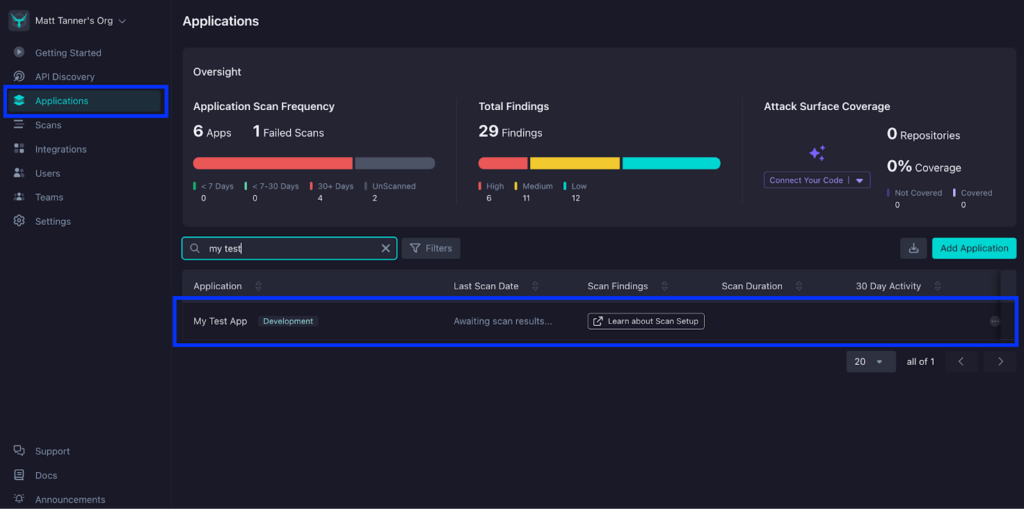
To set HawkScan up with the “OpenAPI – Experimental” policy, you will log into StackHawk, go to the Applications screen, and click on your application.
Once you’ve opened up your application, you’ll click the Settings tab.
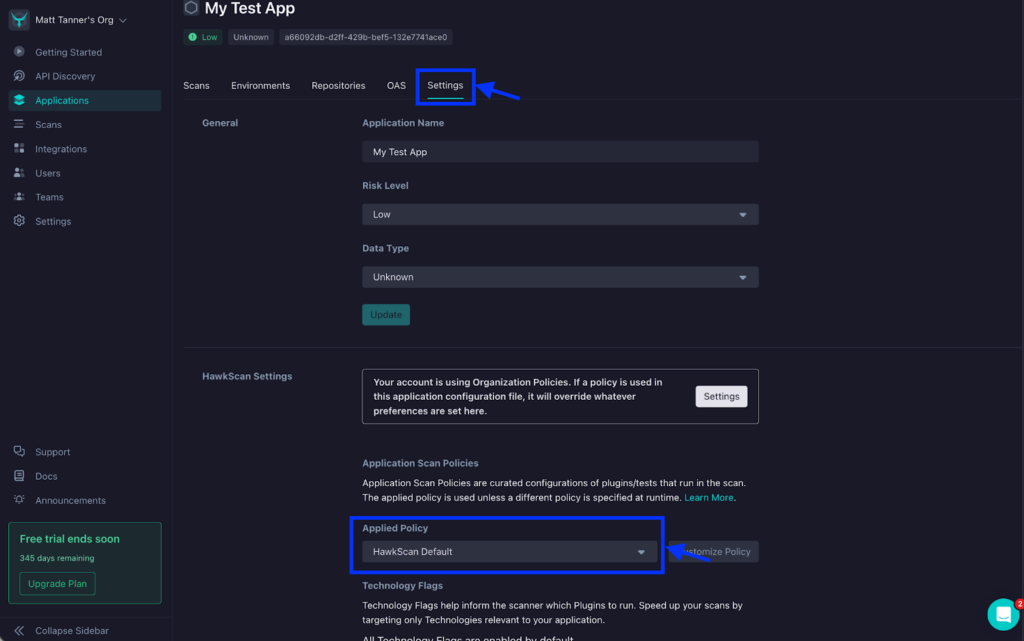
Next, on the Settings screen, under HawkScan Settings, click the Applied Policy dropdown and select the “OpenAPI – Experimental” policy.
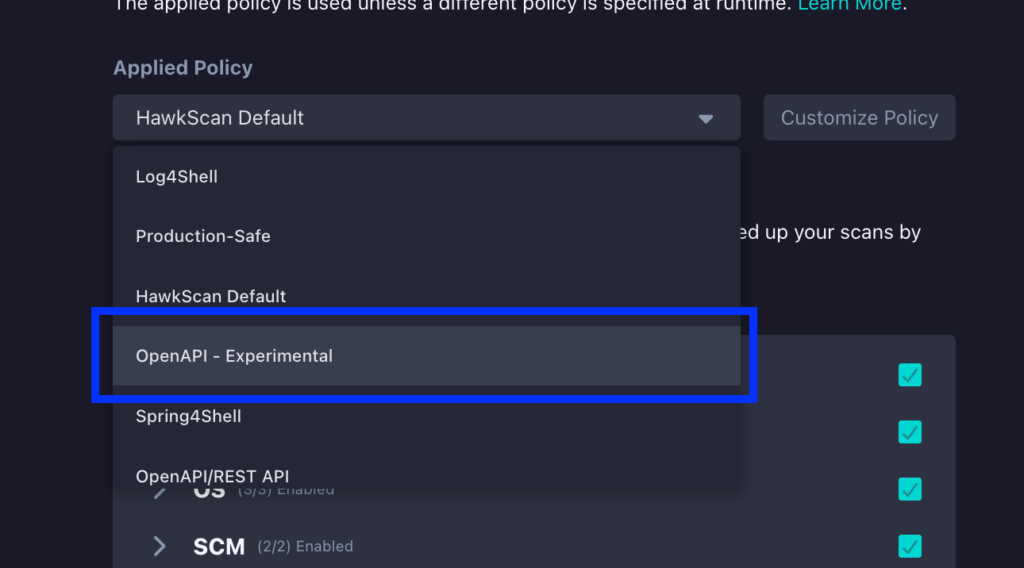
At this point, you can then run HawkScan and begin detecting potential BOLA vulnerabilities.
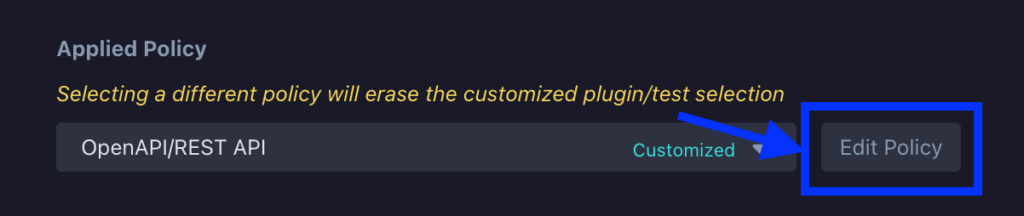
As also mentioned, another way to do this is to simply customize an existing policy to scan for BOLA/IDOR vulnerabilities. To show how this can be done, we can navigate to the same HawkScan Settings section that we looked at above. From here, we will select the “OpenAPI/REST API” policy from the Applied Policy dropdown.
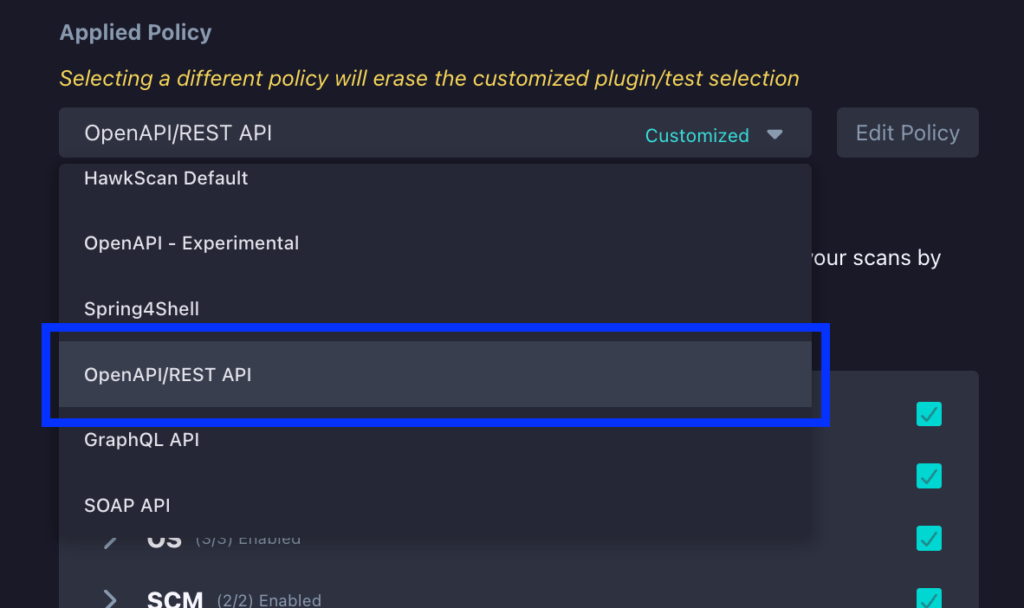
Next, click the Edit Policy button right beside the dropdown.
On the next screen, under the Plugins and Tests section, click on the API Broken Function Level Authorization (BFLA) and BLFA entries to enable HawkScan to execute tests for potential BOLA vulnerabilities and click Save.
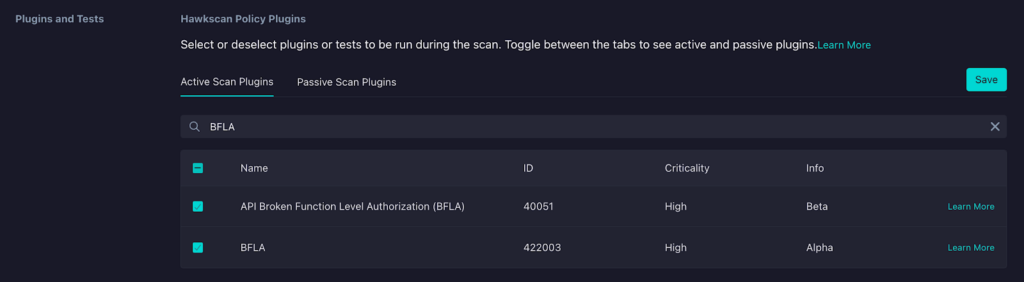
Regardless of how you have enabled BFLA testing in HawkScan, your tests will include testing for potential BFLA vulnerabilities!
Conclusion
Understanding BFLA is key for securing APIs, but implementing function-level authorization in real applications gets complex fast, especially with complicated role hierarchies and permission models. Developers need tools and knowledge to build authorization into the core of API design.
StackHawk goes beyond finding BFLA vulnerabilities. It helps you fix them by providing clear explanations, step-by-step guidance, and easy integration into your development workflow. This makes API security manageable and helps developers build secure coding habits.
By using StackHawk to detect and fix BFLA vulnerabilities early, you can reduce risks from this common API threat. Schedule a demo today to see StackHawk in flight or sign up for a 14-day free trial to see how our platform helps with BFLA and other API security issues in the OWASP API Top 10.