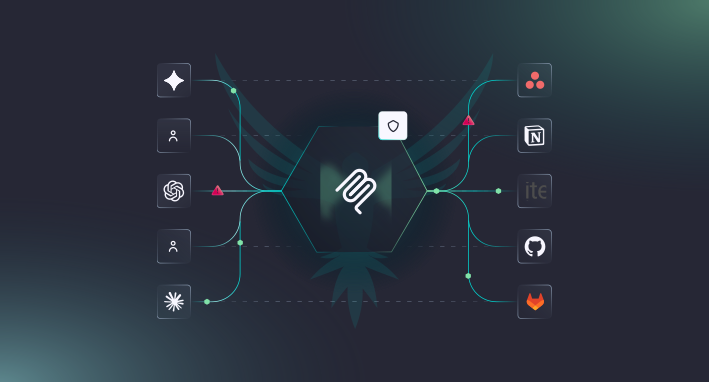
Over the past 18 months, MCP servers have become the de facto way to connect enterprise applications with AI services. MCP SDK downloads are nearing 1 billion monthly downloads, up from roughly 100k when Anthropic launched the protocol in November 2024. Like many AI technologies, MCP server adoption has been very fast and for good reason: MCP gives AI tools a standardized and unified way to call into your existing services. Query a database, trigger an action, pull a document. One protocol that works across tools.
MCP servers come in two flavors. Local servers run on your machine and communicate directly with the tools using them, powering things like IDE integrations and local dev tools. Remote servers run over HTTP and are network-accessible, which makes them useful for enterprise deployments where multiple teams and AI tools need to connect to shared services. It’s also what makes them a security concern. A local MCP server has the same exposure as anything else on your laptop. A remote MCP server is an endpoint on your network, reachable by anything that knows where to find it.
And remote MCP servers don’t exist in isolation. They connect directly to your existing APIs, services, and databases. Every vulnerability in your backend is now reachable through a new front door. An MCP tool that queries your database carries the same SQL injection risk as the API endpoint it’s built on, but with a different protocol and potentially less hardened input handling.
For organizations, that means injection attacks, SSRF, and data exposure can compromise internal systems or provide lateral movement into connected services. For end users, it means their data and credentials can be manipulated through the same tools they trust to work on their behalf.
And the only options for testing remote MCP servers were manual pen tests, ad hoc scripts, or nothing at all. For most teams, it’s a huge blind spot. Until now!
Introducing Automated Remote MCP Server Security Testing
StackHawk now scans remote MCP servers for security vulnerabilities using the same runtime testing engine that runs anywhere throughout the dev lifecycle. MCP scan results show up alongside other API and application scan results in the StackHawk platform. No separate dashboard or workflow.
AND…No other DAST or API security testing tool does this today. We built it because the MCP server attack surface is real, it’s growing, and nobody was covering it. MCP runs on JSON-RPC 2.0 under the hood, and we recently shipped full JSON-RPC security testing support, so extending that to the MCP protocol was a natural next step. Because StackHawk already tests running applications (which is the best way to test APIs and MCPs), we’re perfectly positioned to add MCP servers to our menu of what we test.
How to Security Test MCP Servers with StackHawk
The workflow is the same as scanning any other application with StackHawk.
Step 1: Add an mcp block to your stackhawk.yml with your server’s endpoint. The only pre-work you have to do is track down your MCP server’s endpoint.
Step 2: When you run the scan, HawkScan connects to your MCP server the same way an AI client would. It performs the protocol handshake, sends a tools/list to discover every tool the server exposes, along with their input schemas. No manual inventory needed.
Step 3: From there, the scanning engine takes each tool, extracts its parameters, and fuzzes them using standard tools and call requests for SQL payloads, XSS strings, SSRF probes, etc.
Step 4: If something’s vulnerable and exploitable, the finding is mapped to the specific tool where the issue lives. Results show up in the StackHawk platform like any other scan, along with request/response data, remediation guidance, and more. Most importantly, findings come with full context of what and where the vulnerability is: You’ll see “SQL Injection found in search_users,” not a raw JSON-RPC call you have to go decode.
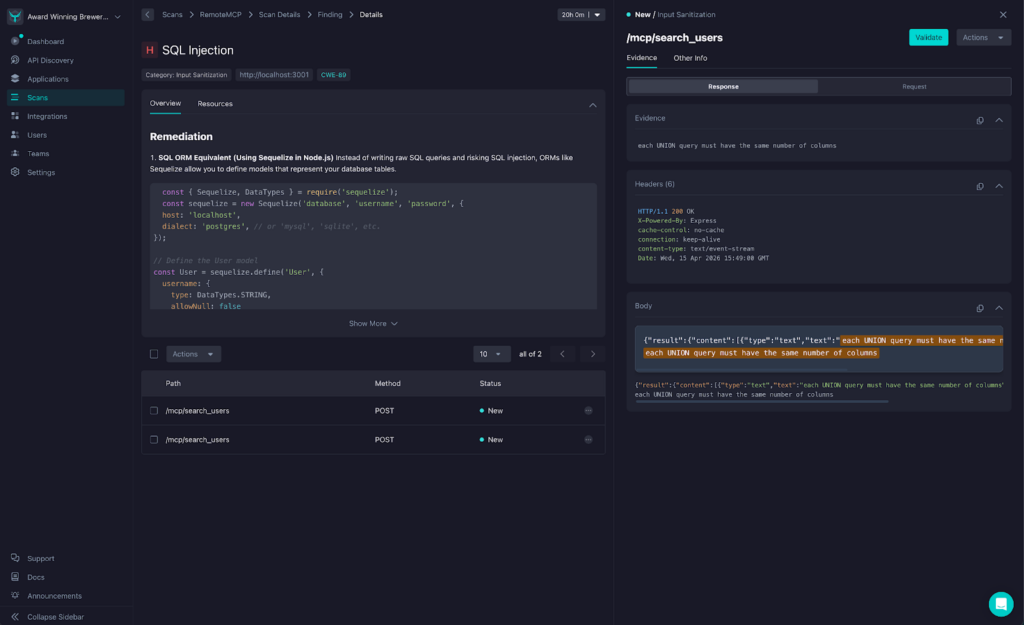
Read the full documentation for testing remote MCP servers with StackHawk here.
Common MCP Security Risks We Find
MCP tools accept inputs, query data, and trigger actions. They carry the same classes of vulnerabilities as API endpoints.
Injection attacks
An MCP tool that passes user input to a database or web interface without validation is an injection vector. For orgs, that’s unauthorized database access or full backend compromise. For end users, that’s stolen credentials or hijacked sessions.
Server-side request forgery
MCP tools make requests to internal services on behalf of users. Without proper restrictions, an attacker can use a tool to reach systems that were never meant to be externally accessible, including cloud metadata, admin panels, and internal APIs. SSRF is often the foothold that leads to a larger breach.
Sensitive data exposure
MCP tools can return more than intended. PII, API keys, internal system details. For orgs, that’s compliance risk. For end users, that’s personal data surfacing through tools that were only supposed to return a simple result.
What We’re Building Toward
MCP servers are a new attack surface. They need the same testing rigor we apply to APIs. That’s what we built this to do.
A few things to know about where our remote MCP server testing stands today:
- We support HTTP transport MCP servers (the remote, network-accessible kind). Local stdio servers aren’t in scope yet.
- Detection effectiveness depends on how the MCP server handles errors; servers that swallow exceptions or return generic messages reduce what we can find.
- MCP-specific attack classes, such as tool poisoning, are not yet covered.
We’re being upfront about that because MCP security is very much an evolving space. The protocol is still maturing, adoption patterns are still forming, and the threat landscape is still taking shape. We shipped testing for the vulnerabilities that are real and exploitable today, and we’ll keep expanding coverage as the ecosystem develops.
If you want to learn how StackHawk uses agentic testing to test for vulnerabilities in Remote MCP servers, check out our “Agentic AppSec Testing” page.