Security teams were already managing too many signals across too many tools. SAST, SCA, secrets detection, and cloud misconfigurations, with each surfacing a different layer of risk in a different tool. AI-accelerated development is increasingly making the problem worse. More code shipping faster means more APIs, more attack surface, and more findings landing in various places. For lean teams (aka most teams), manually stitching that together is inefficient, or it breaks down entirely.
Most teams using Wiz are bringing more of their security signals into one place for exactly that reason. Shift-Left DAST has been the gap. Findings from CI/CD lived separately, owned separately, with no connection to overall cloud risk as seen in Wiz. That’s what this integration closes. StackHawk’s pre-production dynamic application security testing (DAST) findings flow directly into the Wiz Security Graph, giving security teams application and cloud risk in one place.
How It Works
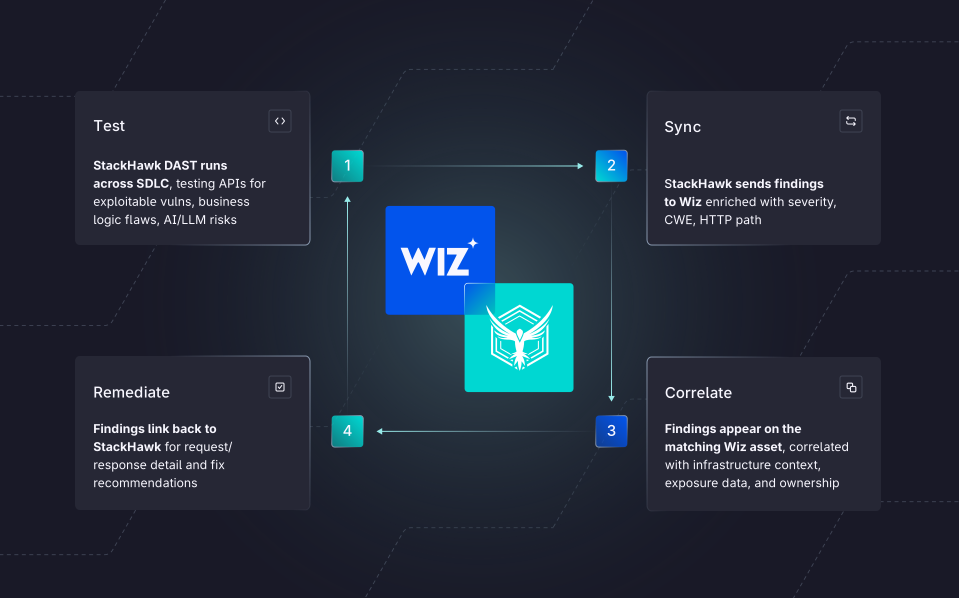
StackHawk runs DAST across the development lifecycle—from dev environments and CI/CD pipelines to staging and production, testing APIs and application endpoints for exploitable vulnerabilities before they reach production. When a scan completes, findings are automatically synced to Wiz and surfaced on the Attack Surface Findings page as enrichment data. In the Wiz Security Graph, those findings appear on the matching Wiz asset, correlated with infrastructure context, exposure data, and ownership. The result is a single finding that carries full context: this exploitable API vulnerability exists, the workload running it is internet-exposed, and it operates with under-permissioned controls in a production environment. That’s a prioritized, actionable risk, rather than two separate line items on two separate dashboards that require cross-referencing systems.
Each finding in Wiz includes a direct link back to the full finding in StackHawk, where developers can access the request and response payloads, a curl command to recreate the attack, and language and framework-specific fix recommendations.
Unified Results. Richer Context. Faster Remediation.
Most security teams don’t have a detection problem; they have a backlog and prioritization problem. The average enterprise has thousands of open findings at any given time, and that number is rapidly increasing as AI-generated code becomes the norm. That means unified alerts and richer context are needed now more than ever before.
One Place For Application And Cloud Risk
StackHawk DAST findings now flow directly into the Wiz Security Graph alongside cloud security findings, so the full picture of risk lives in a single pane of glass. For security teams consolidating tooling into Wiz, this closes the last major gap in that view.
Catch Issues Before They Reach The Infrastructure Wiz Is Protecting
Wiz knows what’s running in your cloud environment. StackHawk tests what’s about to be deployed into it. Pre-production findings reach Wiz before a vulnerability has a chance to compound with infrastructure-level exposure, giving teams a signal when it’s easiest and cheapest to fix, rather than weeks after context has gone stale and the developer who introduced it has moved on.
Prioritize Based On Full Impact, Remediate Faster
A severity score tells you that a vulnerability is high risk. It doesn’t tell you that the workload running it is internet-exposed in a production environment with a significant blast radius. When StackHawk findings land in the Wiz Security Graph, they arrive with that infrastructure context attached and ownership identified, so teams can address the highest-impact vulnerabilities first. And when a developer is ready to fix, StackHawk provides reproduction steps and remediation guidance tailored to their stack.
Schedule a demo to see how StackHawk and Wiz bring application and cloud risk into one place, or check out our integration guide for setup instructions.