A coding agent with shell access and your Git credentials is a new kind of insider. Claude Code, Codex, Cursor, GitHub Copilot, and Antigravity now edit files, run commands, and call MCP tools. In many setups, they also open pull requests on their own. Controlling the agent's actions and testing its output require separate checks. This guide covers both, plus a checklist for your platform team.
What Is AI Coding Agent Security?
AI coding agent security is the practice of controlling what an autonomous coding agent can do on developer machines and connected systems, and testing the code it produces before it ships. It covers the agent's permissions, credentials, tools, and Model Context Protocol (MCP) servers, plus security testing of its output before merge.
The difference from older coding assistants is autonomy. An assistant suggests a completion; an agent takes a goal and executes tool calls: it runs npm install, edits a dozen files, starts the dev server, and pushes a branch. Each call runs with someone's privileges, which is why AI coding assistant security advice built around reviewing suggestions doesn't stretch far enough.
So the job splits in two: the agent itself (what it can touch, run, and read) and the artifact (the endpoints, auth flows, and queries it writes). They need different controls and usually different owners.
Why Coding Agents Change the Security Model
The agent harness is now part of your attack surface. The harness (the CLI, IDE extension, or cloud runner that wraps the model) decides what the agent can read, run, and send over the network, and in most local setups that harness runs as you. In Claude Code, the working-directory check asks for permission rather than enforcing OS isolation: an approved Bash command can still write anywhere your account has access.
Agents also read content nobody vetted. A README in a cloned repo, a GitHub issue, and an MCP tool's response all land in the same context window as your instructions. The model can't reliably separate text to act on from text it should only read. Treat retrieved documents, API responses, and other external inputs as untrusted, even when they arrive through an approved tool.
Veracode's 2026 GenAI Code Security Report found that roughly 44% of tested AI code generation tasks produced code with a known vulnerability. Georgia Tech's Vibe Security Radar traces published vulnerabilities back to the AI tools that introduced them. By April 2026, it had confirmed 74 cases, 14 of them critical, and March 2026 alone had 35, more than all of 2025 combined.
The AI Coding Agent Threats to Plan For
These six threats show up across OWASP's and AWS's agent guidance and in recent incidents. They aren't in priority order.
Prompt injection through repos, docs, and tool output
Prompt injection lets instructions embedded in external content redirect the agent's actions. For coding agents, those instructions can arrive in issue bodies and MCP tool output. The agent may fetch that content and follow its instructions as though they were trusted. Any control that depends on the model choosing not to misbehave is a soft control, so pair it with one the harness enforces.
Over-permissioned agents and leaked credentials
Broad credentials give an attacker more options if a prompt injection redirects the agent. An agent running in your shell can potentially reach whatever your account can: cloud CLI profiles, SSH keys, .env files, and cached Git tokens. Overly broad tool permissions let an agent take unintended actions or reach resources it should not access. Once sensitive data like a secret is in context, it can resurface in logs or later tool calls.
Malicious or compromised MCP servers, plugins, and skills
This is the agent's supply chain. Every MCP server, plugin, and skill you add puts someone else's code or instructions inside the agent's trust boundary. An untrusted local MCP server can execute commands with the client's privileges, and a malicious startup command can send ~/.ssh/id_rsa to a remote URL. Anthropic does not security-audit MCP servers, and plugins can add servers too, so reading a project's .mcp.json doesn't show everything a session can load. Our guide to MCP server security covers the server side.
Package attacks have started to address agents directly: the malicious Nx releases from August 2025 (GHSA-cxm3-wv7p-598c) shipped a script containing a prompt for a "file-search agent" to inventory config and environment files into /tmp/inventory.txt.
Unsafe command execution and data exfiltration
The risk is the command you didn't expect: curl posting a file to an unfamiliar host, rm -rf in the wrong directory, a migration pointed at a shared database. Most agents put commands like these behind an approval prompt, a classifier, or a sandbox by default, so the real danger is the settings that remove the gate. Codex documents its --dangerously-bypass-approvals-and-sandbox flag (alias --yolo) as "No sandbox; no approvals" and marks it as not recommended. Treat a change like that the way you'd treat a firewall rule change: reviewed, logged, and owned.
Vulnerable code that passes review
An agent can follow every permission rule and still write an endpoint that returns other users' records, a login flow with no rate limit, or a query built by string concatenation. In Veracode's testing, the average pass rate was 15% on cross-site scripting and 12% on log injection. A diff alone cannot confirm deployed authorization behavior because exploitability depends on how the running app routes, authenticates, and authorizes a request.
Shadow agents nobody approved
You can't enforce settings on an agent you don't know about. Developers install new agents with one command and connect them to personal API keys, while every control below assumes a known set of agents with managed configuration. Start with an inventory: which agents, on which repos, with which MCP servers and plugins.
| Threat | Primary control | Usually owned by |
|---|---|---|
| Prompt injection | Treat external content as untrusted; enforce limits with deny rules and sandboxing | Platform team |
| Over-permissioned agents | Agent-specific scoped credentials; secrets kept out of context | Platform and IAM |
| Malicious MCP servers, plugins, and skills | Allowlist through managed config; review before adding | AppSec |
| Unsafe commands and exfiltration | Sandbox with restricted egress; approval for risky commands; hooks | Platform team |
| Vulnerable code | Runtime testing of the running app in the agent loop, CI as backstop | Dev teams and AppSec |
| Shadow agents | Inventory, approved-agent list, managed settings, and telemetry | Security and IT |
How to Secure the Agent Itself
Separate controls that enforce a fixed rule from controls that rely on model judgment. Telling an agent not to read .env in a rules file relies on the model following that instruction. A deny rule enforced by the harness or a sandbox that blocks the path at the OS level enforces a deterministic boundary outside the model. Use those enforced controls for your security team's requirements.
Scope credentials first
Least privilege starts with credentials, since they set the blast radius. Give MCP-connected agents dedicated credentials scoped to their tasks, and store those credentials in a secrets manager rather than source code. Keep production credentials off machines where agents run unattended, and don't paste tokens into prompts.
Isolate execution
Claude Code can sandbox bash commands with filesystem and network isolation, Codex keeps network access off in its default workspace-write mode, and a dev container or disposable cloud runner can give any agent a similar outer boundary, as long as you limit what's mounted, keep long-lived credentials out of it, and restrict outbound network access.
The sandbox matters because agent configuration has edges: Claude Code's Read deny rules don't apply to "a Python or Node script that opens files itself," so use the sandbox for OS-level enforcement.
Gate irreversible actions behind human approval
Pushes, deploys, and migrations should wait for a person. Require explicit approval for high-impact or irreversible actions. To keep repeated prompts from becoming noise, allowlist routine commands like your test runner and reserve approval decisions for actions that matter.
Enforce policy with hooks and deny rules
In Claude Code, a PreToolUse hook runs before a tool call executes and can block it, and permission rules are evaluated deny first, then ask, then allow, so an allow rule can't carve an exception out of a deny. This example .claude/settings.json skeleton combines deny rules with a shell-check hook. The check-command.sh script supplies the policy; the configuration shows where it runs:
{
  "permissions": {
    "deny": [
      "Read(./.env)",
      "Read(./.env.*)",
      "Bash(curl *)"
    ]
  },
  "hooks": {
    "PreToolUse": [
      {
        "matcher": "Bash",
        "hooks": [
          {
            "type": "command",
            "command": "${CLAUDE_PROJECT_DIR}/.claude/hooks/check-command.sh",
            "onFailure": "block"
          }
        ]
      }
    ]
  }
}
Know the limits. A deny rule matches the command as written, so a script that makes the same request another way gets past it; sandbox network isolation is what blocks egress regardless of the command text.
check-command.sh is a script you write: it reads the tool call as JSON on stdin and exits with code 2 to block it. By default, a command hook that crashes, times out, or can't find its script lets the call continue through the normal permission flow, so on Claude Code v2.1.295 or later, set "onFailure": "block" on policy hooks and check that a missing script actually blocks the call.
Shared project settings live in the repo, where anyone with write access can change them, so put must-have rules in managed settings, which no other level can override.
Allowlist MCP servers and plugins
Claude Code supports managed MCP configuration, and Cursor requires approval for every new MCP connection and for each tool call unless you allowlist the tool. Scope each server to the tools the agent actually needs.
Log what agents do
Log agent decisions, tool calls, and their outcomes so you can reconstruct what happened. Claude Code can export OpenTelemetry events, including a tool_decision event each time a permission decision is accepted or rejected. After an incident, that beats reconstructing events from a chat transcript.
Know your agent's defaults
Check what each agent does out of the box before layering controls on top:
| Agent | Defaults worth knowing | Deeper guide |
|---|---|---|
| Claude Code | Auto mode is the default for interactive terminal and VS Code sessions (v2.1.283+), where available, with a classifier that blocks actions it judges unsafe; Manual mode starts read-only and asks before edits and commands; managed settings can't be overridden. | Claude Code security best practices |
| Codex | Network access off by default; danger-full-access turns off the sandbox, and the --yolo flag turns off approval prompts too. | Codex Security and where DAST fits |
| Cursor | Terminal commands and MCP connections need approval by default; run modes are best-effort, not a hard boundary | Writing secure code with Cursor |
| GitHub Copilot cloud agent | Can push to a single branch, usually a new copilot/ branch; can't approve or merge its own PR; workflows wait for approval by default. | GitHub Copilot secure coding guide |
| Antigravity | Deny > Ask > Allow; on Antigravity 2.0 for macOS and Linux, the Default preset runs commands without prompting inside the sandbox and asks outside it (Windows still uses the older settings). | Antigravity security guide |
How to Secure What the Agent Ships
None of the controls above tell you whether the checkout endpoint the agent wrote this afternoon lets one customer read another's orders. That's the part an attacker actually reaches.
Pair SAST and unit tests with model-based review so fixed checks and contextual reasoning both contribute. Both still tend to miss behavior that only exists at runtime, like whether a route actually stops one user from reading another user's records. DAST tests for that by sending real requests to the running app, though an authorization check like this one needs the scan set up with at least two test users and data each user owns.
Testing inside the agent's loop keeps the finding and the generated code in the same session, while the agent still has context for the feature.
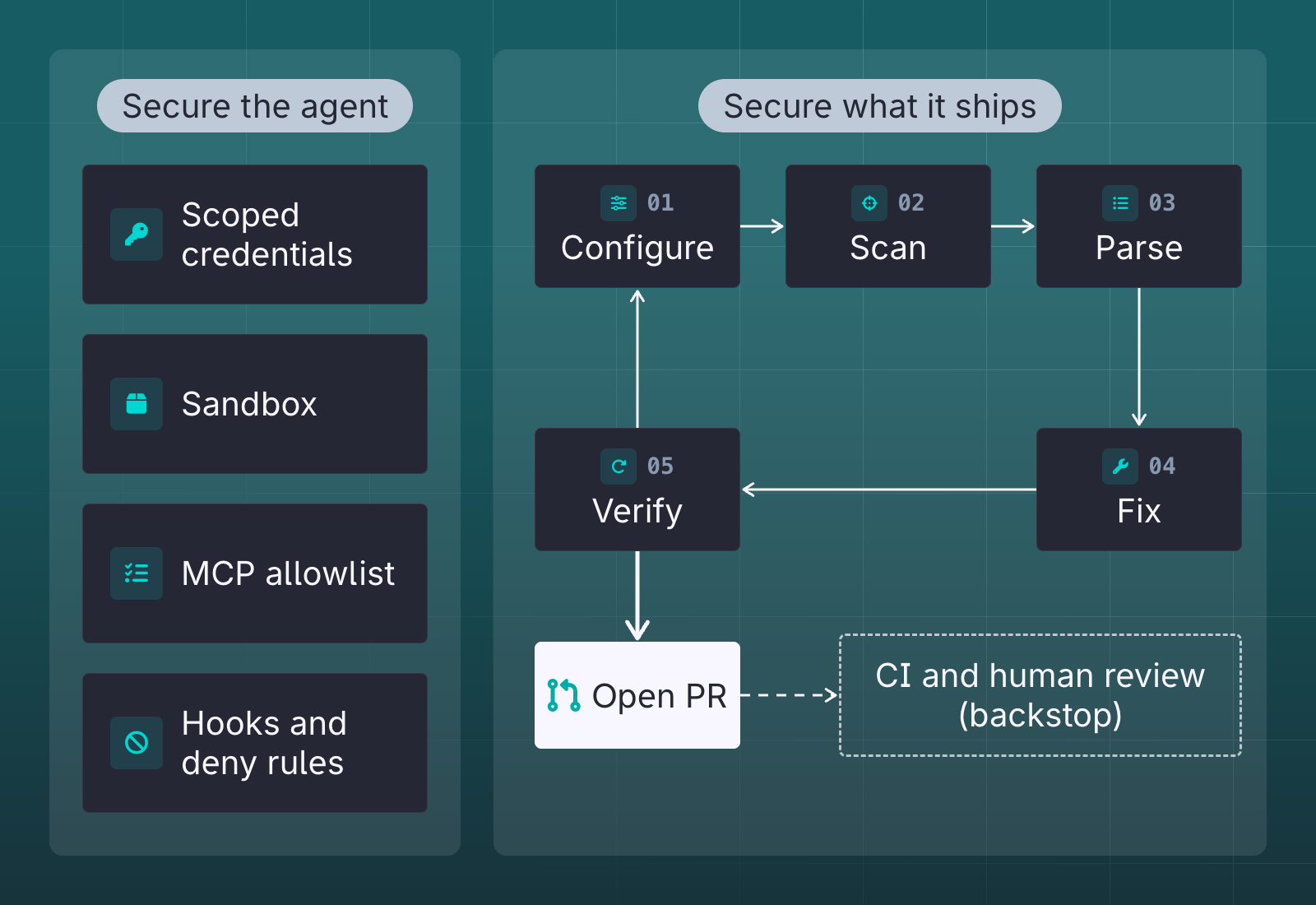
That's the idea behind our security feedback layer for coding agents. As a feature completes, the agent kicks off a StackHawk runtime scan against the running app, reads the findings, fixes them in the same session, and rescans until the issue is gone. The HawkScan agent skill takes the agent through five steps:
- Configure: generate a
stackhawk.ymlfrom the app type, host, and auth pattern. - Scan: run HawkScan against the running application.
- Parse: read structured JSON findings with type, severity, path, and method.
- Fix: change the code, for example, switching to parameterized queries, adding output encoding, or setting security headers.
- Verify: rescan to confirm the fix worked.
For routes behind login, the Data Seed skill seeds checked-in test data so authenticated scans reach deeper application paths, which is where much of the access control logic lives.
To test whether one user can reach another's data, HawkScan's business logic testing scans with two or more auth profiles against your OpenAPI spec in a test or staging environment with representative test data.
The agent applies fixes locally without pushing to CI, merging, or touching your main branch, so the change still goes through code review and CI like any other commit. We've written about why letting the agent fix what it finds is less risky than it sounds.
Security teams also need a record of what was tested. Wingman provides commit-linked testing attestations. Findings and application profiles go to the StackHawk platform; your coding agent's code changes stay in your working tree for review. That's how you start closing the gap between finding and fixing instead of growing a backlog.
Keep CI/CD scans and human review as the backstop for anything that slips through. If you're evaluating an AI coding agent security platform, check that it works alongside the permissions, sandboxes, and hooks above and tests the running app the agent builds, not only the agent's behavior.
AI Coding Agent Security Checklist
- Inventory every coding agent in use, its repos, and the MCP servers, plugins, and skills it loads.
- Publish an approved-agent list and push baseline settings through managed configuration where the agent supports it.
- Give each agent its own scoped credentials, and keep production credentials and personal cloud profiles out of reach.
- Run agents in a sandbox, dev container, or disposable runner with network egress limited to what the task needs.
- Deny reads of .env files and secret stores at the harness level, and load secrets at runtime from a secrets manager.
- Require human approval for pushes, deploys, migrations, and other irreversible actions; allowlist routine commands.
- Enforce hard rules with deny rules, hooks, or sandboxing, not instructions in a prompt file.
- Allowlist MCP servers and plugins, and scope each to the minimum tools needed.
- Treat repo content, issues, fetched web pages, and tool output as untrusted input.
- When a feature is done, have the agent run runtime testing inside the agent loop, fix what it finds, and rescan before it opens a PR.
- Keep CI scans and human review as the backstop, with branch protection so agents can't merge their own PRs.
- Export agent telemetry and keep an audit trail of tool calls, approvals, and commit-linked security test results.
Conclusion
Lock down what the agent can touch, then test its output before it opens a PR. To try that second half on your own code, Wingman runs inside Claude Code, Cursor, Codex, GitHub Copilot, and Antigravity. It comes with a 14-day free trial, then $10 per user per month for unlimited apps and 50 scans per user each month.
AI Coding Agent Security FAQ
Yes. They act with real privileges, read untrusted content, and produce code that needs security review. Treat each agent as an identity with privileges and its output as untrusted until it's tested.
Scope its credentials, sandbox it, gate irreversible actions, enforce hard rules with deny rules or hooks, and allowlist MCP servers. Then have it run runtime security tests against the app it built and fix what it finds before the PR.
AI code security is about vulnerabilities in AI-generated code. AI coding agent security includes that plus the agent's own behavior: permissions, credentials, tools, and exposure to prompt injection. An agent can write safe code and still leak a token through a malicious MCP server.
The threats are the same; the controls differ. Claude Code uses permission rules, hooks, and managed settings, Codex uses sandbox modes and approval policies with network off by default, and Cursor gates terminal commands and MCP tool calls behind approval. Map each checklist item to the matching setting in the agents your team uses.